ASSA Draw
A vector drawing tool for creating ASSA drawing commands (\p1 … \p0) used in Advanced SubStation Alpha subtitles.
Menu: ASSA tools → Draw...
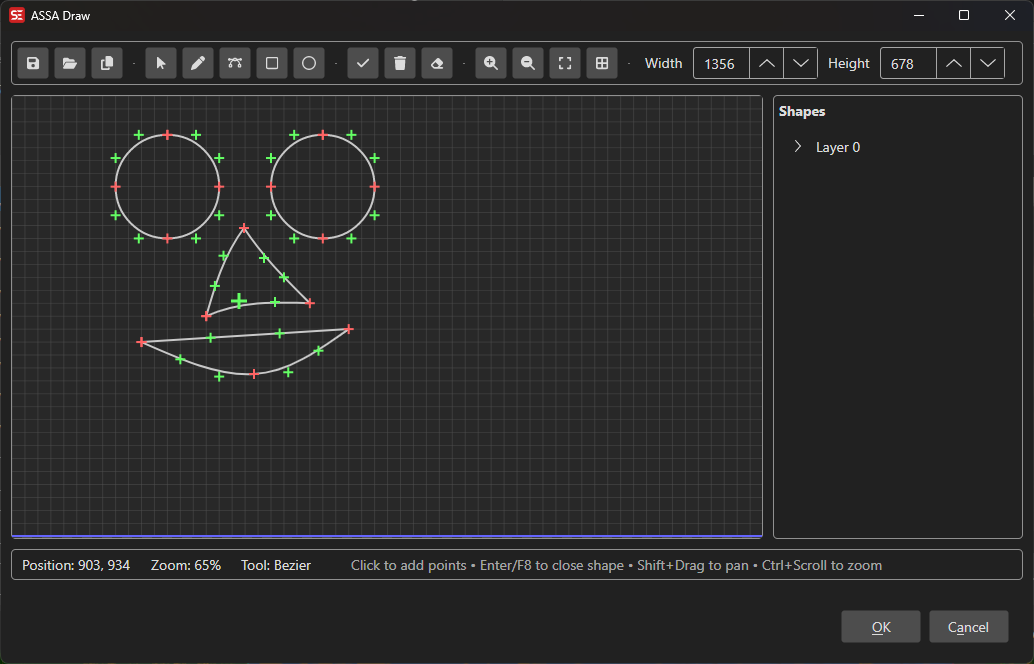
How to Use
- Go to ASSA tools → Draw… to open the drawing canvas.
- Select a drawing tool (Line, Bézier curve, Rectangle, Circle, etc.) from the toolbar.
- Click on the canvas to create points and shapes.
- Use the shape tree on the side to manage layers and shapes.
- Adjust individual point coordinates for precise positioning.
- Toggle the grid overlay for alignment guidance.
- Click OK to insert the generated ASSA drawing code into your subtitle.
Features
Drawing Tools
- Select: Selection/move tool for picking and dragging existing shapes and points.
- Line: Draw straight line segments.
- Bézier Curve: Draw smooth curves with control points.
- Rectangle: Draw rectangles.
- Circle: Draw circles/ellipses.
- Color Picker: Pick a color from the canvas.
Canvas
- Configurable canvas size (default 1920×1080).
- Zoom in/out for detailed editing.
- Grid overlay for alignment.
- Real-time position display.
Shape Management
- Organize shapes in a tree view with layers.
- Select, move, and delete shapes or individual points.
- Set layer colors.
- Edit exact X/Y coordinates for selected points.
Import / Export
- Open existing ASSA drawing files.
- Save drawing code as files.
- Copy generated ASSA drawing code to the subtitle.
Keyboard Shortcuts
| Shortcut | Action |
|---|---|
| F1 | Show help |
| Escape | Close dialog |