ASSA Image Color Picker
Pick colors directly from a video frame screenshot for use in ASSA subtitle styles and override tags.
Menu: ASSA tools → Image color picker...
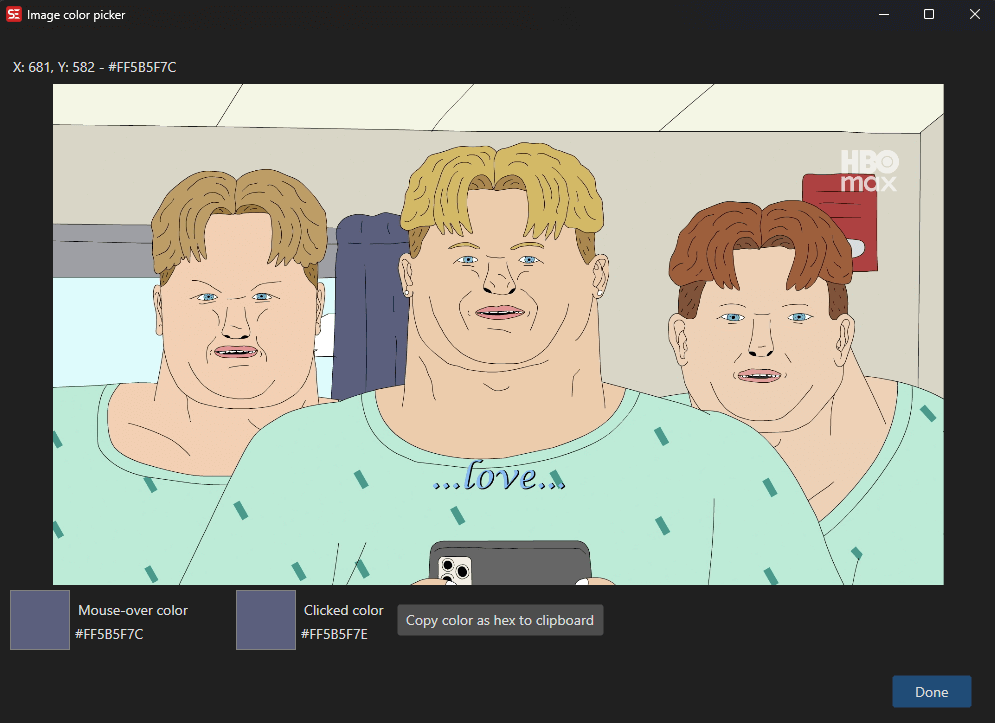
How to Use
- Load a video and select a subtitle line.
- Go to ASSA tools → Image color picker… to open the color picker.
- A screenshot of the current video frame is displayed.
- Move the mouse over the image — the current color under the cursor is shown in real time.
- Click on the image to select a color.
- Use Copy to copy the selected color as a hex value to the clipboard.
- Click OK to apply.
Features
Color Picking
- Real-time color preview as you move the mouse over the video frame.
- Click to lock in a color.
- Displays both the current mouse color and the last clicked color.
Color Display
- Shows colors as hex values (e.g.,
#FF00FF00). - Visual color swatch for both current and selected colors.
Copy to Clipboard
- Copy the selected color as a hex string for use in ASSA override tags or style editors.
Resolution Handling
- Source and target resolution support for accurate coordinate mapping.
Keyboard Shortcuts
| Shortcut | Action |
|---|---|
| F1 | Show help |
| Escape | Close dialog |