ASSA Apply Override Tags
Apply ASSA override tags to subtitle lines with a live video preview.
Menu: ASSA tools → Apply override tags...
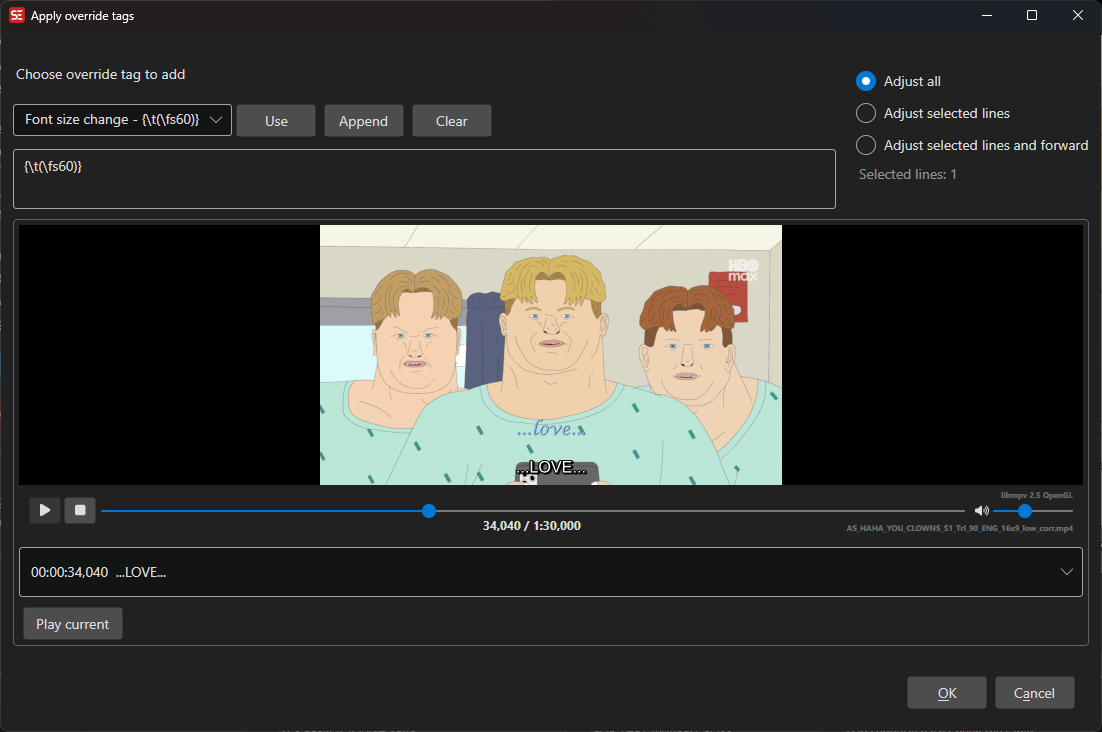
How to Use
- Load a video and subtitle file in ASSA format.
- Optionally select specific subtitle lines to apply tags to.
- Go to ASSA tools → Apply override tags… to open the dialog.
- Select an override tag from the list or enter a custom tag.
- Choose the scope: all lines, selected lines, or selected lines and forward.
- Preview the result in the built-in video player.
- Click OK to apply the override tags.
Features
Override Tag Selection
- Browse a list of common ASSA override tags.
- Select from predefined tags or build custom tag combinations.
- Remembers the last used override tag.
Application Scope
- All lines: Apply the tag to every line in the subtitle.
- Selected lines: Apply only to the currently selected lines.
- Selected lines and forward: Apply to the selected lines and all subsequent lines.
Live Preview
- Built-in video player shows the effect of the override tags in real time.
- Subtitle list displays all lines with current text.
Selection Info
- Displays information about how many lines will be affected.
Keyboard Shortcuts
| Shortcut | Action |
|---|---|
| F1 | Show help |
| Escape | Close dialog |