ASSA Set Background
Add styled background boxes behind subtitle text using ASSA drawing commands.
Menu: ASSA tools → Generate background boxes...
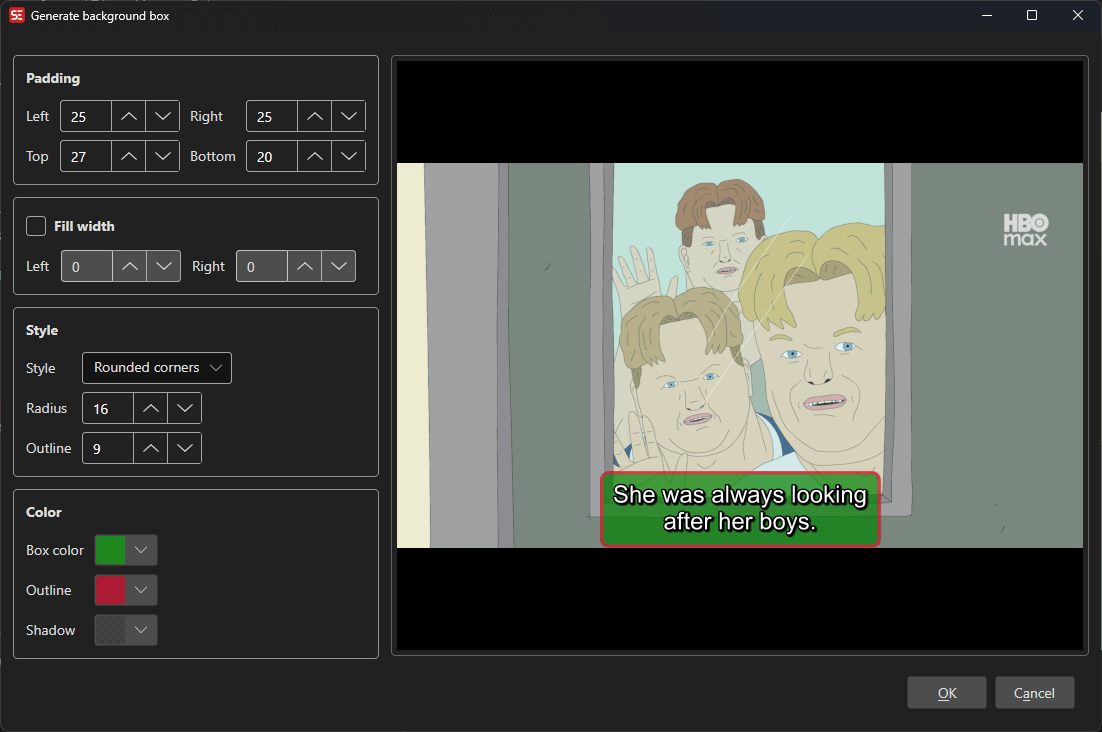
How to Use
- Load a video and subtitle file in ASSA format.
- Go to ASSA tools → Generate background boxes… to open the background dialog.
- Configure the background box style — shape, colors, padding, and outline.
- Preview the result in the built-in video player.
- Click OK to apply the background box to your subtitle.
Features
Box Styles
- Square corners: Rectangular background box.
- Rounded corners: Background box with configurable corner radius.
- Circle: Circular background shape.
- Spikes, Bubbles, Wave, Hexagon, Torn paper, Cloud, Torn paper (double), Starburst, Scroll: Additional decorative box shapes.
Padding
- Configure left, right, top, and bottom padding independently.
Colors
- Box color: Background fill color.
- Outline color: Border/outline color around the box.
- Shadow color: Shadow color.
Outline and Shadow
- Adjustable outline width.
- Adjustable shadow distance.
Fill Width
- Option to fill the full width of the video with configurable left and right margins.
Live Preview
- Built-in video player shows a real-time preview of the background effect.
Keyboard Shortcuts
| Shortcut | Action |
|---|---|
| F1 | Show help |
| Escape | Close dialog |