Auto Translate
Automatically translate subtitles using various translation engines and AI services.
- Menu: Translate → Auto-translate…
- Shortcut: Configurable
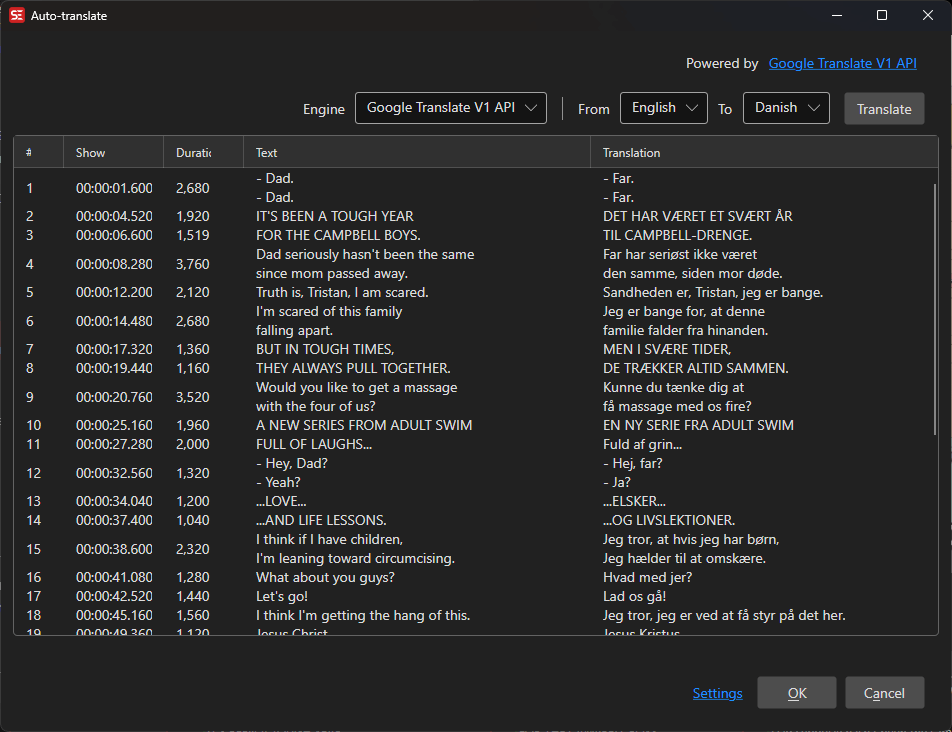
How to Use
- Open Translate → Auto-translate…
- Select a translation engine
- Select the source and target languages
- Click Translate to start
- Review the translations in the grid
- Click OK to apply
Supported Engines
- Google Translate V1 API — Free Google Translate
- Google Translate V2 API — Google Cloud Translation (requires API key)
- Bing Microsoft Translator — Azure Cognitive Services (requires API key)
- DeepL V2 translate — DeepL translation (requires API key)
- LibreTranslate — Open-source, self-hosted translation
- MyMemory Translate — Free translation memory
- ChatGPT — OpenAI AI translation (requires API key)
- LM Studio (local LLM) — Local LLM translation
- Ollama (local LLM) — Local LLM-based translation
- Ollama advanced (local LLM) — Ollama translated in batches with surrounding context, a synopsis and a glossary; see Advanced local engines
- llama.cpp (local LLM) — Server-managed local LLM translation; Subtitle Edit downloads llama.cpp and a curated model (TranslateGemma, Qwen or Aya Expanse) and runs a local
llama-serverfor you. See Using your own model to run a model we don’t ship, such as TranslateGemma 27B - llama.cpp advanced (local LLM) — The managed llama.cpp server translated in batches with surrounding context, a synopsis and a glossary; see Advanced local engines
- OpenAI Compatible API — Generic engine for any service exposing an OpenAI-compatible
chat/completionsendpoint (vLLM, KoboldCpp, a llama.cpp server on another machine, cloud providers, …); configure URL, model, prompt, and an optional API key - Anthropic Claude — AI translation (requires API key)
- Groq — AI translation (requires API key)
- OpenRouter — AI translation (requires API key)
- Lara — AI translation (requires API key)
- Perplexity — AI translation (requires API key)
- Google Gemini — AI translation (requires API key)
- NVIDIA — AI translation (requires API key)
- Mistral AI Translate — AI translation (requires API key)
- DeepSeek — AI translation (requires API key)
- Papago Translate — Naver Papago translation (requires API key)
- thammegowda-nllb-serve — Self-hosted NLLB (No Language Left Behind) server
- winstxnhdw-nllb-api — NLLB (No Language Left Behind) API
- Baidu Translate — Baidu translation (requires App ID and secret)
- CrispASR MADLAD — Local MADLAD-based translation with downloadable models (shown with size and install status); also available in Batch Convert. The language list is the 419 languages the MADLAD-400 model itself knows, so it is both longer and shorter than the usual one: it adds languages such as Iloko, Waray, Papiamento, Moroccan Arabic and Latin, and leaves out ones MADLAD cannot produce — including Cantonese, for which Google Translate, NLLB or any of the LLM engines are the alternatives. Quality varies a lot across that long tail — Google evaluated only about half of the languages the model claims
llama.cpp: using your own model
The models offered in the download list are deliberately kept small enough to run on an ordinary machine (around 8 GB or less). You are not limited to them — larger models such as TranslateGemma 27B work fine if your hardware can handle them.
Two ways to use one:
- Drop a
.ggufinto the models folder. Copy the file into Subtitle Edit’sllama.cpp/modelsfolder and it appears in the model list marked (custom). Subtitle Edit recognizes the model family from the file name and startsllama-serverwith the right chat template, so a self-downloaded TranslateGemma or Qwen quant behaves like the curated ones. - Run your own server. Tick Use remote server and point Subtitle Edit at any
llama-serveryou started yourself (the default ishttp://localhost:8080/v1/chat/completions). Subtitle Edit then does no model management at all.
Be aware of what a bigger model costs. TranslateGemma 27B at Q4_K_M is roughly a 16 GB download and needs about 20 GB of VRAM to run fully on the GPU — a 24 GB card in practice. Google’s own figures put the 12B ahead of the Gemma 3 27B baseline, so the 12B in the download list is already a strong choice and the jump to 27B buys less than the size difference suggests.
Prompts: chat models and completion models
Every local-LLM engine (LM Studio, Ollama, KoboldCpp, llama.cpp, OpenAI Compatible API) has a
prompt you can edit. {0} is replaced with the source language and {1} with the target
language, both as English names.
By default the prompt is an instruction and Subtitle Edit appends the subtitle text after it — what a chat-tuned model expects.
Some translation models are trained on a completion format instead: the text has to sit inside the
prompt, followed by a cue for the target language. Write {2} where the text belongs and Subtitle
Edit sends the filled-in template as one block instead of appending anything. For example
MiLMMT-46 (Xiaomi’s 46-language
translation model) is trained on:
Translate this from {0} to {1}:
{0}: {2}
{1}:
The trailing {1}: cue is what makes such a model translate at all — without it, it tends to echo
the source. Set the model’s temperature to 0 where the engine offers it. Curated MiLMMT models in
the llama.cpp engine’s download list carry this prompt already; for LM Studio, KoboldCpp, Ollama or
your own OpenAI-compatible server, paste it into the engine’s prompt field.
Headless runs take the same prompt via seconv --translate-prompt:<text|file> — see
Auto-translate (command line).
Engine Configuration
Depending on the selected engine, you may need to provide:
- API Key — Authentication key for cloud services
- API URL — Custom endpoint URL (for self-hosted services)
- Model — Specific model to use (for AI engines)
The llama.cpp advanced and Ollama advanced engines translate in batches with context, synopsis, and glossary support — see Advanced Local Engines.
Translation Review
The translation grid shows the original text alongside the translated text. You can edit individual translations before accepting them.
Keyboard Shortcuts
| Key | Action |
|---|---|
| Escape | Close / Cancel |
| F1 | Open help |