Blank Video
Generate a blank video file for testing or subtitle preview purposes.
- Menu: Video → Generate blank video…
- Shortcut: Configurable
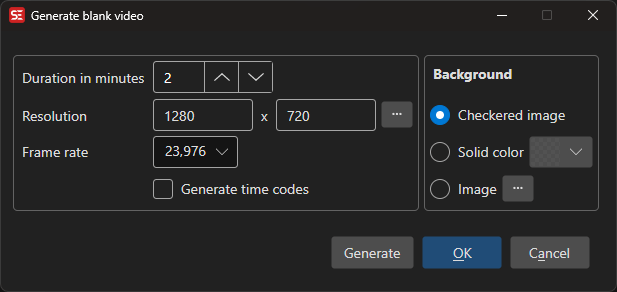
How to Use
- Open Video → Generate blank video…
- Set the video resolution (width × height)
- Select a frame rate
- Set the duration in minutes
- Choose a background type
- Click Generate
Background Options
- Checkered image — Classic checkered pattern (useful for transparency testing)
- Solid color — A single flat color background
- Image — Use a custom image file as the background
Additional Options
- Generate time codes — Burn time code display into the video
- Use source resolution — Match resolution from an existing video (picked via the resolution browse button)
Keyboard Shortcuts
| Key | Action |
|---|---|
| Escape | Close / Cancel |
| F1 | Open help |