Compare
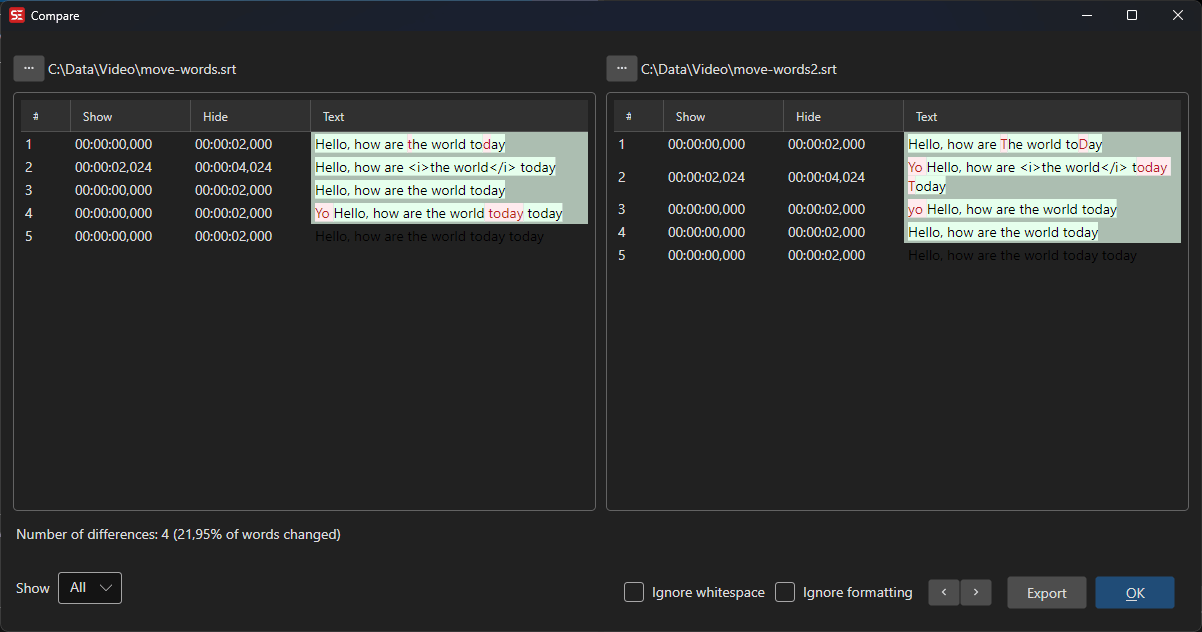
Compare two subtitle files side by side to identify differences in text, timing, and formatting.
Menu: File → Compare...
How to Use
- Go to File → Compare… to open the compare dialog.
- The left panel shows the currently loaded subtitle.
- Use the file picker on either side (or drag-and-drop) to load a second subtitle file.
- Differences are highlighted with colors:
- Red: Lines present in only one side (added or removed).
- Green: Cells where the start time, end time, or text differs.
- Orange: Cells where the line number differs.
- Use Previous difference / Next difference to jump between differing rows.
- Use the options and view dropdown to refine the comparison.
Features
Comparison Options
- Ignore formatting: Compare text only, ignoring formatting tags.
- Ignore white space: Ignore differences in whitespace.
Visual Comparison
- Side-by-side subtitle display with synchronized scrolling.
- Color-coded differences for easy identification.
- View modes: Show all, Show only differences, Show only differences in text.
Actions
- Reload right from file: Reload the right pane from the same file as the left pane (useful for diffing in-memory edits against the saved file).
- Export: Export the comparison as an HTML file.
Keyboard Shortcuts
| Shortcut | Action |
|---|---|
| F1 | Show help |
| Escape | Close dialog |