Convert Actors
Convert actor/voice labels in subtitles from one style to another — for example, from inline [NAME] text to the subtitle’s dedicated Actor property, or vice versa.
- Menu: Tools → Convert actors…
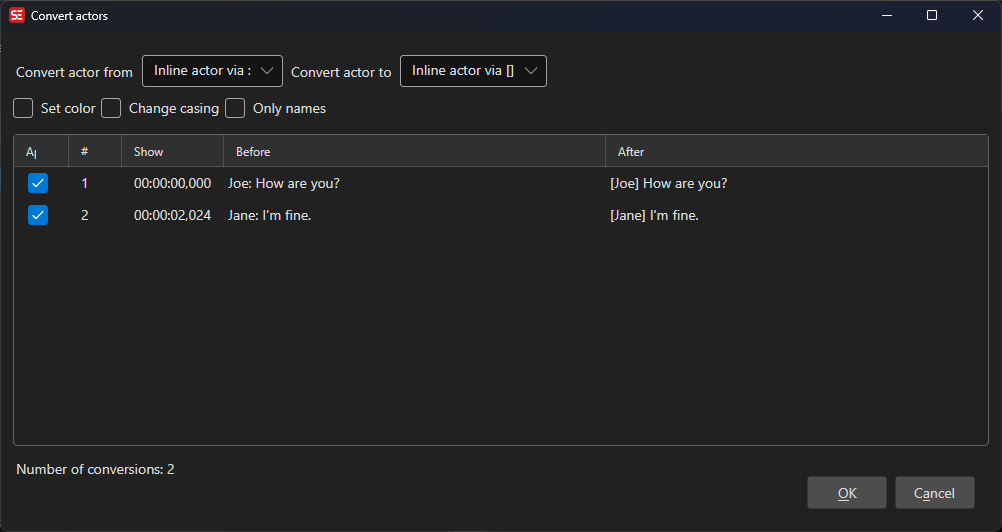
Convert From / Convert To
Both dropdowns share the same set of options:
| Option | Example |
|---|---|
Inline actor via [] |
[JOHN] Hello there. |
Inline actor via () |
(JOHN) Hello there. |
Inline actor via : |
JOHN: Hello there. |
| Actor | The subtitle’s Actor metadata field |
Select where the actor label currently comes from in Convert from, and where it should be placed in Convert to.
Options
Set color
When enabled, wraps the converted actor label in a color tag using the chosen color.
For ASS/SSA formats this uses an override tag ({\c&H...&}); for other formats it uses an HTML <font color="..."> tag.
Change casing
When enabled, applies a casing transformation to the actor label before conversion:
- Normal casing — Capitalizes the first letter, lowercases the rest
- All uppercase —
JOHN - All lowercase —
john - Proper case — Capitalizes each word
Only names
When enabled, items where the actor label is not recognized as a proper name are shown unchecked in the preview list by default. Items are matched against the built-in names dictionary for the detected language.
Preview
All proposed conversions are shown in a preview list with Before and After columns before any changes are applied.
- Check or uncheck individual rows to include or exclude specific conversions.
- The status bar shows the total number of conversions found.
Click OK to apply all checked conversions, or Cancel to discard all changes.
Notes
- When converting from a bracketed inline format (e.g.
[]or()) to the Actor property, a subtitle line that contains two differently labeled speakers on separate lines will be automatically split into two separate subtitle entries, each with its own Actor value. - A bracketed tag that a line splitter broke in half —
(Speakerat the end of one line,2)at the start of the next — is recognized and read as one tag. - The selected settings (from/to type, color, casing, only names) are saved and restored between sessions.
- For text-to-speech you do not have to convert the file first: the Text to Speech window detects speaker names in the text when you generate, and offers to cast them on the fly without changing the subtitle itself. Convert actors is the tool for making the actors part of the file.