Copy/Paste Translate
Translate subtitles by copying text blocks for translation in an external tool, then pasting back the results.
- Menu: Translate → Auto-translate via copy-paste…
- Shortcut: Configurable
How to Use
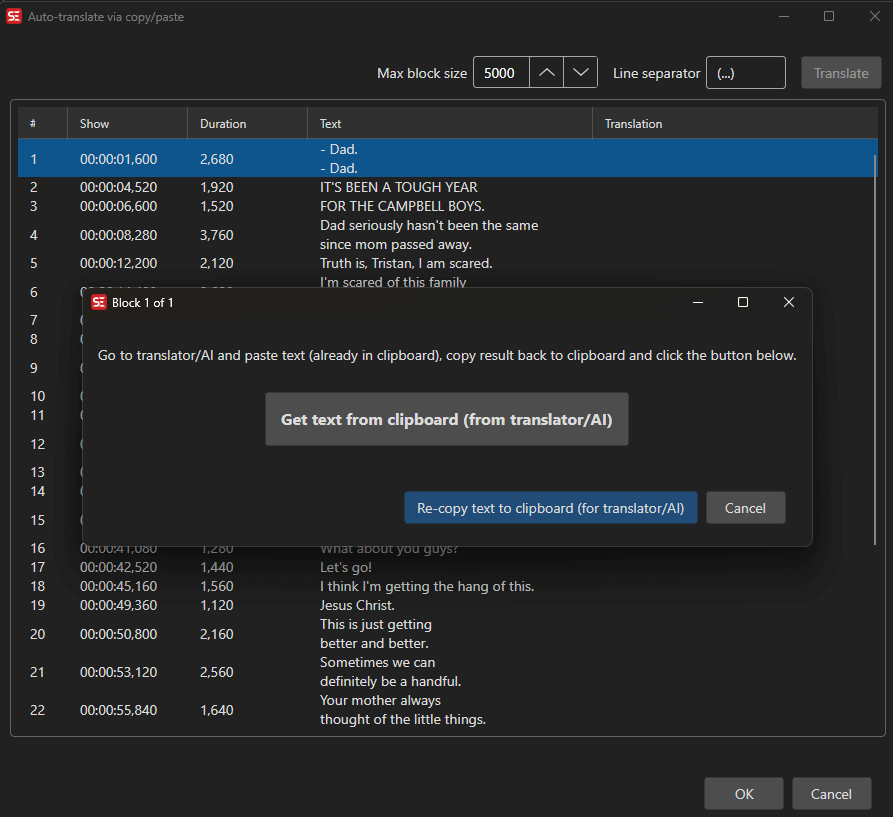
- Open Translate → Auto-translate via copy-paste…
- Set the Max block size — maximum block size in characters
- Set the Line separator — character(s) used between subtitle lines in the copied text
- Click Translate to start; the next block of subtitle text is copied to the clipboard
- Paste the text into your preferred translation tool (e.g., Google Translate, DeepL website)
- Copy the translated text
- Paste the translated text back into the dialog and confirm
- Repeat for all blocks
- Click OK to apply all translations
Settings
- Max block size — Maximum number of characters per block (default 5000, range 100–500,000). Smaller blocks generally give more reliable translations.
- Line separator — The separator inserted between subtitle lines in the clipboard text (default:
(...))
Keyboard Shortcuts
| Key | Action |
|---|---|
| Escape | Close / Cancel |