OCR (Optical Character Recognition)
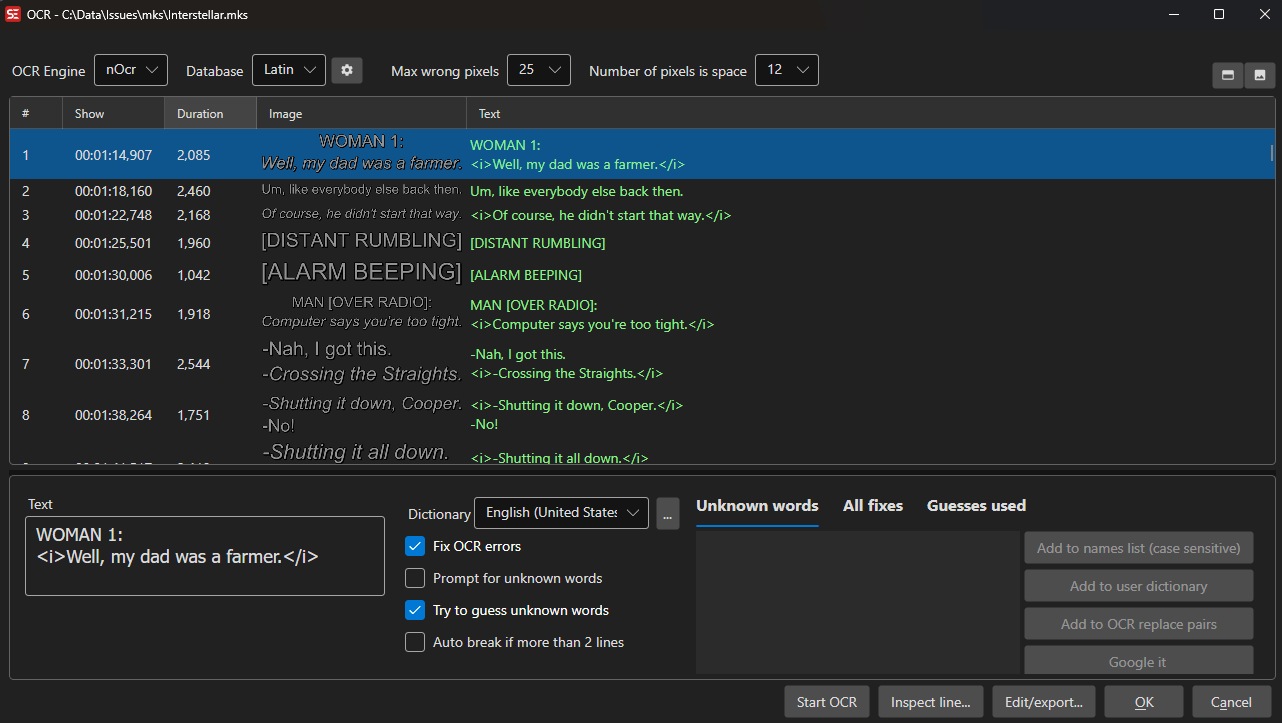
Subtitle Edit can convert image-based subtitle formats to text using OCR.
- Menu: File → Import → Image-based subtitle for OCR…
Supported Image Formats
- Blu-ray SUP (.sup)
- VobSub (.sub/.idx)
- DVD subtitles
- BDN XML
- Transport stream (DVB) subtitles
- Matroska embedded image subtitles (PGS, VobSub, DVB)
- MP4 embedded VobSub
- WebVTT with embedded images
OCR Engines
Tesseract
Open-source OCR engine with language packs.
- Download language packs via the OCR window
- Good general-purpose accuracy
nOCR (Nikse OCR)
Built-in trainable OCR engine.
- Train character databases for specific fonts
- Very accurate once trained
- Best for consistent fonts (like DVD/Blu-ray subtitles)
Binary OCR
Binary image comparison engine.
- Compares against a database of known character images
- Fast and accurate for known fonts
- Supports database editing, character history, max error percentage, and pixels-are-space tuning
Google Lens Sharp / Google Lens Standalone
Cloud-based OCR using Google Lens (free, but capped).
- Requires internet connection.
- The Standalone variant is Windows-only.
Google Vision
Cloud-based OCR using Google Cloud Vision API.
- Requires API key
Ollama
Local LLM-based OCR via an Ollama server (e.g. with a vision model).
- Default endpoint:
http://localhost:11434/api/chat
llama.cpp
Local LLM-based OCR using a llama.cpp-compatible server. Subtitle Edit can download llama.cpp and the model for you, or talk to a server you run yourself.
- Default endpoint:
http://127.0.0.1:8080/v1/chat/completions - Curated vision models, listed best-first for subtitles: GLM-OCR 0.9B (Q8_0, about 1.4 GB — the default, and the most accurate on subtitle images), PaddleOCR-VL 1.6 (about 1.8 GB, 109 languages), HunyuanOCR 1.5 (Q8_0, about 1.3 GB) and LightOnOCR 1B (Q8_0, about 1.2 GB — the least accurate and much the slowest). Custom vision models also appear in the list: put the
*.ggufin the llama.cpp models folder together with itsmmprojvision projector, named eithermmproj-<file>.ggufor<file>-mmproj.gguf(the two naming schemes used on Hugging Face). A*.ggufwithout a projector next to it is not offered — it cannot see the image - The settings dialog has a download/update button for the llama.cpp engine itself; the dot next to it turns amber when a newer build than the one installed is available
CrispEmbed
Local OCR engine with multiple model backends (free/open source).
- Backends: PP-OCRv6, GLM-OCR, GOT-OCR2, Qwen3-VL-2B, and DeepSeek-OCR-2
- PP-OCRv6 is a text detector plus recognizer rather than a vision language model, so it needs only two small files (about 79 MB in total) and is the quickest way to get started
- DeepSeek-OCR-2 is the most accurate backend on subtitle-style images; it ships a single
q4_kmodel of about 2.31 GB - GLM-OCR, GOT-OCR2 and Qwen3-VL-2B each offer a smaller
q4_kand a higher-qualityq8_0model (from about 445 MB for GOT-OCR2 q4_k up to about 2.29 GB for Qwen3-VL-2B q8_0) - The engine and models are downloaded from the OCR window on first use
Mistral OCR
Cloud-based OCR using Mistral API.
- Requires a Mistral API key
Paddle OCR Standalone / Paddle OCR Python
Local OCR engine.
- Standalone (downloadable CPU/GPU builds) is available on Windows and Linux.
- The Python variant works anywhere a Paddle OCR Python install is available.
Engine Setup Notes
- nOCR databases are stored in the Subtitle Edit OCR folder and can be created, renamed, edited, and deleted from the OCR window.
- Binary OCR databases use image comparison and are edited separately from nOCR databases.
- PaddleOCR can download standalone CPU/GPU builds and support files on Windows and Linux, or use a Python installation.
- Ollama and llama.cpp are useful when you want local AI-based OCR and have a vision-capable model available.
- CrispEmbed is fully self-contained: pick a backend and model in the OCR window and Subtitle Edit downloads what is needed.
- Mistral OCR and Google Vision require cloud credentials.
How to Use
- Open an image-based subtitle file
- The OCR window opens automatically
- Select an OCR engine
- Configure engine-specific settings
- Click Start OCR
- Review and correct any errors
- Click OK to import the text subtitles
Saving the Images
The subtitle list’s right-click menu has Save all images with HTML index…. Pick a folder and
Subtitle Edit writes index.html plus images/0001.png, 0002.png, … — every subtitle bitmap
next to the text OCR produced for it, which is the quickest way to proof-read a run against the
originals.
The page is self-contained (no external css, js or fonts), so it opens straight off the file system. It follows the reader’s light/dark preference, with an Auto/Light/Dark override, and adds a text filter, an “only lines without text” filter for spotting images that produced nothing, a dark/light/checkerboard backdrop for the transparent bitmaps, click-to-zoom, and each line’s number, time codes, duration and image size.
Keyboard Shortcuts
General
| Shortcut | Action |
|---|---|
| Escape | Cancel OCR / Close window |
| Ctrl+G | Go to line number |
| Ctrl++ | Zoom in (images in grid) |
| Ctrl+- | Zoom out (images in grid) |
| F1 | Show help |
Subtitle Grid
| Shortcut | Action |
|---|---|
| Ctrl+I | Toggle italic formatting |
| Ctrl+P | View selected image (use arrow keys to navigate) |
| Delete | Delete selected line(s) |
| Home | Jump to first line |
| End | Jump to last line |
| Double-click | Inspect line (nOCR/Binary OCR only) |
Unknown Words List
| Shortcut | Action |
|---|---|
| Enter | Jump to subtitle line containing the selected unknown word |
Note: All shortcuts can be customized. Go to Options → Shortcuts to view and change key bindings.
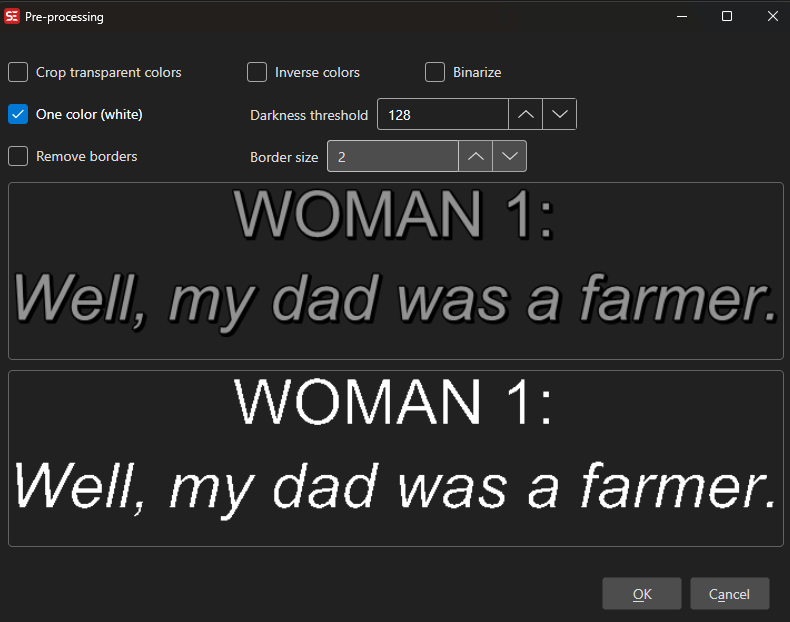
Pre-processing
Before OCR, you can apply image pre-processing:
- Crop transparent colors
- Remove borders (with configurable border size)
- Invert colors
- To one color (keep pixels brighter than a darkness threshold)
- Binarize (convert to black/white using Otsu thresholding)
Batch OCR
Batch Convert can process image-based subtitle files with OCR. Subtitle Edit 5 includes Binary OCR in Batch Convert and can auto-detect several nOCR/Binary OCR settings such as language and pixels-are-space values.
For VobSub files, Batch Convert isolates the glyph color before OCR (on by default, configurable in the Batch Convert settings): the subpicture is rebuilt as a crisp black-on-white bitmap from pixel frequency, so outline and anti-alias colors no longer melt adjacent characters together.
For command-line workflows, see Command Line (seconv), which documents OCR engines and options for headless conversion.
Unknown Words
When the OCR engine encounters uncertain characters, you can:
- Choose from suggested alternatives
- Type the correct text
- Add to the OCR fix dictionary for automatic correction
What is remembered
Some of the choices in the unknown-word prompt are saved to disk and reused on later OCR runs; others only last as long as the OCR window is open.
| Choice | Remembered? | Stored in |
|---|---|---|
| Change all | Yes | {language}_OCRFixReplaceList.xml |
| Add to names list | Yes | {language}_names.xml |
| Add to user dictionary | Yes | {language}_user.xml |
| Skip once | No | — |
| Skip all | No — current OCR session only | — |
“Skip all” is deliberately temporary. It silences a word for the rest of the current OCR session and is forgotten when the OCR window closes, so a mis-click never has lasting consequences. If you want a word to be accepted permanently, use Add to user dictionary (or Add to names list for proper nouns) instead, and use Change all for a correction that should be applied automatically from now on.
OCR Fix Replacement Lists
Subtitle Edit uses language-specific XML files to automatically correct common OCR errors. These files are named {language}_OCRFixReplaceList.xml (e.g., eng_OCRFixReplaceList.xml for English) and are located in the Dictionaries folder.
See the example file: Dictionaries/eng_OCRFixReplaceList.xml
XML Structure
The OCR fix replacement list contains several sections that handle different types of corrections:
1. WholeWords
Replaces entire words that match exactly. This is the most common section for fixing OCR mistakes.
<WholeWords>
    <Word from="tñere" to="there" />
    <Word from="ri9ht" to="right" />
    <Word from="0f" to="of" />
    <Word from="alot" to="a lot" />
    <Word from="becuase" to="because" />
</WholeWords>
Use cases:
- Common character misrecognitions (e.g.,
0→o,l→I) - Typical OCR errors for specific words
- Common misspellings that OCR produces
2. PartialWordsAlways
Replaces character sequences within words, always applied without spell checking.
<PartialWordsAlways>
    <WordPart from="¤" to="o" />
    <WordPart from="lVI" to="M" />
    <WordPart from="IVl" to="M" />
</PartialWordsAlways>
Use cases:
- Fixing specific character combinations that are always wrong
- Removing special characters that OCR incorrectly inserted
3. WholeLines
Replaces entire lines that match exactly (including formatting tags).
<WholeLines>
<Line from="[chitte rs]" to="[chitters]" />
<Line from="Hil' it!" to="Hit it!" />
<Line from="<i>Hil' it!</i>" to="<i>Hit it!</i>" />
<Line from="ISIGHS]" to="[SIGHS]" />
</WholeLines>
Use cases:
- Fixing common sound effect text
- Correcting specific phrases that always appear incorrectly
4. PartialLinesAlways
Replaces text fragments within lines, always applied without spell checking.
<PartialLinesAlways>
    <LinePart from="Apollo 1 3" to="Apollo 13" />
    <LinePart from=",.," to="..." />
    <LinePart from=" lt " to=" it " />
    <LinePart from=" lf " to=" if " />
</PartialLinesAlways>
Use cases:
- Fixing common spacing issues
- Correcting punctuation errors
- Fixing common word fragments
5. PartialLines
Replaces text fragments within lines (may be spell-checked).
<PartialLines>
    <LinePart from=" /be " to=" I be " />
    <LinePart from=" aren '1'" to=" aren't" />
    <LinePart from=" aren'tyou" to=" aren't you" />
</PartialLines>
6. RegularExpressionsIfSpelledCorrectly
Uses regex patterns to fix errors, but only applies the replacement if the corrected word is in the dictionary.
<RegularExpressionsIfSpelledCorrectly>
    <!-- Fix lowercase 'l' to uppercase 'I' if result is a valid word -->
    <RegEx find="\bl([A-Z]+)\b" spellCheck="I$1" replaceWith="I$1" />
    <RegEx find="\b([A-Z]+)l\b" spellCheck="$1I" replaceWith="$1I" />

    <!-- Fix possessive forms: David's, there's -->
    <RegEx find="\b([A-Z][a-z]+)['']s\b" spellCheck="$1" replaceWith="$1's" />
    <RegEx find="\b([a-z]+)['']s\b" spellCheck="$1" replaceWith="$1's" />

    <!-- Fix missing spaces: ofDavid → of David -->
    <RegEx find="\bof([A-Z][a-z]+)\b" spellCheck="$1" replaceWith="of $1" />
    <RegEx find="\bin([A-Z][a-z]+)\b" spellCheck="$1" replaceWith="in $1" />

    <!-- Fix 'l' in brackets: [GRlNDlNG] → [GRINDING] -->
    <RegEx find="\[([A-Z ]*)l([A-Z ]*)\]" spellCheck="[$1I$2]" replaceWith="[$1I$2]" />
</RegularExpressionsIfSpelledCorrectly>
Attributes:
find: The regex pattern to matchspellCheck: The text to check against the dictionary (use$1,$2for capture groups)replaceWith: The replacement text if spell check passesreplaceAllFrom/replaceAllTo: Optional character replacement before spell checking
Use cases:
- Fixing lowercase
lto uppercaseI(e.g.,lTEM→ITEM) - Correcting apostrophes in possessive forms
- Fixing missing spaces after common words
- Pattern-based corrections that should only apply if the result is a valid word
Creating Custom Rules
To add your own OCR fix rules:
- Open the appropriate language file:
Dictionaries/{language}_OCRFixReplaceList.xml - Add entries to the relevant section based on the type of error
- Save the file
- Restart Subtitle Edit for changes to take effect
Tips:
- Use
WholeWordsfor simple word replacements - Use
RegularExpressionsIfSpelledCorrectlyfor pattern-based fixes where you want to verify the result is a real word - Test your regex patterns carefully to avoid unintended replacements
- The replacements are applied in the order they appear in the file