Spell Check
Check spelling of subtitle text and correct misspelled words.
- Menu: Spell check → Spell check…
- Shortcut: Configurable
How to Use
- Open Spell check → Spell check…
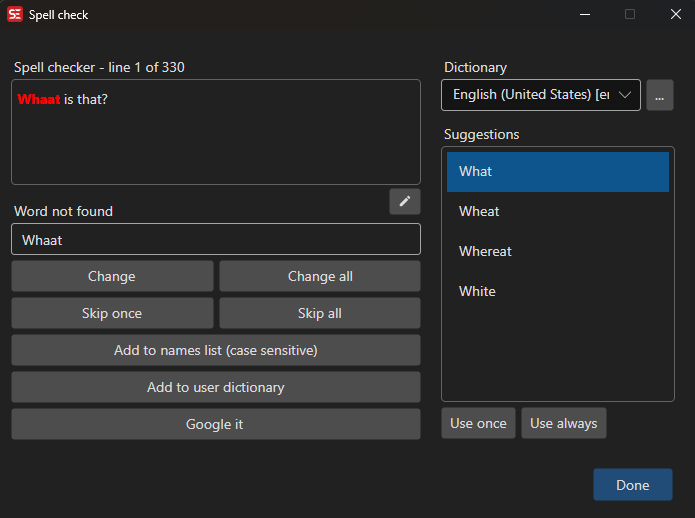
- Select the dictionary language (auto-detected from subtitle content)
- The spell checker will highlight the first unknown word
- Choose an action for each flagged word:
- Change — Replace with the text in the word field (once)
- Change all — Replace all occurrences, and remember the correction for future runs
- Skip once — Ignore this occurrence
- Skip all — Ignore all occurrences of this word, for the current session only
- Add to names list (case sensitive) — Add the word to the names/proper nouns list (matches the exact casing)
- Add to user dictionary — Add the word to your personal dictionary
- The spell checker advances to the next unknown word automatically
- When all words have been checked, the window closes
Skip all is not saved. It lasts until the window closes and is not carried over to the next run, so a mis-click never has lasting consequences. To accept a word permanently use Add to user dictionary (or Add to names list for proper nouns); to have a correction applied automatically from now on use Change all.
Suggestions
When a misspelled word is found, the spell checker provides a list of suggested corrections.
- Double-click a suggestion to use it once
- Use once — Replace with the selected suggestion for this occurrence
- Use always — Replace all occurrences with the selected suggestion
Dictionaries
Spell check requires a dictionary to be installed. If no dictionary is found, you will be prompted to download one.
- Get dictionaries — Download additional dictionaries
- The dictionary language is auto-detected from the subtitle content
- You can manually select a different dictionary from the dropdown
- The last used dictionary is remembered between sessions
Additional Features
- Edit whole text — Edit the full subtitle text for the current line
- Google it — Search Google for the current word
- The current subtitle line is highlighted in the subtitle grid as you check
Keyboard Shortcuts
| Key | Action |
|---|---|
| Escape | Close spell check |
| F1 | Open help |