Transparent Subtitles
Generate a transparent video overlay with rendered subtitles that can be composited over other video.
- Menu: Video → Generate transparent video with subtitles…
- Shortcut: Configurable
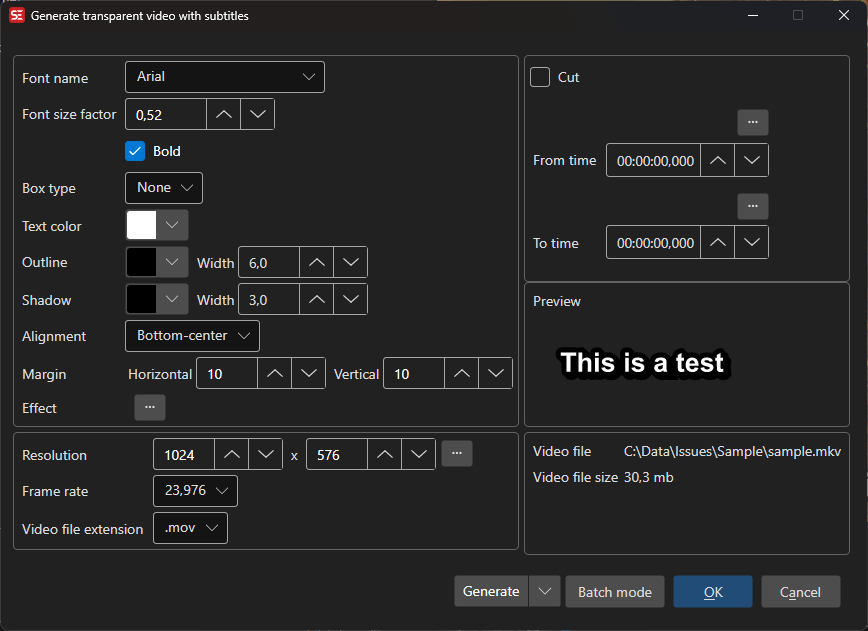
How to Use
- Open Video → Generate transparent video with subtitles…
- Configure font settings (name, size, colors, outline, shadow, alignment)
- Set the video resolution and frame rate
- Select the output video extension (e.g.
.mov,.mkv,.mp4,.webm) - Select an output folder
- Click Generate to create the transparent video
Font Settings
- Font name — Select the subtitle font
- Font factor — Scale the font size
- Bold — Use bold font weight
- Outline — Outline thickness and color
- Shadow — Shadow width and color
- Box type — Box style around text
- Text color — Subtitle text color
- Spacing — Letter spacing, from -20 to 100
- Alignment — Subtitle alignment position
- Margins — Horizontal and vertical margins
- Fix RTL — Fix right-to-left text rendering
Video Settings
- Resolution — Output video width and height (or use source resolution)
- Frame rate — Output frame rate
- Extension — Output container format (
.mov,.mkv,.mp4,.webm)
Cut Options
- Cut from/to — Generate only a portion of the subtitle timeline
- Target file size — Limit output to a specific file size
Batch Mode
Multiple jobs can be queued for batch processing.
Keyboard Shortcuts
| Key | Action |
|---|---|
| Escape | Close / Cancel |
| F1 | Open help |