Word Lists
Manage custom word lists used by spell check and OCR error fixing.
- Menu: Options → Word lists…
- Shortcut: Configurable
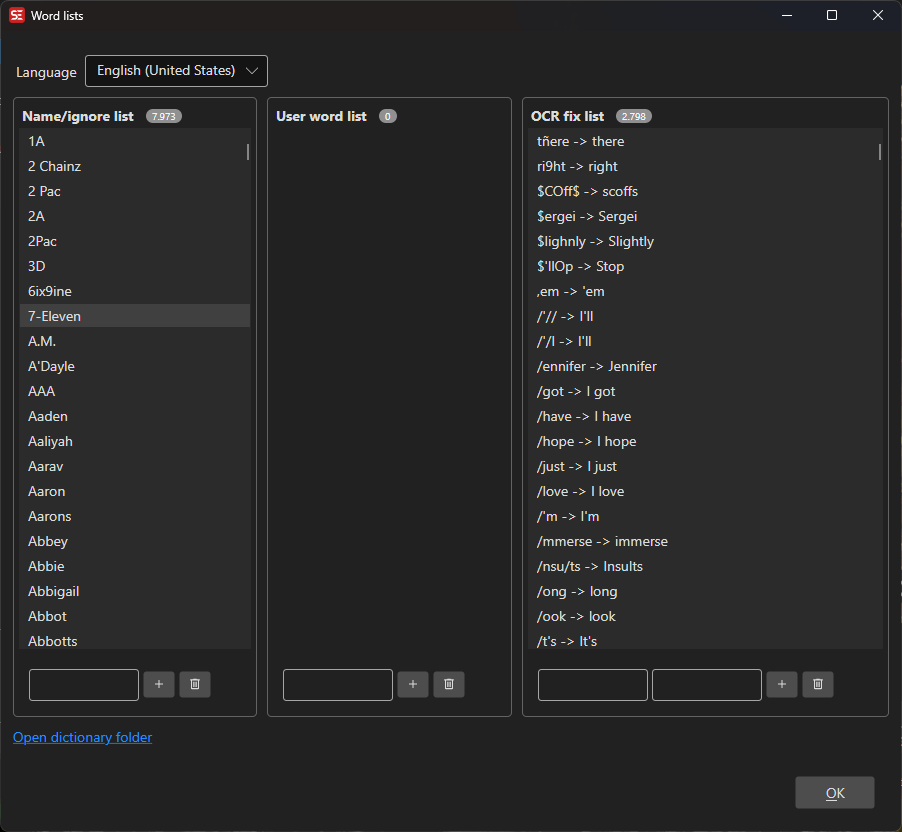
How to Use
- Open Options → Word lists…
- Select a language from the dropdown
- Manage entries in the three word list categories
- Changes are saved automatically when entries are added or removed
Word List Categories
Names / Proper Nouns
A list of names and proper nouns that should not be flagged as misspelled. These are shared with the spell checker and OCR fix engine.
- Add a new name in the text field and click Add
- Select a name and click Remove to delete it
User Words
Custom words added to the user dictionary. These supplement the main spell check dictionary.
- Add a new word in the text field and click Add
- Select a word and click Remove to delete it
OCR Fix Replacements
Find-and-replace pairs used during OCR to fix common recognition errors (e.g., “rn” → “m”, “0” → “O”).
- Enter the Find and Replace text, then click Add
- Select a pair and click Remove to delete it
Language Selection
Word lists are organized by language. The language dropdown shows all languages that have dictionary or word list files installed in the dictionaries folder.
Keyboard Shortcuts
| Key | Action |
|---|---|
| Escape | Close |
| F1 | Open help |