ASSA Draw
A vector drawing editor for ASSA drawings (\p1 ... \p0) in Advanced SubStation Alpha subtitles: speech bubbles, arrows, logos, masks and other shapes drawn on top of the video.
Menu: ASSA tools → Draw...
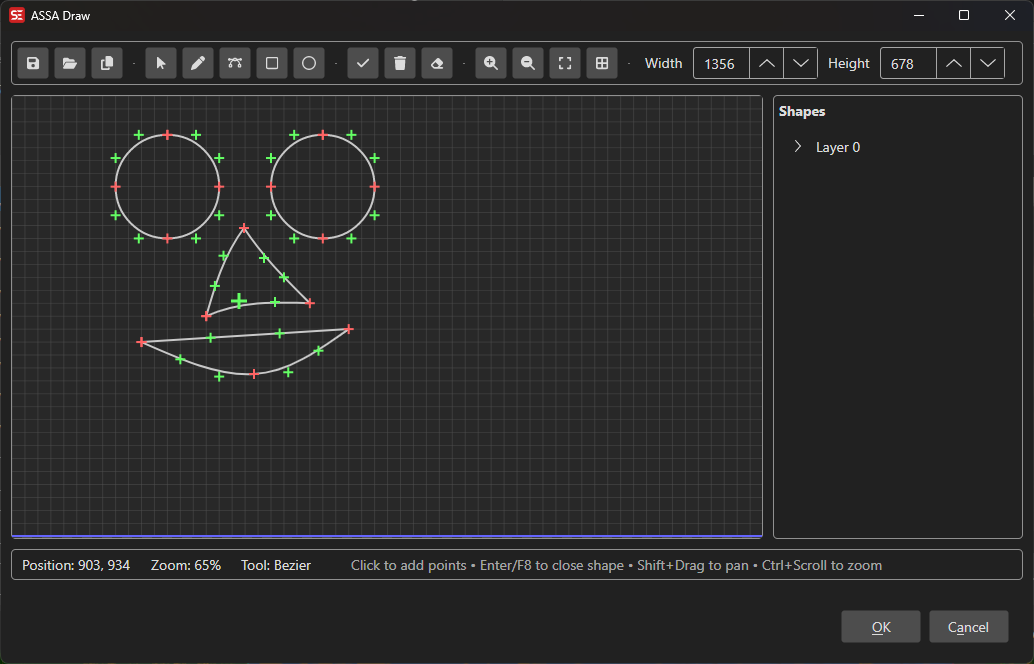
The window works like a vector drawing program:
- Options bar (top): undo/redo, shape actions, grid and preview toggles, background, canvas size, and Import SVG/Copy/Load/Save.
- Tool strip (left): the drawing tools, zoom, and the current color.
- Canvas (center): the video frame area (the script resolution).
- Shapes panel (right): layers, shapes and points, with the properties of what is selected.
- Status bar (bottom): pointer position, tool, selection, and zoom. The generated ASSA code is shown next to OK and Cancel.
How to Use
- Select one or more lines and go to ASSA tools → Draw…. Drawings already in the selected lines are loaded.
- Pick a tool in the tool strip and draw on the canvas, or place a ready-made shape with the Shape tool.
- Use the Select tool to move, scale and rotate shapes. Right-click anything for more options.
- Click OK to write the drawing back to the subtitle. Each layer becomes one line with its own color.
Tools
| Tool | Key | What it does |
|---|---|---|
| Select | V |
Click a shape to select it, and drag it to move it. Drag the handles around the selection to scale it, or the round handle above it to rotate it. |
| Line | L / F4 |
Click to add straight-line points. Enter/F8 closes the shape, and Esc cancels it. |
| Bézier curve | B / F5 |
Click to add curve points. Drag the green control points to shape the curves. |
| Rectangle | R / F6 |
Click two corners. |
| Circle | C / F7 |
Click the center, then the radius. |
| Shape tool | S |
Places a shape from the shape library. |
| Eyedropper | I |
Picks a color from a shape or from the background. |
Drag a point with any tool to move it. The single-letter keys are ignored while typing in a number field.
Scale and rotate
With the Select tool, a selected shape (or a multi-selection, Ctrl+A) gets eight scale handles and a rotate handle:
- The dragged edge or corner follows the pointer, and the opposite side stays in place.
- Hold
Shiftwhile dragging a corner to keep the proportions, or while rotating to snap to 15° steps. - The size or angle is shown while dragging.
- Dragging a shape that is part of a multi-selection moves the whole selection.
Shape Library
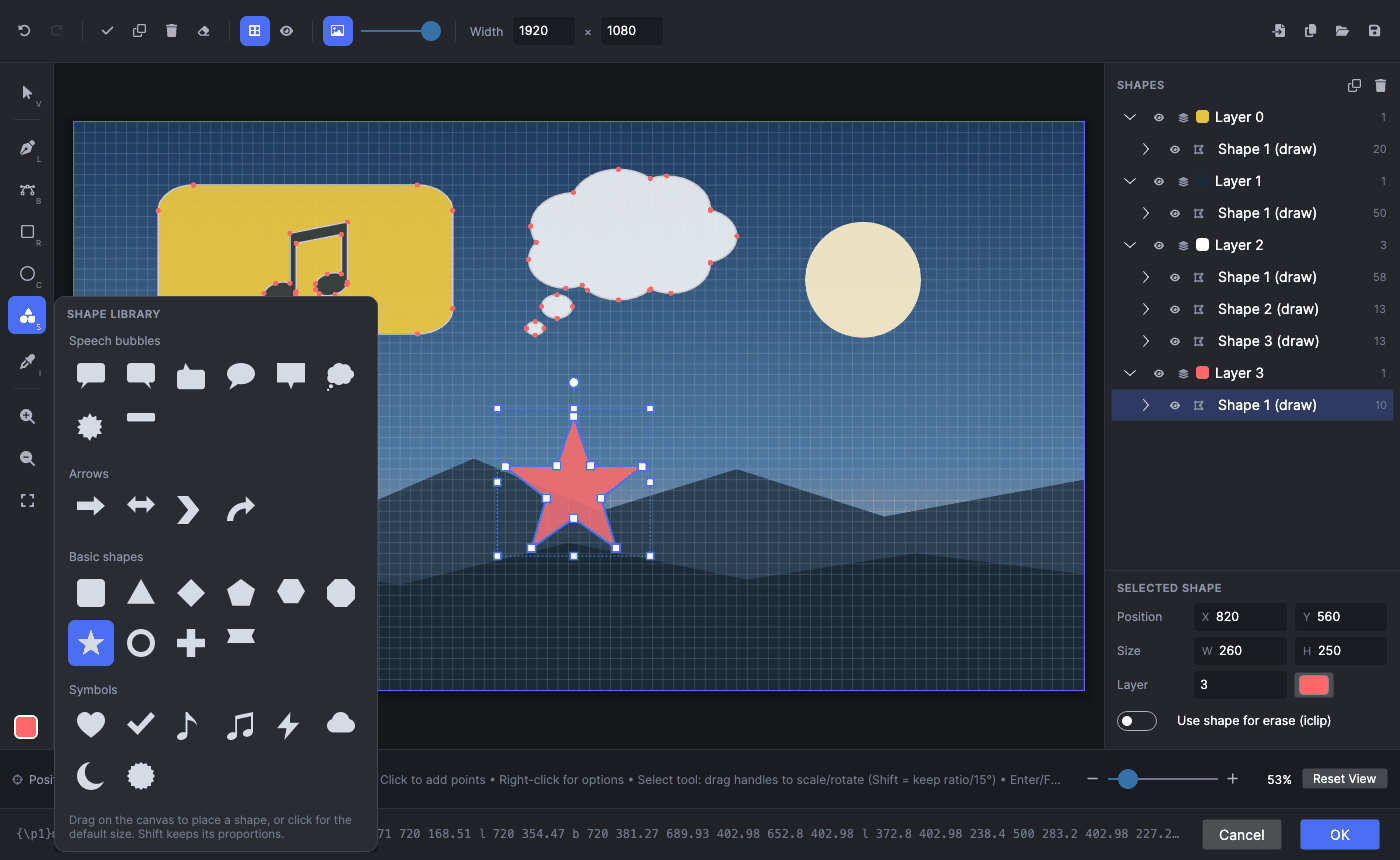
Click the Shape tool to open the shape library, then pick a shape:
- Drag on the canvas to place the shape in that rectangle. Hold
Shiftto keep its proportions. - Click to place it at a default size, centered on the click.
The shape is placed on a new layer in the current color and selected with the Select tool, ready to be moved or resized.
Built-in shapes:
- Speech bubbles: speech bubble (tail left, right or up), oval, box, thought, shout, caption box.
- Arrows: arrow, double arrow, chevron, curved arrow.
- Basic shapes: rounded rectangle, triangle, diamond, pentagon, hexagon, octagon, star, ring, plus, banner.
- Symbols: heart, check mark, music note, music notes, lightning, cloud, moon, badge.
My shapes: To save your own shape, right-click a shape (or a multi-selection) and choose Add to shape library…. Saved shapes keep their colors, one per layer. Right-click a saved shape in the library to remove it.
Colors and Layers
ASSA drawings have one color per line, so each layer has one color. The layer color is shown as a swatch in the shapes panel and at the bottom of the tool strip (the current color).
- New shapes use the current color. They join the layer that already has that color, or a new layer.
- To change a color, select a shape or layer and use the color swatch in the properties panel.
- Eyedropper (
I): click a shape to take its color, or click the background (video frame or image) to take that pixel’s color. A preview of the color under the pointer follows the cursor. The picked color becomes the current color and recolors the selected shape’s layer. - Use shape for erase (iclip): turns a shape into a cut-out (
\iclip) of its layer. Eraser shapes are drawn dashed.
Right-click Menus
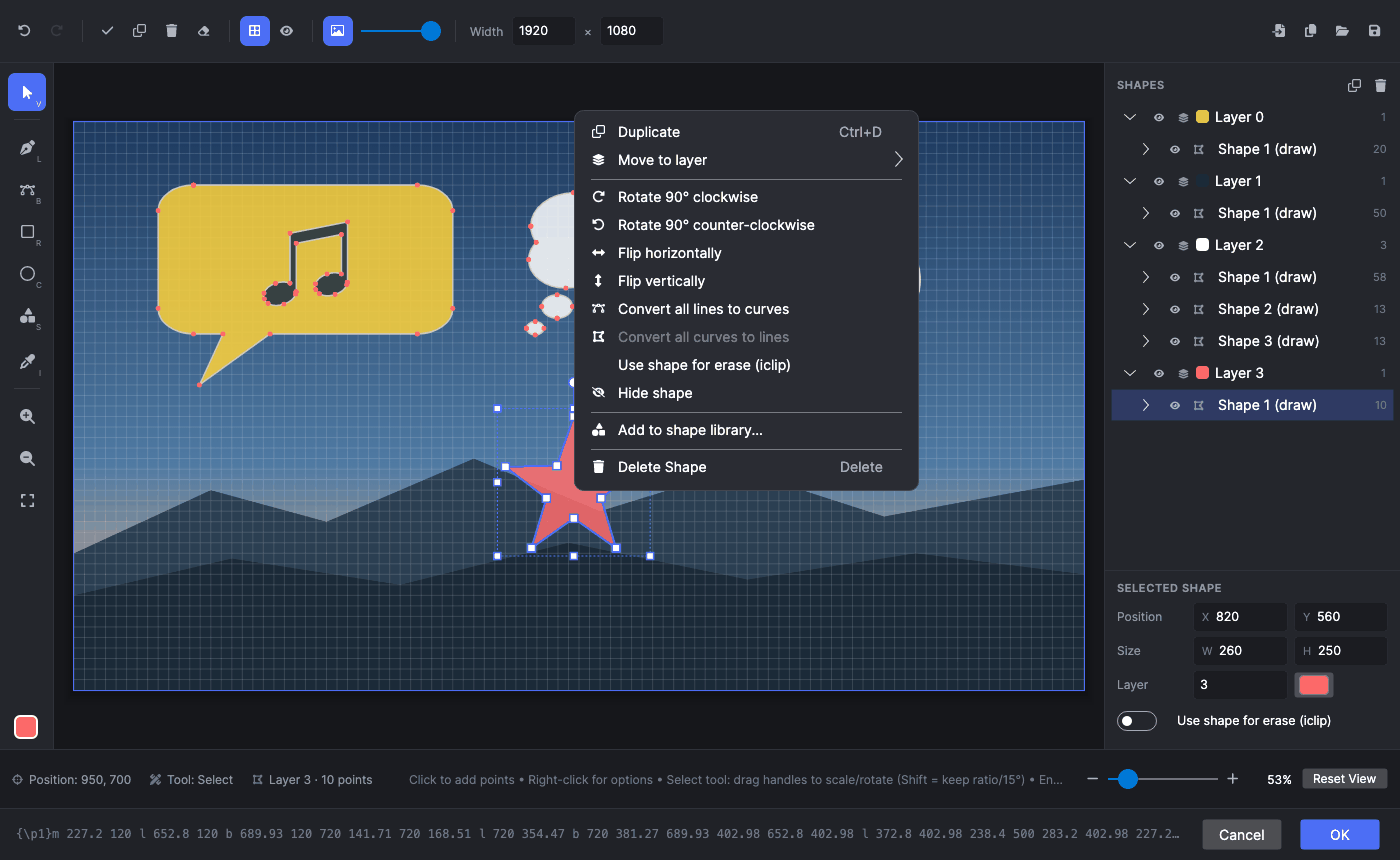
- Shape:
- Duplicate (
Ctrl+D), Move to layer - Rotate 90° clockwise/counter-clockwise, Flip horizontally/vertically
- Convert all lines to curves / all curves to lines
- Use shape for erase, Hide shape
- Add to shape library…, Delete shape (
Del)
- Duplicate (
- Point:
- Convert segment to curve / to line
- Delete point. A curve’s end point takes its control points with it.
- Empty canvas:
- Undo/redo, Close shape/Cancel drawing (while drawing), Select all
- Zoom, Grid, Preview
- Import SVG image…, Background, Clear all
- Shapes panel: the same shape and point items. On a layer: Hide/show layer, Change layer, Delete layer.
Shapes Panel
- Layers contain shapes, and shapes contain their points. Click the eye button to hide or show a layer or shape. Hidden shapes are not included in the preview.
- Selected shape: edit its position (X/Y), size (W/H), layer number and color, and turn Use shape for erase (iclip) on or off.
- Selected point: edit its exact X/Y coordinates.
- Selecting a shape or point on the canvas selects it in the panel, and the other way around.
Background
Use the Background button (picture icon) in the options bar to show something behind the drawing to trace over:
- Video frame (current position): the frame at the video position (or at the start of the selected line).
- Video frame at…: a frame at a time code you type.
- Image file…: a PNG, JPG, BMP or WebP image. You can also drop an image on the window.
- Stretch image to canvas: otherwise the image keeps its aspect ratio and is centered.
- No background.
The slider next to the button sets the background opacity. The background is only for display and is never part of the result.
Import SVG Images
Use Import SVG in the options bar or the canvas menu, or drop an .svg file on the window. The SVG is converted to ASSA drawing shapes:
- Supported: paths, rectangles, circles, ellipses, lines, polygons and polylines, groups,
<use>and transforms. Arcs and quadratic curves become Bézier curves. - Each fill color becomes its own layer, in the order of the SVG file. Strokes become filled outlines on their own layer, and holes are kept.
- Colors and opacity come from attributes,
style, and simple.classrules. Gradients use their first color. - An SVG with the frame’s aspect ratio fills the frame. Other SVGs are fitted to half the frame and centered.
- Not supported: gradients (as gradients), patterns, masks and clip paths, text, and filters.
Preview
Toggle preview (F9) shows the drawing as libass renders it: filled, in the layer colors, with eraser shapes cut out. The outlines and points stay on top for editing. This needs ffmpeg with libass.
Undo and Redo
Every change can be undone with Ctrl+Z and redone with Ctrl+Y or Ctrl+Shift+Z (⌘ on macOS). While you are drawing a shape, undo removes the last point you added. A whole drag, or holding an arrow key, counts as one step.
Keyboard Shortcuts
| Shortcut | Action |
|---|---|
V L B R C S I |
Select, line, Bézier, rectangle, circle, shape tool, eyedropper |
F4–F7 |
Line, Bézier, rectangle, circle |
Enter / F8 |
Close the shape being drawn |
Esc |
Cancel the shape being drawn (or close the dialog) |
Del |
Delete the selected shape |
Ctrl+Z / Ctrl+Y |
Undo / redo |
Ctrl+D |
Duplicate the selected shape |
Ctrl+A |
Select all shapes |
Ctrl+Arrow / Alt+Arrow |
Move the selection 10 px / 1 px |
Ctrl + mouse wheel |
Zoom around the pointer |
Ctrl++ / Ctrl+- / Ctrl+0 |
Zoom in / zoom out / fit the frame |
Shift + drag, middle mouse button |
Pan |
Ctrl+G |
Toggle the grid |
F9 |
Toggle the libass preview |
Ctrl+C |
Copy the ASSA code to the clipboard |
Ctrl+N |
Clear all |
F1 |
Show help |