Import Plain Text
Turn a plain text file — or pasted text — into subtitle lines, with generated time codes. The time codes can then be aligned to the actual audio with a forced aligner or via speech to text.
- Menu: File → Import → Plain text…
- Shortcut: Configurable (no default)
- Also: Opening a file Subtitle Edit cannot read lands here too - a plain
.txtfile goes to this window directly, and for other extensions the “unknown subtitle format” error offers an Import plain text button. See File → Open
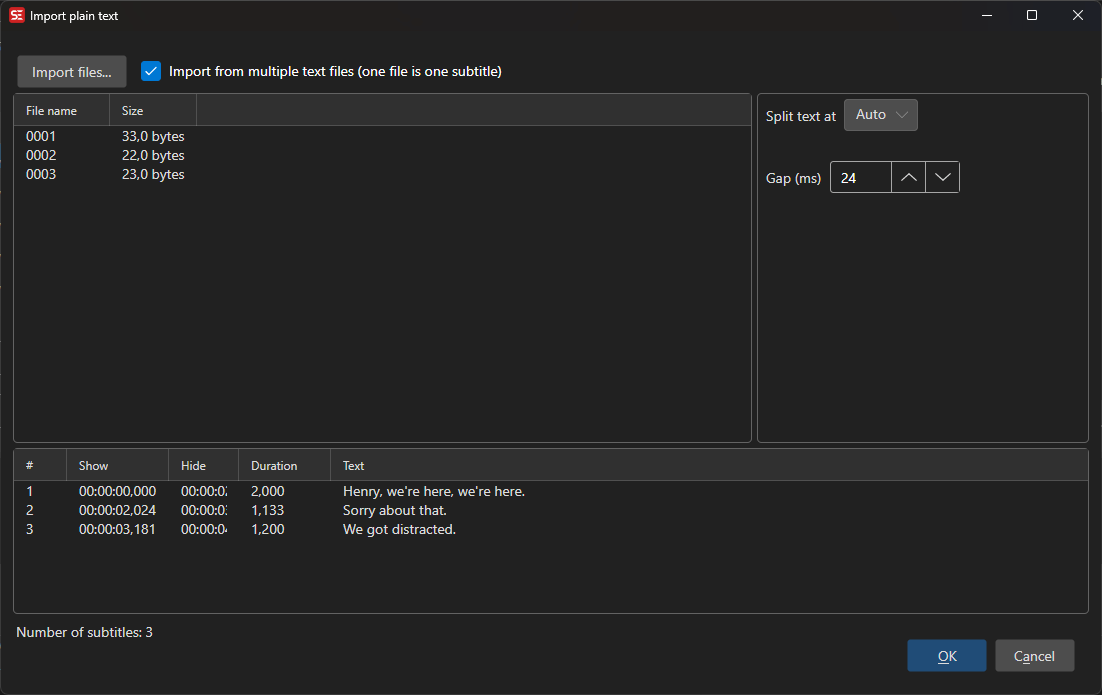
Importing Text
Paste or type text into the edit box, or click Import… to load a text file. Tick Import from multiple text files (one file is one subtitle) to switch to a file list where each file becomes one subtitle line — useful for batch workflows; .txt and .rtf files can also be dragged onto the list, and time codes embedded in file names are picked up automatically.
Options
- Split text at — How the text is divided into subtitles:
- Auto — Splits into subtitles using your max line length and line count settings, breaking preferentially at sentence endings, then at commas and other pauses
- Blank lines — Each paragraph (text between blank lines) becomes one subtitle
- One line is one subtitle
- Two lines are one subtitle
- Gap (ms) — Pause inserted between generated subtitles
- Use fixed duration / Fixed duration (ms) — Give every subtitle the same duration instead of calculating it from text length
Without fixed duration, each subtitle’s duration is calculated from its text length using your optimal characters/second setting, clamped between the minimum and maximum display duration. Lines are laid out sequentially starting at zero.
The preview grid updates as you change options and shows the resulting subtitles with their time codes.
Aligning Time Codes to the Audio
Sequential time codes from text length are only a starting point. If you have the video, two buttons at the bottom can time the text against the actual speech:
Align time codes via forced aligner…
A forced aligner matches the text you already have against the audio, without transcribing it first — this is fast and keeps your text exactly as written. Long videos are aligned in windowed chunks, so any length works.
Setup dialog:
- Engine — Uses the Crisp ASR engine; click Download / update engine… if it is not installed yet
- Aligner model — Pick an alignment model. The wav2vec2 aligners are language-specific and small (~200–300 MB); the Canary CTC and Qwen3 forced aligner models are multilingual
Missing models are downloaded automatically when you press OK. Progress is shown per window and line while aligning. If the script is longer than the speech in the video, the trailing lines cannot be aligned and a warning tells you how many lines were matched.
Set end times from isolated speech
A forced aligner is precise about where a line starts - and has no idea where it ends: it ends every line where the next one begins, so the last line before a stretch of music “lasts” until the music is over. Subtitle Edit therefore normally sets the end from reading time.
With Set end times from isolated speech (slow) ticked in the forced aligner setup, music and sound effects are first removed from the audio, and each line ends where its speech actually goes quiet (a quarter of a second of silence). If the speech does not go quiet within twice the reading time - someone else talking over it, or singing - reading time is used as before, and the minimum and maximum durations and the gap to the next line apply either way.
Measured against hand-timed subtitles on a trailer with wall-to-wall music, the median end-time error went from 310 ms to 196 ms, and lines more than half a second off from 5 to 2 of 29. On the audio with its music the same detection is useless - music never goes quiet - which is why the separation is needed.
It uses the same source separation model (Mel-Band RoFormer, 457 MB, downloaded on first use) as Isolate speech, and costs the same: about as long as the video itself on a GPU, many times longer on CPU only. If the separation fails, the alignment carries on with reading-time ends.
Align time codes via “Speech to text”…
Runs normal speech to text on the video, then matches your script against the transcript. Useful when the forced aligner does not support your language. Lines that cannot be matched get interpolated time codes.
OK / Result
Pressing OK replaces the currently loaded subtitle with the imported lines. Save your current work first if you need it.