Merge Two Subtitles
Combine two subtitles into one bilingual subtitle — for example an original and its translation.
- Menu: Tools → Merge two subtitles…
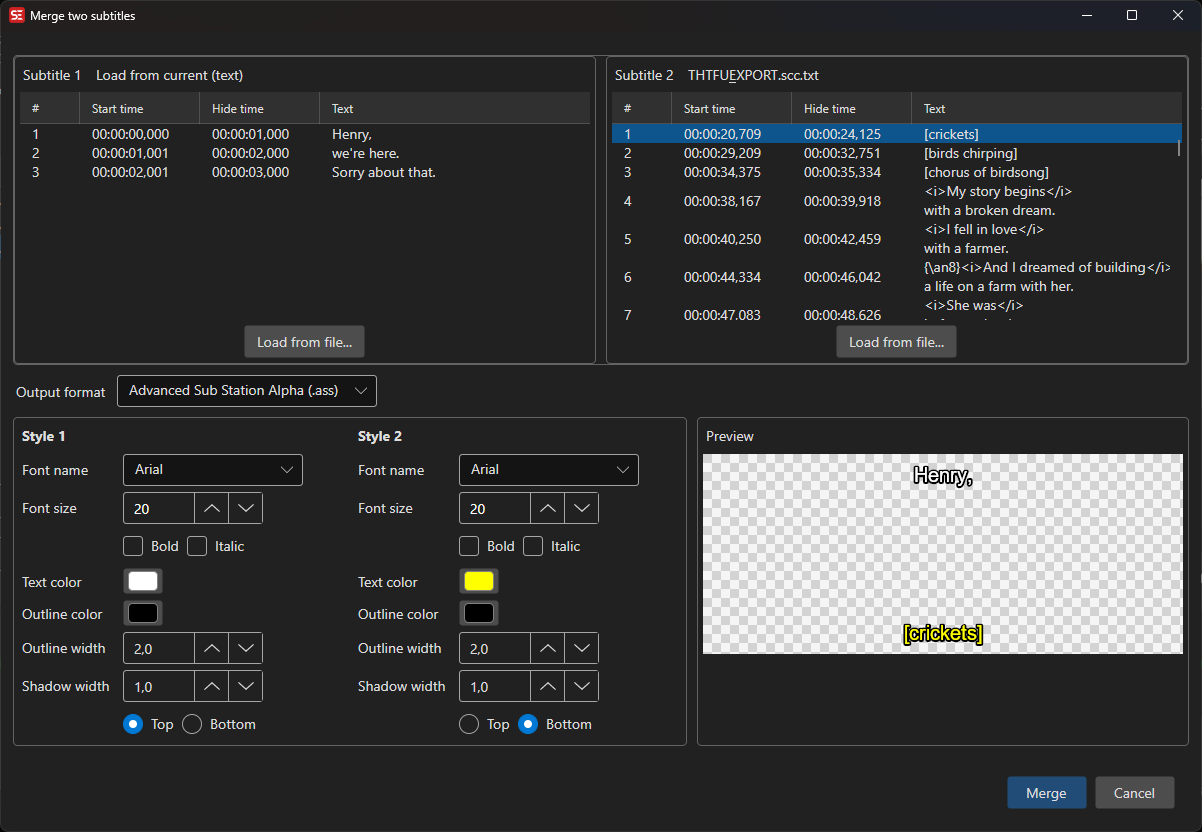
How to Use
- Open Tools → Merge two subtitles…
- Subtitle 1 is pre-filled with the current subtitle and, in translation mode, Subtitle 2 with the original/translation. Use Load from file on either side to pick a different file
- Pick the output format
- Review the live preview
- Click Merge
Output Formats
- SubRip (.srt) — overlapping pairs are stacked into one subtitle, subtitle 1’s text as the first line(s) and subtitle 2’s text below
- Advanced Sub Station Alpha (.ass) — each source keeps its own configurable style (Style 1 / Style 2): font, font size, bold, italic, primary color, outline color, outline width, shadow width, and top/bottom alignment, so e.g. the original can sit at the top and the translation at the bottom. A rendered preview of each style is shown next to its settings
Tips
- To create a bilingual subtitle from a translation you are working on, open the tool while in translation mode — the current text and the translation are loaded as subtitle 1 and 2 automatically
- For two independent files, timing does not need to match exactly — lines are paired by overlap