Audio Visualizer
The audio visualizer displays the audio waveform (and/or spectrogram) of the loaded video, enabling precise visual timing of subtitles.

Display Modes
- Waveform — Shows audio amplitude over time
- Spectrogram — Shows frequency distribution over time
The spectrogram can be generated and toggled independently of the waveform. If you disable spectrogram generation, Subtitle Edit hides the spectrogram layer and keeps the waveform view available.
Mouse Controls
Navigation
| Mouse Action | Effect |
|---|---|
| Scroll wheel | Scroll waveform left/right |
| Alt+Scroll wheel | Horizontal zoom in/out |
| Shift+Scroll wheel | Vertical zoom in/out |
Subtitle Timing
| Mouse Action | Effect |
|---|---|
| Click + Ctrl (cmd on mac) + Shift | Set start and offset the rest |
| Click + Shift | Set start of current |
| Click + Ctrl (cmd on mac) | Set end of current |
| Click on empty area | Set video position |
| Click on subtitle | Select the subtitle |
| Double-click on subtitle | Set video position and select subtitle |
| Drag subtitle left/right edge | Adjust start/end time |
| Drag subtitle body | Move entire subtitle |
| Right-click | Context menu |
Creating New Subtitles
| Mouse Action | Effect |
|---|---|
| Click+Drag in empty area | Mark a new subtitle range; press Enter to insert it (Escape cancels) |
Keyboard Shortcuts (Waveform)
| Shortcut | Action |
|---|---|
| Set start | Set the start time of the selected subtitle |
| Set end | Set the end time of the selected subtitle |
| Set end and go to next | Set end time and move to next subtitle |
| Set start and offset the rest | Set start and shift all following subtitles |
| Set end and offset the rest | Set end and shift all following subtitles |
| Center on video position | Center the waveform on the current video position |
| Insert at position (focus text) | Insert a new subtitle at video position and focus the text editor |
| Insert at position (no focus) | Insert a new subtitle at video position |
| Seek silence | Find the next silent section |
Note: Actual key bindings depend on your shortcut configuration. See Options → Shortcuts to view or change them.
Toolbar
The waveform toolbar (when visible) provides buttons for:
- Zoom in/out (horizontal and vertical)
- Toggle waveform/spectrogram mode
- Toggle grid lines
- Navigate to previous/next shot change
- Apply common subtitle timing actions
The toolbar can be toggled from Video → More → Toggle waveform toolbar. Subtitle Edit 5 also supports waveform toolbar customization, including button visibility/order and import/export of toolbar settings.
Waveform Themes
Waveform theme settings can be imported and exported. Use this to copy waveform colors and toolbar preferences between installations or share a timing workspace with another user.
Spectrogram
The spectrogram view helps locate speech, music, and noise by frequency. It can be used together with the waveform when amplitude alone is not enough to identify a sound or silence boundary.
Shot Changes
Shot changes (scene cuts) are displayed as vertical lines on the waveform. These help align subtitle timing with scene transitions.
- Toggle shot change at video position — Add or remove a shot change marker
- Go to previous/next shot change — Navigate between shot changes
- Snap to shot changes — see Snapping to shot changes below
- Extend to next shot change — Extend subtitle to the next scene cut
The shot change line color can be customized in Subtitle Edit 5, which is useful when your waveform or spectrogram theme makes the default color hard to see.
Snapping to shot changes
Every way of snapping a cue to a shot change puts it in the same place: the Beautify time codes profile’s In cues gap after the cut for a start, and its Out cues gap before the cut for an end. What differs is how a cue gets captured:
Dragging in the waveform. A start or end edge — or a whole subtitle — snaps when it comes within Snap distance when dragging of a shot change. The distance is in pixels, so snapping feels the same at every zoom level: the cue snaps when it looks close. Hold Shift while dragging to move freely. Turn it off altogether with Snap to shot changes (hold Shift to override).
Snap selected lines’ start to next shot change / end to previous shot change. Moves one cue to the nearest cut in that direction, however far away it is, keeping the other cue where it is. Useful after a rough placement.
Snap selected lines to nearest shot change. Looks for a cut near each cue within Max start distance and Max end distance (seconds) and snaps whichever it finds. If both cues are nearest the same cut, the start takes it and the end looks ahead within the tighter Max end distance when start and end share a cut instead, so the subtitle is not collapsed onto the cut.
All the distances live in Options → Settings → Waveform, directly under the snap toggles. The shortcuts ship without default keys — assign them in Options → Shortcuts.
Context Menu
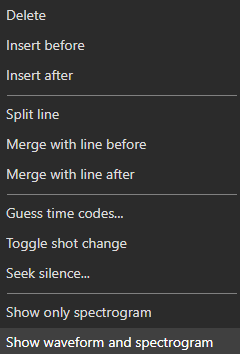
Right-click on the waveform for options including:
- Add subtitle at position
- Split subtitle
- Merge subtitles
- Delete subtitle
- Go to subtitle
- Toggle shot change, or toggle a chapter at the video position
- Extract audio, or clone the voice heard in the selected subtitle into a TTS engine (Clone voice to)
- Copy the selected subtitle (Ctrl+C) or paste lines from the clipboard at the waveform position (Ctrl+V)
- Zoom controls