Check and Fix Netflix Errors
Run Netflix-style quality checks and review proposed fixes before applying them.
- Menu: Tools → Check and fix Netflix errors…
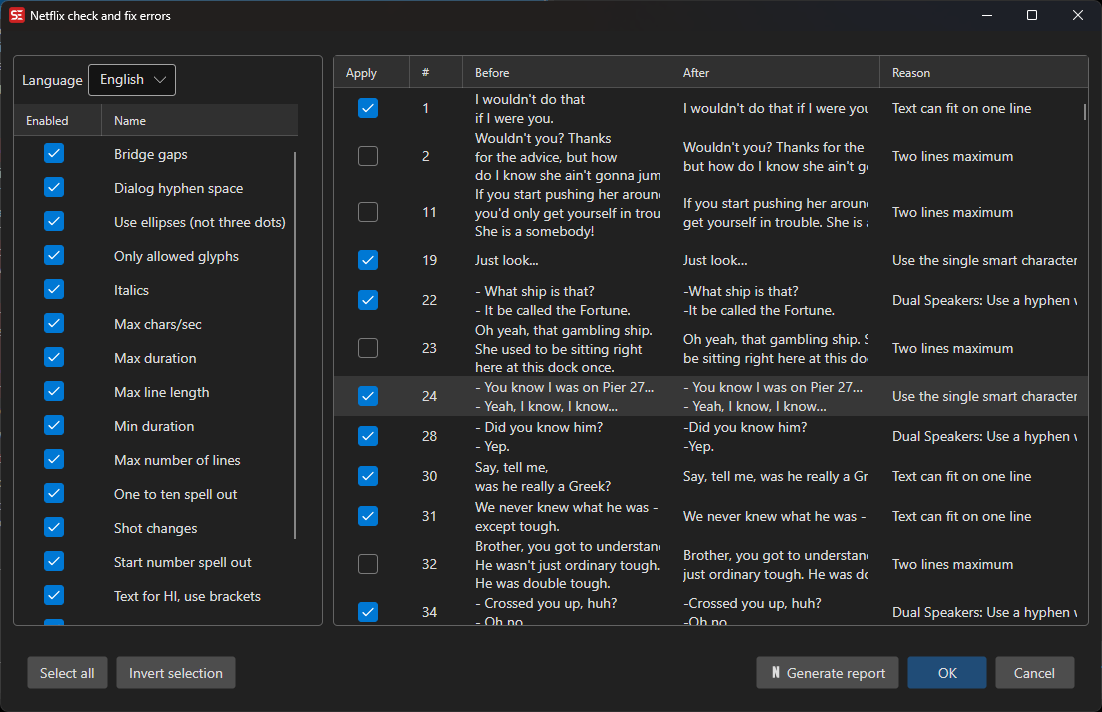
What It Checks
The checker can report common Netflix delivery issues, including:
- minimum and maximum duration
- maximum characters per second
- maximum line length
- maximum number of lines
- minimum two-frame gaps
- bridge short gaps
- shot change rules
- dialog hyphen spacing
- ellipsis style
- whitespace issues
- allowed glyphs
- italics rules
- HI/sound-effect bracket style
- numbers 1–10 that should be spelled out
- numbers at the start of a subtitle that should be spelled out
- Timed Text frame-rate issues
How to Use
- Open Tools → Check and fix Netflix errors….
- Select the subtitle language.
- Enable the checks you want to run.
- Review the proposed fixes in the preview grid.
- Edit a proposed replacement if needed.
- Click OK to apply the selected text fixes.
The tool does not blindly rewrite the subtitle. It shows the original and proposed text so you can review each change first.
Reports
Click Generate report to save a CSV quality report. The report contains line number, time code, context, and comment columns, which makes it useful for handoff or QC review.
Notes
- Some checks are report-only when a safe automatic text fix is not available.
- Shot-change checks use video frame-rate information when a video is loaded.
- Profile settings such as line length, duration, and reading-speed limits can still be configured in Settings.