Settings
Configure application preferences, rules and profiles, appearance, video player, waveform, and more.
- Menu: Options → Settings…
- Shortcut: Configurable
How to Use
- Open Options → Settings…
- Pick a section from the icons on the left
- Adjust settings as needed
- Click OK to save
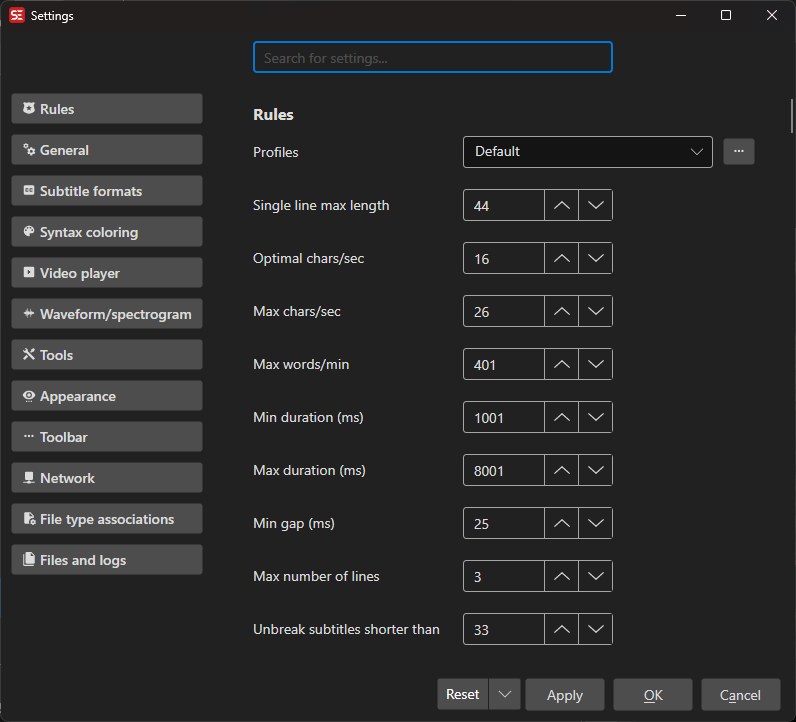
The window is split into sections; the list below follows the order they appear in. Some sections and options only show up on the platform they apply to.
Rules
The subtitle rules that drive error checking, the grid’s warning colors, and tools such as Fix common errors.
- Profiles — Rules are stored per profile, so you can switch between e.g. Netflix, broadcast and default. Profiles can be exported and imported
- Single line max length, Optimal chars/sec, Max chars/sec, Max words/min
- Min duration (ms), Max duration (ms)
- Min gap (ms) — The “…” button opens a calculator: pick a frame rate and a number of frames and it works out the milliseconds. It opens on the current video’s frame rate and the frame count already configured. Shown in millisecond mode only; in frame mode the value is entered in frames
- Max number of lines, Unbreak subtitles shorter than
- Dialog style, Continuation style — Including a custom continuation style editor
- Cps/line-length — Which characters count towards CPS and line length
General
- Prompt before delete, Lock time codes, Remember window position and size
- Use frame mode (hh.mm.ss.ff) — Show times as frames instead of milliseconds
- Limit number of lines in subtitle text box
- Open last recent file on start
- Auto-convert encoding to UTF-8 on open, Force CR+LF on save, Auto-trim white-space
- Remove blank lines when opening a subtitle — Off by default
- Default encoding
- Subtitle grid Enter-key / single-click / double-click action — What each gesture does to the video position and focus
- Subtitle grid, center when selecting prev/next row
- Save as behavior, Save as: append language code, Default save location (with a custom folder)
- Auto-save — Save the open file while editing
- Auto-backup — Automatic backups at a set interval, with a restore dialog
Subtitle Formats
- Default format and default save-as format
- Favorite subtitle formats and favorite languages — These float to the top of the pickers
- WebVTT: use X-TIMESTAMP-MAP — Offset time codes on load
Syntax Coloring
- Color text if too wide (pixels) — With its own settings for how the width is measured
- Error background color
Video Player
- Video player — Which player to use, plus Download mpv / Download VLC when the library is missing
- Subtitle preview properties — Font name, size and bold, primary/outline/shadow colors, border style and outline/shadow width for the subtitle drawn on the video
Waveform / Spectrogram
- Waveform draw style and spectrogram mode
- Toolbar items — Which timing buttons the waveform toolbar shows, and in which order
- Waveform single-click / double-click action
- Extract audio format, sample rate and bitrate — What the audio Subtitle Edit extracts for the waveform looks like
- Snap to shot changes (hold Shift to override) and Snap to frames
- Snap distance when dragging (pixels) — how close a dragged cue has to come to a shot change before it snaps; in pixels, so it feels the same at every zoom
- Snap to nearest shot change: max start / end distance (seconds), and the tighter max end distance when start and end share a cut — how far the Snap selected lines to nearest shot change shortcut looks for a cut. Where a snapped cue lands is set by the beautify profile’s in/out cues gap (gear icon next to the snap toggle)
- Mouse-wheel video position step
- Waveform text font size and the full color set — text, waveform, subtitle background, background, selected subtitle background, selected, cursor/head, shot change, left/right border, fancy high color. Color themes can be imported and exported
- Download ffmpeg and a disk space readout for the extracted audio
Tools
- Allow single-letter shortcuts in text box
- Go-to-line-number also sets video position
- Adjust all times, remember line selection choice
- Merge lines: keep end time (allow overlap with next subtitle), and the variant that limits it to ASSA files
- Auto-break — Break early for end of sentence, comma or dash; break by pixel width; prefer bottom heavy and its bottom heavy percentage; use do-not-break-after list (with an editor for the list); split odd lines action
- Spell check engine, and treat words ending in ‘in’’ as ‘ing’ (English only)
- OCR: use word split list, OCR: try to guess unknown words
- Speech to text: prompt for language/engine first time only
- Multiple replace: show context menu buttons
- Grid: focus text box after insert new subtitle
- Text to speech: prompt to merge continuation lines
- Fix common errors: skip step 1 (choose fixes)
- Music symbol and music symbols to replace
Appearance
- Theme, icon theme, match icon color to dark theme foreground color, UI scale (%)
- Dark theme foreground / background color, focused button background color
- UI font, and a separate font for the subtitle text box and grid
- Grid — Show subtitle text as single line (with the separator to use), text fit, show formatted text, live spell check, compact mode, alternating row colors (light and dark), grid lines, bookmark color
- Subtitle text box — Bold text, color tags, live spell check, centered text, and which buttons are shown (auto-break, unbreak, italic, color, remove formatting, AI assistant), the up/down start/end/duration controls and their labels
- Show button hints — Turns the tooltips on and off
- Show ASSA layer box, show horizontal line above toolbar, show Plugins menu
Toolbar
One checkbox per toolbar button, so the main toolbar can be trimmed to what you use: new, open, open video, save, save as, find, replace, multiple replace, spell check, fix common errors, remove text for hearing impaired, visual sync, point sync, beautify time codes, burn-in, auto-translate, speech to text, settings, layout, source view, help, encoding, frame rate, and the format-specific icons (style manager, properties, attachments, ASSA draw) that only appear for ASSA/SSA/WebVTT files.
Network
Proxy settings for every download and online engine: address, username, password, domain, bypass proxy for, and what to notify about.
Updates
- Check for updates on startup — Hidden for store-managed installs (e.g. Flatpak), which update through the store
- Update channel — Stable, or stable and beta
File Type Associations
Windows only. Tick the subtitle file types Subtitle Edit should open by default.
Files and Logs
Links to the error log, the tools log and the settings file (each enabled only when the file exists), plus write tools log to turn the tools log on.
Keyboard Shortcuts
| Key | Action |
|---|---|
| Escape | Close settings |
| F1 | Open help |