ASSA Properties
Edit the script info header properties of an Advanced SubStation Alpha (ASS/SSA) subtitle file.
Menu: ASSA tools → Properties...
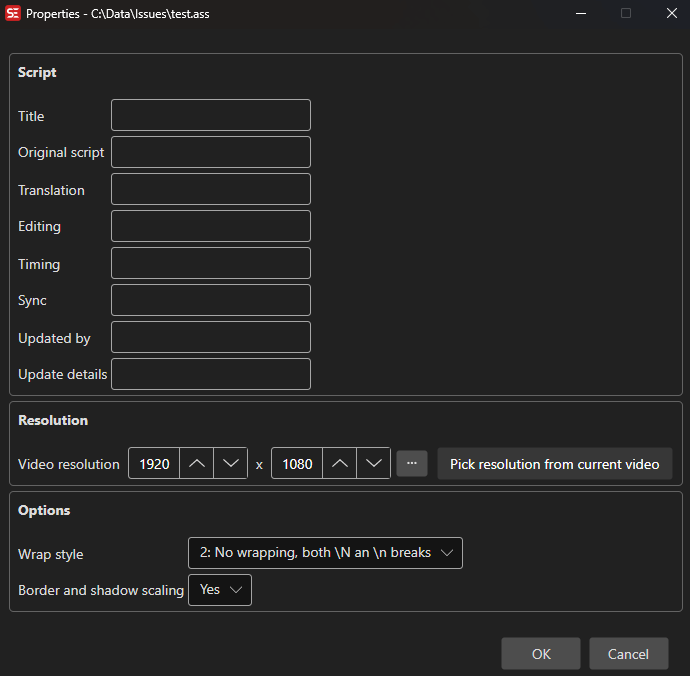
How to Use
- Open a subtitle file in ASS/SSA format.
- Go to ASSA tools → Properties… to open the properties dialog.
- Edit the script info fields as needed.
- Set the video resolution (PlayResX / PlayResY) — the … button picks a standard resolution, and Pick resolution from current video is shown when a video is loaded.
- Choose a wrap style and border/shadow scaling mode.
- Click OK to save changes.
Features
Script Info Fields
- Title: The title of the script.
- Original Script: Author of the original script.
- Translation: Translator name.
- Editing: Editor name.
- Timing: Timer name.
- Sync Point: Synchronization reference.
- Updated By: Name of the person who last updated the script.
- Update Details: Description of the last update.
Video Resolution
- Video Width / Height: Sets the PlayResX and PlayResY values used for style positioning.
- … button: Pick from a list of standard resolutions (4K DCI, 4K UHD, Full HD 1080p, HD 720p, SD PAL, …).
- Pick resolution from current video: Fills width and height from the currently loaded video; only shown when a video is loaded.
Wrap Style
- Controls how long lines are word-wrapped (smart wrapping, end-of-line wrapping, no wrapping, or smart wrapping with wider lower line).
Border and Shadow Scaling
- Choose whether border and shadow sizes scale with the script resolution or the video resolution.
- The dropdown offers Yes, No and N/A (not set).
Keyboard Shortcuts
| Shortcut | Action |
|---|---|
| F1 | Show help (default key, changeable) |
| Escape | Close dialog |