ASSA Styles
Manage Advanced SubStation Alpha (ASS/SSA) subtitle styles, including file styles and storage (template) styles.
Menu: ASSA tools → Styles...
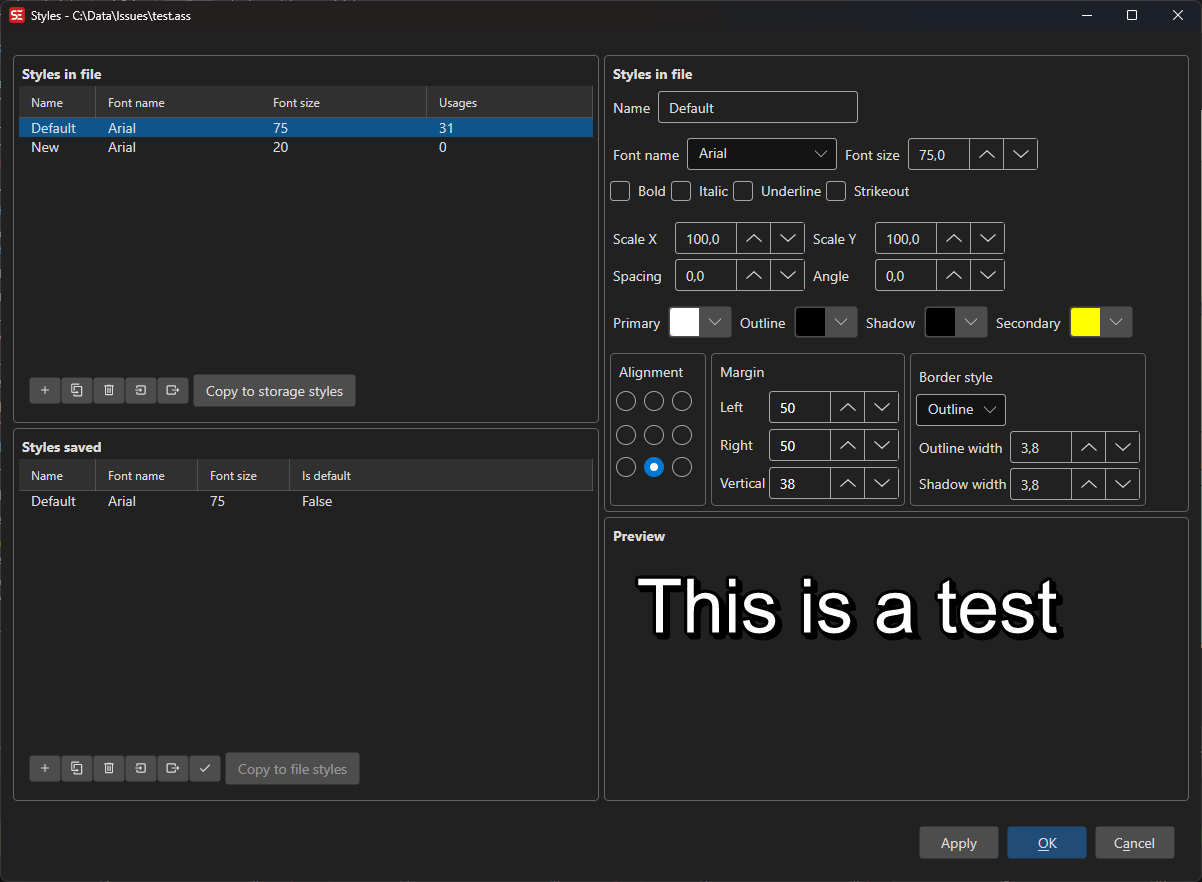
How to Use
- Open a subtitle file in ASS/SSA format (or convert your current subtitle to ASSA format).
- Go to ASSA tools → Styles… to open the styles manager.
- The left panel shows File Styles (styles in the current subtitle), and the right panel shows Storage Styles (reusable template styles).
- Select a style to view and edit its properties — font, colors, border, shadow, alignment, margins, and more.
- Use the preview area to see how your style looks.
- Click OK to apply changes.
Important: Only File Styles affect the current subtitle. Storage Styles are a personal template library that lives outside any subtitle file — editing one (or creating a new one) and clicking OK will not change how your subtitle looks. To apply a storage style to the current subtitle, first copy it into the file styles (select it in the right panel and use Copy to file styles), then make sure your subtitle lines use that style name. See Storage Styles below.
Features
File Styles
- View all styles defined in the current subtitle file.
- Add, remove, copy, or rename styles.
- Import styles from other subtitle files.
- The Usages column shows how many lines use each style. Right-click a style for Take usages from… (pick which other styles’ lines should use it instead) and Replace style with….
- Reorder styles via the right-click menu — Move up (
Ctrl+Up), Move down (Ctrl+Down), Move to top, and Move to bottom. Select several styles first to move them as a block. This is the order the styles are written to the file with, so it is also the order other tools will list them in.
Storage Styles
- Maintain a library of reusable styles separate from any subtitle file.
- Storage styles are templates only — they are saved with your settings and reused across subtitles, but they do not belong to the current subtitle and do not change its appearance on their own.
- To apply a storage style to the current subtitle: select it in the right panel, choose Copy to file styles, then assign that style to the relevant subtitle lines.
- Copy styles between file and storage.
- Storage styles are grouped in categories: pick one from the Category dropdown, use the New category…, Rename category… and Delete category buttons next to it, and right-click a style for Move to category….
- Set a style as the default for new subtitles (this only affects newly created/converted subtitles, not the current one).
- Default template: when a new subtitle is created as ASSA, or an existing subtitle is converted to ASSA (via the format dropdown or Save as), the whole category of the default style is copied into the file — so a multi-style template (e.g. dialogue + signs) survives the conversion — and the lines start out on the default style. If no style is marked as default, the styles in the Default category are used. SubStation Alpha has its own separate storage styles (SSA tools → Styles…) that work the same way for conversions to SSA.
Style Properties
- Font: Name, size, bold, italic, underline, strikeout. The
...button opens the font picker with two tabs — Installed fonts and Collected fonts (fonts gathered in Subtitle Edit’s ownFontsfolder inside the data folder) — the paperclip button picks a font from the subtitle’s attachments, and the font button opens the Font collector, which shows the fonts the subtitle uses, whether they are available, and can copy them to a folder — including SE’sFontsfolder. The font combo also lists the collected fonts. - Scale X, Scale Y, Spacing, Angle.
- Colors: Primary, secondary, outline, and back (shadow) colors.
- Border: Outline width and border style (outline + shadow or opaque box).
- Shadow: Shadow depth.
- Alignment: 9-position alignment grid.
- Margins: Left, right, and vertical margins.
Preview
- Live preview of the selected style with sample text.
- Preview updates as you change style properties.
Keyboard Shortcuts
| Shortcut | Action |
|---|---|
| F1 | Show help (default key, changeable) |
| Escape | Close dialog |