Assisted Split and Assisted Move
Split the selected line at one of up to five ranked split points, or move words between the selected line and its neighbours - each suggestion is shown as a full preview of the resulting lines, and one click (or one key press) applies it.
- Menu: Right-click a line in the subtitle grid → Assisted split… / Assisted move…
- Shortcut: Configurable (no default) - “Assisted split” and “Assisted move” in the General category
Both tools work on the selected line and open a window with numbered cards. Each card has a title saying what the suggestion does, followed by a preview box per resulting line with the text, the start and end time, the character count and the CPS. Click a card or press its number to apply it; Escape closes the window without changing anything.
The previews are produced by running the real split or move on a copy of the lines, so what a card shows is exactly what you get. Both changes go into the undo history like any other edit.
Assisted Split
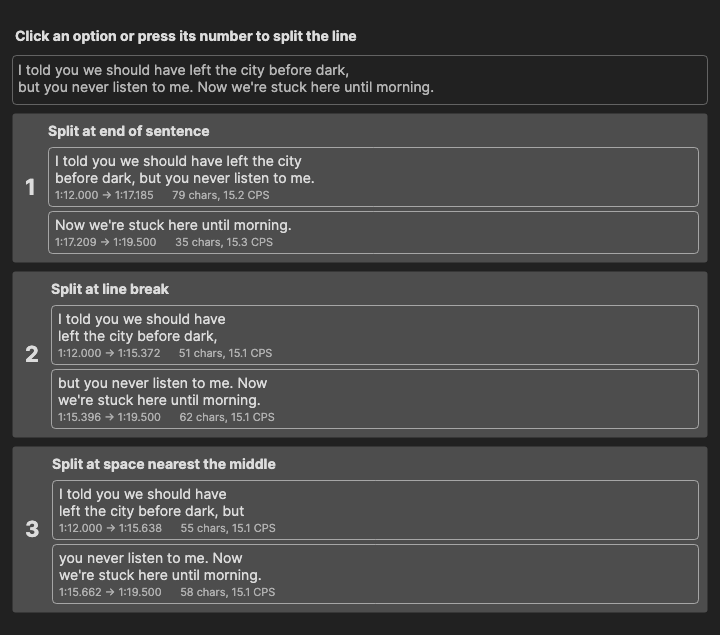
Where Split line cuts the selected line at the middle (or at the text cursor), assisted split shows the sensible cut points first.
How to Use
- Select a line and right-click → Assisted split…
- The window shows the original text at the top and the candidates below it
- Click a card, or press 1 to 5
- The line is split; the new second half is selected and scrolled into view
If nothing sensible is found (for example a line with fewer than four characters), the status bar says No split suggestions for this line and no window opens.
Split Points
The candidates are ranked in this order, and at most five are shown:
- Split at dialog dash - at a line break where the next line starts with a dash
- Split at end of sentence - after
.,!,?or…(closing quotes and brackets stay with the sentence). A full stop glued to a letter or digit, as in1.5ornikse.dk, does not count - Split at line break - at an existing line break that is not a dialog dash
- Split at comma - at the comma nearest the middle of the text
- Split at space nearest the middle - always offered as a fallback
Split points never land inside a <...> or {...} tag, two candidates that give the same result are shown once, and a candidate that would leave a lone dash on a line is dropped.
What the Split Does
Applying a card uses the same rules as Split line: the time codes are divided between the halves in proportion to their text, the continuation style and tag fix-up from the rules profile are applied, and an original subtitle (when one is open) is split at the same point.
Assisted Move
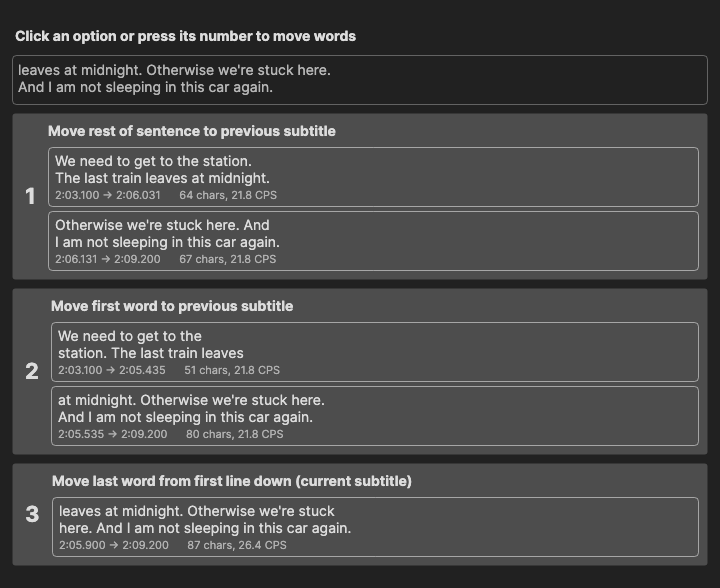
Moves words across the boundary between the selected line and the previous or next line, or between the two lines of the selected subtitle. The list is context aware: word moves across a boundary are only offered when the sentence actually continues across it, so words are never pushed into a line that starts a new sentence or a new dialog.
How to Use
- Select a line and right-click → Assisted move…
- Click a card, or press 1 to 6
- The selected line and the affected neighbour are updated together
If the sentence neither runs on into the next line nor continues from the previous one, and the line itself has no two-line move to offer, the status bar says No move suggestions - the sentence does not continue into the previous/next subtitle.
Suggestions
When the selected line does not finish its sentence and the next line does not open a dialog:
- Move unfinished sentence to next subtitle - the text after the last sentence end goes to the start of the next line
- Balance with next subtitle - moves as many words as it takes for both lines to hold about the same amount of text
- Move last word to next subtitle
- Fetch first word from next subtitle
- Fetch rest of sentence from next subtitle - the next line’s text up to its first sentence end joins the end of the selected line
When the previous line runs on into the selected one, the mirrored set is offered: Move rest of sentence to previous subtitle, Balance with previous subtitle, Move first word to previous subtitle, Fetch last word from previous subtitle and Fetch unfinished sentence from previous subtitle.
For a two-line subtitle that is not a dialog, two moves inside the line are added: Move last word from first line down (current subtitle) and Move first word from next line up (current subtitle).
A sentence “continues” when the earlier text does not end with ., !, ? or … (closing quotes ignored) and the later text does not start with a dash. A line ending in an ellipsis still continues when the next line starts with a lowercase letter.
Timing and Line Breaks
- For moves across a boundary, the boundary moves with the text: the outer start and end and the gap between the two lines are kept, and the span is divided in proportion to the new text lengths (each side keeps at least 15% of it). Moves inside a subtitle leave the time codes alone
- Both sides are re-broken with auto-break for the detected language. Dialog lines keep their per-speaker lines and are only re-broken when a line is over the single line max length
- A move is dropped when it would leave a lone dash on a line, or push a side over two full lines - unless that side was already over the limit and does not grow
Notes
- Neither tool is available for a read-only original reference line
- The single-step moves are also available as text box shortcuts, see Text Editor; for splitting a whole file by rules, see Split/Break Long Lines
Keyboard Shortcuts
| Key | Action |
|---|---|
| 1-5 (split) / 1-6 (move) | Apply that candidate |
| Escape | Close without changes |
| F1 | Show help (default key, changeable) |