Auto Translate: Advanced Local Engines
The llama.cpp advanced (local LLM), Ollama advanced (local LLM) and LM Studio advanced (local LLM) engines translate in batches with surrounding context, a synopsis, and a glossary — giving more consistent names, pronouns, and terminology than line-by-line translation. This page covers their Advanced… settings dialog and the llama.cpp engine settings.
LM Studio advanced talks to LM Studio’s OpenAI-compatible endpoint (default http://localhost:1234/v1/chat/completions). LM Studio can have several models loaded; leave the model empty to use the loaded one.
See Auto Translate for the translation window itself.
Advanced Settings
With an advanced engine selected, click Advanced… in the engine settings row.
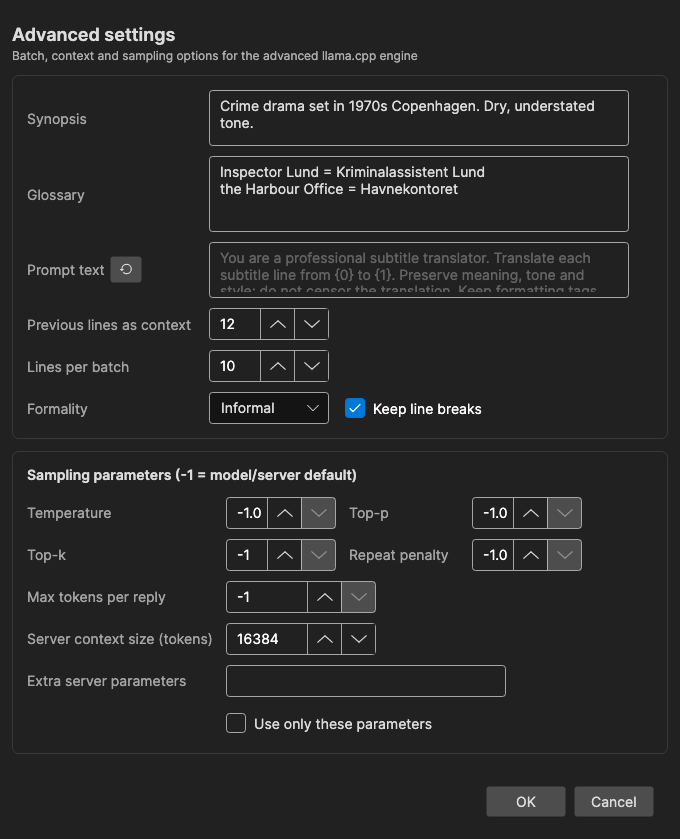
Context
- Synopsis — Optional description of the content (genre, setting, tone), included in every request so the model picks a fitting style
- Glossary — Terms the model must translate a certain way, one per line:
source term = translation - Prompt text — Custom system instructions replacing the built-in prompt (
{0}= source language,{1}= target language); leave empty to use the built-in prompt - Previous lines as context — How many already-translated lines before the batch are sent as history for consistency (default 12)
- Lines per batch — Subtitle lines per request (default 10). If the model returns an invalid reply, the batch is retried and then halved automatically
- Formality — Default, Formal, or Informal; adds an instruction to use e.g. “Sie”/”vous”/”usted” or “du”/”tu”/”tú”
- Keep line breaks — Ask the model to keep the same number of line breaks per line
Sampling Parameters
-1 means the model/server default is used.
- Temperature — Randomness. When unset, Subtitle Edit uses the curated value for the model, or 0.2 — low temperatures keep terminology consistent across batches
- Top-p, Top-k, Repeat penalty — Standard sampling options, passed through when set
- Max tokens per reply — Response length cap; unset means no cap is sent
- Server context size (tokens) — The context window for the locally started llama.cpp server (default 16384). Bigger batches, more history, and a long synopsis/glossary need more context. Only affects the local llama.cpp server; Ollama and LM Studio manage their own context
- Extra server parameters — Additional
llama-servercommand-line arguments, e.g.-ngl 30 --no-mmap, applied when the local server starts. They are appended after Subtitle Edit’s own flags, so a repeated flag overrides Subtitle Edit’s value - Use only these parameters — Start
llama-serverwith the parameters above instead of Subtitle Edit’s own tuning; only the model, host and port are still set. Ignored while the field is empty
llama.cpp Engine Settings
For the local llama.cpp engines, the gear button opens an info dialog about the bundled llama.cpp server build:
- Backend — The detected build (e.g. CUDA, Vulkan, CPU, or Metal on macOS)
- Status — Whether the pinned release is installed and up to date
- Release — The llama.cpp release Subtitle Edit is pinned to
- Install folder — Where the server binaries live
Use Download / Update / Re-download… to (re)install the server build, for example after a graphics driver change. The same dialog is used by AI Review and the AI Assistant.