Transparent Subtitles
Generate a transparent video overlay with rendered subtitles that can be composited over other video.
- Menu: Video → Generate transparent video with subtitles…
- Shortcut: Configurable
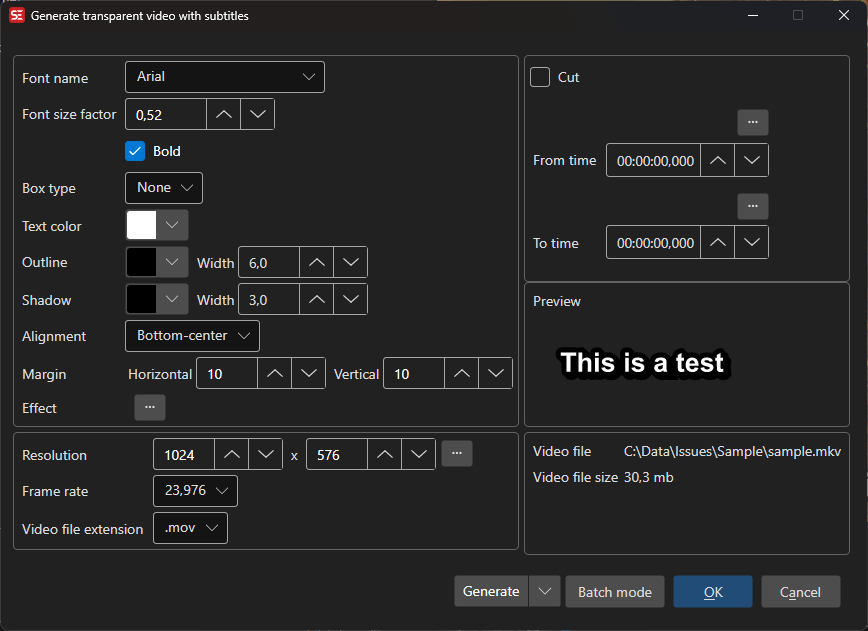
How to Use
- Open Video → Generate transparent video with subtitles…
- Configure font settings (name, size, colors, outline, shadow, alignment)
- Set the video resolution and frame rate
- Select the output video extension (
.movor.mkv) - Select an output folder
- Click Generate to create the transparent video
Font Settings
- Font name — Select the subtitle font
- Font factor — Scale the font size
- Bold — Use bold font weight
- Outline — Outline thickness and color
- Shadow — Shadow width and color
- Box type — Box style around text
- Text color — Subtitle text color
- Spacing — Letter spacing, from -20 to 100
- Alignment — Subtitle alignment position
- Margins — Horizontal and vertical margins
Effect
The Effect browse button opens a picker with one entry to apply to every line: Fix right-to-left, Fade in/out, Slow font size change, Increase font kerning, Scroll up, Scroll down, Rotate in, Tilt bounce and Font size bounce in. The selected effect is shown next to the button.
Preview
In single mode the loaded video plays in an embedded player with the current style and effect rendered on top. In batch mode a static preview image rendered from the current settings is shown instead.
Video Settings
- Resolution — Output video width and height (or use source resolution)
- Frame rate — Output frame rate
- Extension — Output container format (
.mov,.mkv). The overlay is encoded as ProRes 4444, which.mp4and.webmcannot carry
Cut Options
- Cut from/to — Generate only a portion of the subtitle timeline
Batch Mode
Click Batch mode to queue several subtitle files (Single mode switches back). The list shows subtitle file name, size, video file and status, with Add…, Remove, Clear and Pick video file… buttons. Output properties… sets the output folder and naming; the chosen folder (or Use source folder) is shown next to it.
Keyboard Shortcuts
| Key | Action |
|---|---|
| Escape | Close / Cancel |
| F1 | Show help (default key, changeable) |