File Menu
The File menu provides operations for creating, opening, saving, importing, and exporting subtitle files.
New
Create a new empty subtitle.
- Menu: File → New
- Shortcut:
Ctrl+N
New (keep video)
Create a new subtitle while keeping the currently loaded video.
Open
Open an existing subtitle file.
- Menu: File → Open
- Shortcut:
Ctrl+O
Open (keep video)
Open a subtitle file while keeping the currently loaded video.
Open original subtitle
Open a second subtitle file for translation mode (shown side by side). See Translation Mode for how a file that does not line up 1:1 is handled.
Edit original subtitle
Toggle “edit original” mode: the original subtitle (even one opened as a read-only reference) becomes the file being edited, and the working subtitle’s text box goes read-only. See Edit original mode.
Save
Save the current subtitle file.
- Menu: File → Save
- Shortcut:
Ctrl+S
Save As
Save the current subtitle to a new file or format.
- Menu: File → Save as…
- Shortcut:
Ctrl+Shift+S
Close Original
Close the secondary (original) subtitle file in translation mode.
Recent Files
Quick access to recently opened subtitle files.
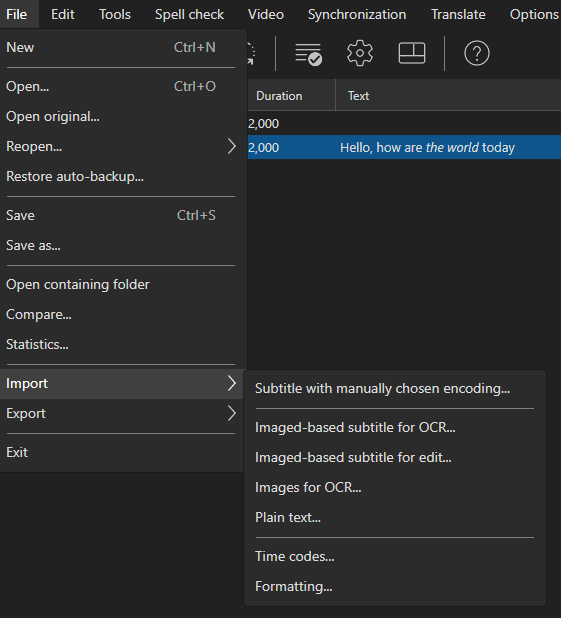
Import
Import subtitle with manually chosen encoding
Open a subtitle file with a specific text encoding.
Import time codes
Import time codes from another subtitle file, applying them to the current text.
Import plain text
Import plain text and create subtitle lines from it, with optional forced-aligner timing against the video’s audio.
See Import Plain Text for details.
Import images
Import image files and create subtitle entries from them.
Import image-based subtitle for OCR
Read the subtitles out of an image-based file (Blu-ray .sup, VobSub .sub, .ts, BDN xml) and run OCR on them to get editable text.
Import image-based subtitle for edit
Open an image-based subtitle in the image-based subtitle editor — moving, resizing and re-colouring the bitmaps — without converting them to text.
Import CSV/XLSX/ODS with custom columns
Import a spreadsheet or delimited text file and choose which column holds the start time, end time, text, and so on.
See Import Spreadsheets for details, including the column names that are recognised automatically when a spreadsheet is opened directly.
Import formatting
Copy the formatting — italic/bold/underline, font tags and ASSA override tags — from another subtitle file onto the currently loaded lines, matched line by line. A warning is shown first when the two files do not have the same number of lines.
Export
Export as plain text
Export subtitle text without time codes.
Export custom text format
Export using a customizable text template. A template has a header, a per-subtitle text part, and a footer.
Placeholders for the text part include {start}, {end}, {text}, {number}, {number-1}, {duration}, {gap}, {actor}, {text-line-1}, {text-line-2}, {text-length}, {cps-period}, {bookmark}, {media-file-name}, {text-csv}, and {tab}.
The time code format is built from these letters (anything else is kept as-is):
| Letters | Meaning |
|---|---|
hh / h |
hours |
mm / m |
minutes |
ss / s |
seconds |
zzz |
milliseconds / fraction of a second |
ff / f |
frames (uses the current frame rate) |
So hh:mm:ss,zzz gives 00:01:01,160 and hh:mm:ss:ff gives 00:01:01:04.
A time code format that starts with s’s or z’s means totals instead of clock components: ss.zzz gives total seconds 61.160, ss.zzzzzz gives 61.160000 (Audacity/Tenacity label style), ss gives 61, and zzz gives total milliseconds 61160. A format of exactly ff gives total frames.
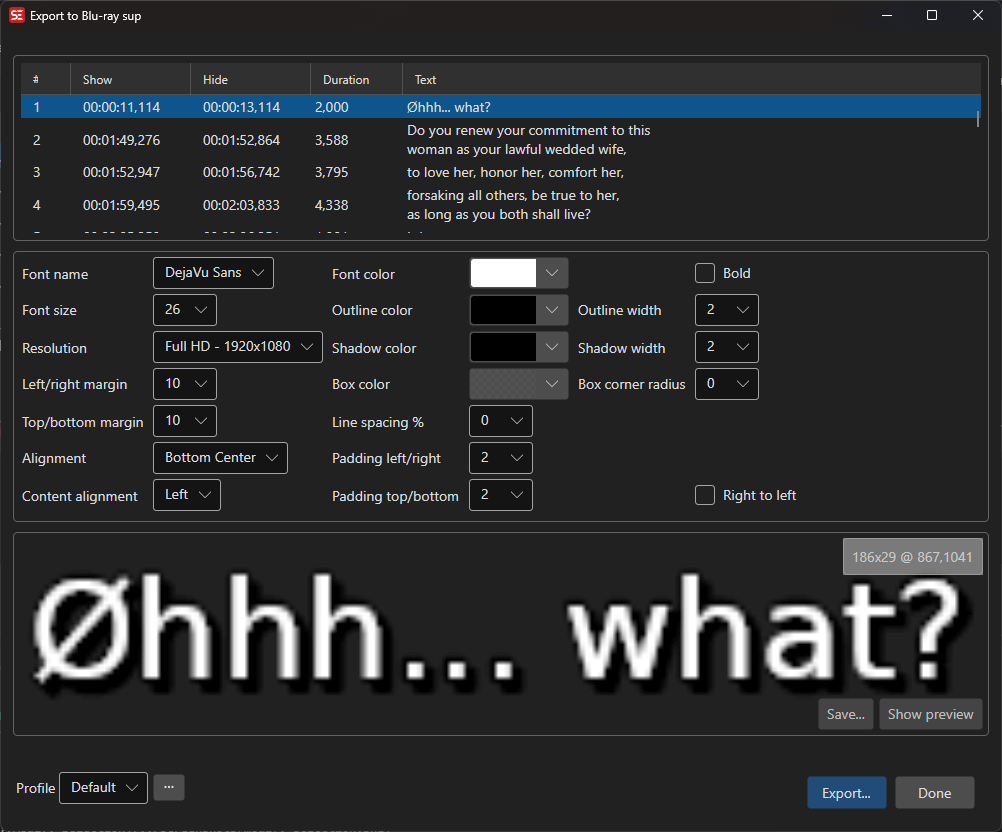
Export to Blu-ray SUP
Export subtitles as Blu-ray SUP image format.
Export to EBU STL
Export subtitles in EBU STL format (used in European broadcasting).
Export to PAC
Export subtitles in PAC format.
Export to Cavena 890
Export subtitles in Cavena 890 format.
Export image-based
Export subtitles as images (BDN XML, VobSub, Blu-ray SUP, Final Cut Pro + image, IMSC 1.1 image profile, etc.).
BDN/xml writes 32-bit PNGs; BDN/xml 8-bit writes the same index.xml with 8-bit palette-indexed PNGs, which is what most Blu-ray authoring tools expect.
The IMSC 1.1 image profile export writes a single self-contained TTML file with each subtitle embedded as a base64 PNG (smpte:image / smpte:backgroundImage), media timebase, and percentage-positioned regions — the standardized image-subtitle carriage for streaming and broadcast delivery.
ASSA override tags
Tags in the text are read rather than drawn as literal characters:
| Tag | Effect on the exported image |
|---|---|
{\an1} - {\an9} |
Places the subtitle, overriding the alignment chosen in the window |
{\pos(x,y)} |
Positions the subtitle (coordinates are in the script’s own resolution) |
{\i1}, {\b1}, {\c&H..&}, {\fn..}, {\fs..} |
Italic, bold, colour, font and size |
{\alpha&H80&}, {\1a}, {\3a}, {\4a} |
Transparency — all parts at once, or text, outline and shadow separately |
{\3c&H..&}, {\4c&H..&} |
Outline and shadow colour, overriding the colours chosen in the window |
{\bord2}, {\shad0} |
Outline and shadow width (in the script’s own resolution) — {\bord0} turns the outline off |
{\fad(in,out)}, {\fade(..)} |
Fade in/out — Blu-ray SUP only (see below) |
Anything else is removed before rendering.
Fading (Blu-ray SUP). A subtitle with {\fad(400,400)} is written the way a Blu-ray disc does it: the image is encoded once and the fade follows as palette updates, one per video frame, which cost about a kilobyte each instead of a whole new image. Long fades are sampled coarser so a single subtitle never adds more than 60 of them. The other image formats have no way to animate a subtitle and ignore the tag - the image is written fully opaque.
Compare
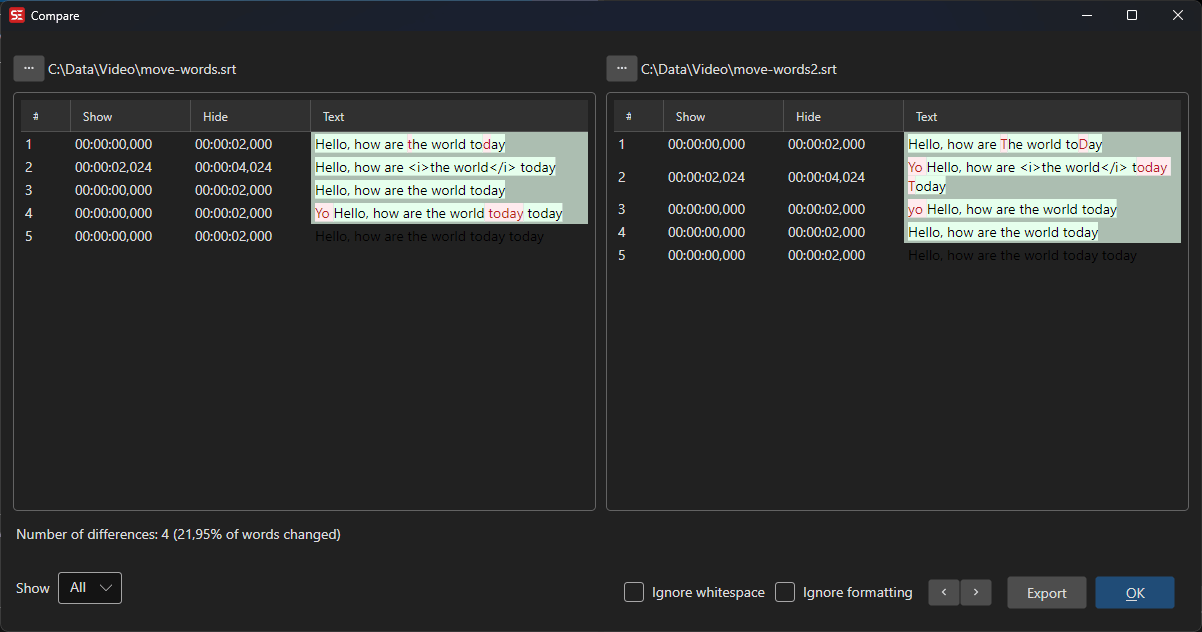
Compare two subtitle files side by side.
- Menu: File → Compare…
Statistics
View subtitle file statistics (character count, line count, reading speed, etc.).
- Menu: File → Statistics…
Restore Auto Backup
Restore a previously auto-saved backup of a subtitle file.
Open Containing Folder
Open the folder containing the current subtitle file in the file manager.