Remove/replace Unicode Characters
Find every character outside Latin-1 (code point above 255) in the subtitle and remove or replace each one - the Subtitle Edit 4 “Remove Unicode characters” plugin, now built in.
- Menu: Tools → Remove/replace Unicode characters…
- Shortcut: None (menu only)
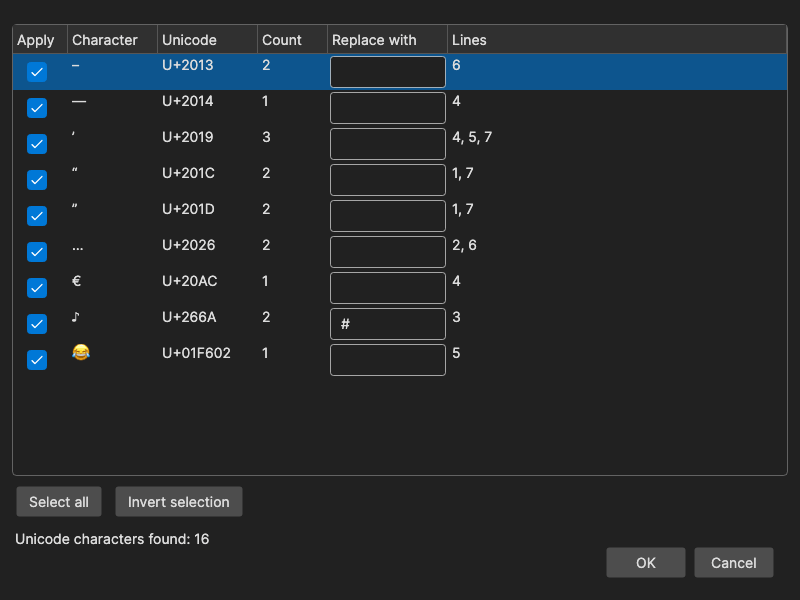
Typical targets are typographic quotes and apostrophes, the … ellipsis, em and en dashes, music notes and emoji - characters that some players, encoders or delivery formats cannot show. Accented Latin-1 letters such as é, ü and ñ are below the limit and are not listed.
How to Use
- Open Tools → Remove/replace Unicode characters…; the whole subtitle is scanned and the status line says Unicode characters found: N (or No Unicode characters found)
- Tick Apply for the characters to change
- Leave Replace with empty to remove the character, or type the replacement (for example
...for…or"for“) - Click OK - the change is applied to every line, and can be undone like any other edit
The Table
| Column | Content |
|---|---|
| Apply | Whether the row is applied on OK (all rows start ticked) |
| Character | The character itself |
| Unicode | Its code point, e.g. U+2026 |
| Count | How many times it occurs in the subtitle |
| Replace with | Editable replacement text; empty means remove |
| Lines | The line numbers it occurs in, e.g. 1, 5, 7 |
Rows are sorted by code point. Characters are counted per rune, so an emoji made of a surrogate pair is one row, not two broken halves.
- Select all ticks every row; Invert selection flips them
- With one or more rows selected, Space toggles their Apply boxes (typing a space in a Replace with box still inserts a space)
Remembered Replacements
Every non-empty Replace with is saved when you click OK and filled in again the next time the same character shows up, in any subtitle. Clearing a box and clicking OK forgets that mapping. Characters not present in the current subtitle keep their saved replacements untouched.
Notes
- The tool works on the whole subtitle, not on the selection
- It replaces plain text only; tags such as
<i>are left alone, but a listed character inside a tag (for example in a font name) is replaced too - For the invisible right-to-left control characters use Edit → Remove Unicode control chars (selected lines) instead, see Edit Menu
Keyboard Shortcuts
| Key | Action |
|---|---|
| Space | Toggle Apply for the selected rows |
| Escape | Close without changes |
| F1 | Show help (default key, changeable) |