ASSA Apply Advanced Effects
Apply cinematic and creative ASS/SSA override tag effects to subtitles with real-time video preview.
- Menu: ASSA tools → Apply advanced effects…
- Shortcut: Configurable
Overview
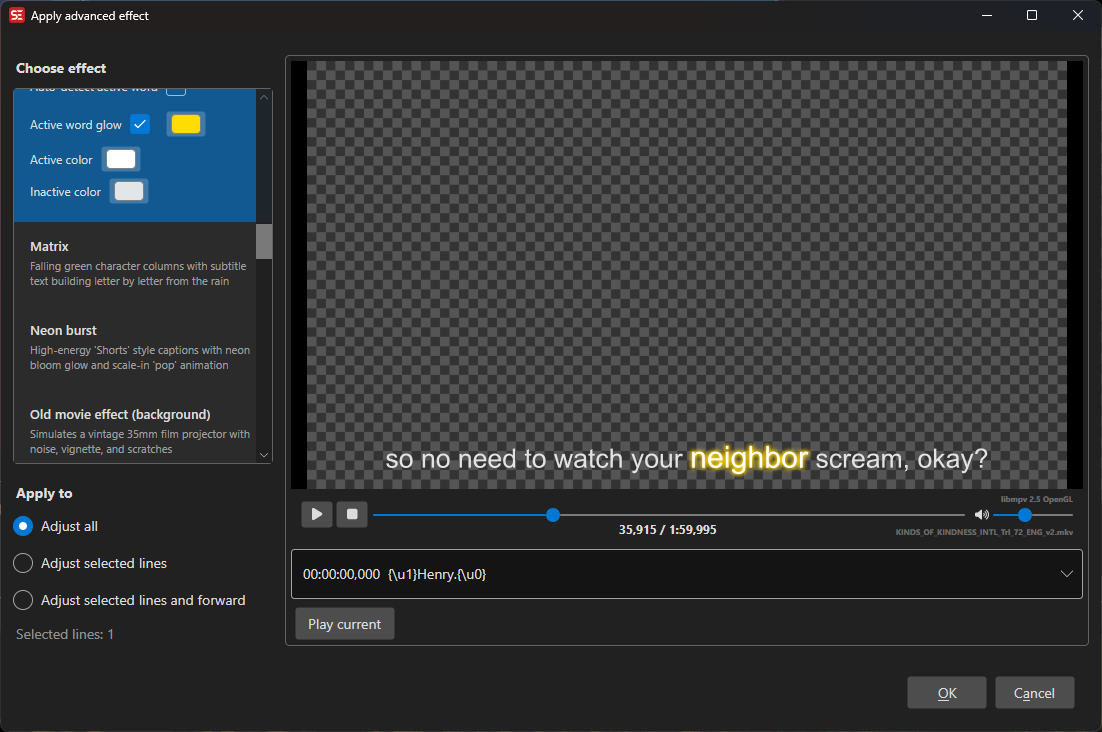
This feature automatically generates complex ASSA override tag animations and effects for selected subtitle lines. Each effect creates frame-by-frame animations using ASSA’s vector drawing and animation capabilities, with real-time video preview.
Effects range from text animations (typewriter, karaoke, bounce-in) to visual enhancements (neon, glitch, rainbow) to transitions and atmospheric/background generators (starfield, rain, snow, fireflies, old movie, confetti, hearts).
How to Use
- Open ASSA tools → Apply advanced effects…
- Select an effect from the dropdown list
- Choose which lines to affect:
- All lines — Apply to entire subtitle
- Selected lines — Apply only to selected lines
- Selected lines and forward — Apply from first selected line to end
- Preview the effect in the video player
- Click OK to apply
Note: Audio-reactive effects (like Audio text pulse) are only shown when waveform/audio peak data is available.
Available Effects
Text Animation Effects
| Effect | Description |
|---|---|
| Typewriter | Characters appear one-by-one as if being typed |
| Typewriter with highlight | Characters appear one-by-one with a glowing highlight on the active character |
| Word by word | Words appear one-by-one instead of characters |
| Karaoke | Highlights each character in sequence, revealing the text left to right like karaoke lyrics |
| Karaoke - active word pop | Dims inactive words and pops/glows a pre-marked active word (via \u1 or highlight color); can auto-detect the active word |
| Scramble reveal | Text starts scrambled and gradually resolves to the correct characters |
| Bounce in | Each character springs in with an elastic pop animation |
| Slow zoom-in | Text starts at normal size and gently grows slightly over the subtitle duration |
| Slow zoom-out | Text starts slightly larger and gently shrinks to normal size over the subtitle duration |
| Slide in from left | Text slides in from off-screen left, holds, then exits back to the left |
| Slide in from right | Text slides in from off-screen right, holds, then exits back to the right |
| Word spacing | Increases spacing between words using the \fsp tag for better readability |
| Word flip 3D | Each word folds in with a 3D flip and elastic pop as it is spoken — modern “Shorts” caption style |
| Cinematic title | Letters track from wide to normal spacing while resolving from a soft blur — classic film title reveal |
Visual Enhancement Effects
| Effect | Description |
|---|---|
| Neon burst | Text appears with a neon glow and “pop” animation using modern colors |
| Rainbow pulse | Text cycles through rainbow colors with a pulsing animation |
| Wave | Text characters undulate in a wave motion |
| Wave (blue) | Blue/cyan wave variant |
| Glitch | Digital glitch overlays with flashes, distortion, and chromatic offset |
| Audio text pulse | Audio-reactive glow/scale pulse driven by waveform amplitude |
| Lower third | Name and role banner bottom-left with an accent bar sliding in — interview/documentary style (first line = name, following lines = role). The accent color is picked in the effect settings |
Transition Effects
| Effect | Description |
|---|---|
| Transition - fade-in | Per-line fade-in from black at the start of each subtitle |
| Transition - fade-out | Per-line fade-out to black at the end of each subtitle |
| Transition - TV close | Black bars grow inward from top and bottom while the middle fades to white, then cuts to solid black — mimics an old CRT TV powering off |
| Fade in/out | Text fades in at the start and fades out at the end of each subtitle |
Decorative/Atmospheric Effects
| Effect | Description |
|---|---|
| Star Wars scroll | Classic opening crawl effect with perspective text scrolling into the distance |
| Credits scroll | Vertical scrolling credits effect |
| Infinite starfield (background) | Continuous warp-speed starfield background |
| Infinite rain (background) | Continuous falling rain with depth layers |
| Infinite snow (background) | Continuous snowfall with depth layers |
| Fireflies (background) | Warm glowing dots drifting and pulsing organically |
| Old movie effect (background) | Film grain, scratches, gate flicker, and vignette |
| Matrix | Falling green character rain with matrix-style subtitle reveal |
| Confetti burst | Colorful spinning confetti bursts from dynamic launch points |
| Hearts (rain) | Bezier-drawn hearts rain gently with tumbling motion |
Effect Scope Options
All Lines
Applies the effect to every subtitle line in the file.
Selected Lines
Applies the effect only to the currently selected subtitle lines. Useful for applying effects to specific scenes or sections.
Selected Lines and Forward
Applies the effect starting from the first selected line through to the end of the subtitle file.
Real-Time Preview
The video player shows a live preview of the selected effect as you change options. The effect is rendered using a temporary ASS file and displayed over the video using libmpv’s subtitle rendering.
- Position control — Seek through the video to preview the effect at different timestamps
- Play/Pause — Click the video surface to toggle playback
- Subtitle list — Select different subtitle lines to preview their effect
Technical Details
How Effects Work
Each effect generates ASSA override tags ({\tag}) to animate properties like:
- Position (
\pos,\move) - Scale (
\fscx,\fscy) - Rotation (
\frx,\fry,\frz) - Color (
\1c,\3c,\4c) - Transparency (
\alpha,\1a,\3a,\4a) - Blur (
\blur) - Border (
\bord) - Transitions (
\t(...)) - Vector drawing (
\p1, drawing commands)
Many effects split a single subtitle line into multiple lines with sequential timing to create frame-by-frame animation.
Video Resolution
Effects that involve positioning or drawing (background effects, particles, transitions) adapt to the video resolution. The feature automatically detects the video dimensions or uses a fallback resolution of 1280x720.
Performance Considerations
- Complex effects (especially particle/background effects like starfield/rain/snow/old-movie/confetti/hearts) generate many subtitle lines
- Each generated line adds to the ASS file size and rendering overhead
- Audio-reactive effects split subtitle lines into short frame windows for waveform-driven animation
- Effects are optimized for modern playback engines (libmpv, mpv, VLC, etc.)
- Preview uses temporary files that are automatically cleaned up on close
Tips
- Preview before applying — Always preview the full effect with the video before committing
- Test with different scenes — Some effects look better in bright/dark scenes
- Combine with styles — Effects respect the base ASSA style but may override specific properties
- Selective application — Use “Selected lines” to apply different effects to different scenes
- Experiment — Each effect has its own aesthetic; try multiple effects to find the right fit
Keyboard Shortcuts
| Key | Action |
|---|---|
| Escape | Close without applying |
Related Features
- ASSA Styles — Manage base styles for text appearance
- ASSA Apply Override Tags — Manually add override tags to specific subtitles
- ASSA Properties — Edit script-level properties (resolution, aspect ratio, etc.)
- ASSA Draw — Create custom vector shapes and drawings