ASSA Override Tags Reference
Advanced SubStation Alpha (ASS/SSA) override tags allow you to modify the appearance and position of subtitle text inline, overriding the default style settings.
Overview
Override tags are enclosed in curly braces {} and can be placed anywhere in the subtitle text. They affect the text that follows them until another override tag changes the property or the line ends.
Basic syntax:
{\tag}text affected by tag
{\tag1\tag2}text affected by multiple tags
Normal text {\tag}tagged text{\r} back to normal
Important notes:
- Override tags must appear within override blocks:
{and} - Tags are case-sensitive
- Multiple tags can be combined in the same block
- Any unrecognized text within override blocks is silently ignored
- Tags only affect text that follows them in the subtitle line
Quick Reference Table
| Category | Tag | Description |
|---|---|---|
| Text Style | \b1 / \b0 |
Bold on/off |
\i1 / \i0 |
Italic on/off | |
\u1 / \u0 |
Underline on/off | |
\s1 / \s0 |
Strikeout on/off | |
| Border/Shadow | \bord<size> |
Set border width |
\shad<size> |
Set shadow depth | |
\be<strength> |
Blur edges | |
| Colors | \c&H<BGR>& |
Primary/text color |
\3c&H<BGR>& |
Border color | |
\4c&H<BGR>& |
Shadow color | |
| Transparency | \alpha&H<AA>& |
Set alpha for all |
\1a&H<AA>& |
Primary alpha | |
| Font | \fn<name> |
Font name |
\fs<size> |
Font size | |
\fscx<percent> |
Horizontal scale | |
\fscy<percent> |
Vertical scale | |
\fsp<pixels> |
Letter spacing | |
| Position | \pos(<x>,<y>) |
Absolute position |
\move(<x1>,<y1>,<x2>,<y2>) |
Move animation | |
\an<1-9> |
Alignment (numpad) | |
| Rotation | \frz<degrees> |
Z-axis rotation (2D) |
\frx<degrees> |
X-axis rotation (3D) | |
\fry<degrees> |
Y-axis rotation (3D) | |
| Animation | \fad(<in>,<out>) |
Fade in/out |
\t(<tags>) |
Transform/animate tags | |
\clip(...) |
Clipping mask | |
| Other | \r |
Reset to default style |
\N |
Hard line break | |
\p<level> |
Drawing mode |
Text Styling Tags
Bold
\b1— Enable bold\b0— Disable bold\b<weight>— Set font weight (100-900, where 400 is normal and 700 is bold)
Example:
How {\b1}are{\b0} you?          → How **are** you?
{\b1}This whole line is bold.   → **This whole line is bold.**
{\b700}Bold text{\b0}            → **Bold text**
Italic
\i1— Enable italic\i0— Disable italic
Example:
How {\i1}are{\i0} you?          → How *are* you?
{\i1}This whole line is italic. → *This whole line is italic.*
Underline
\u1— Enable underline\u0— Disable underline
Example:
How {\u1}are{\u0} you?              → How <u>are</u> you?
{\u1}This whole line is underlined. → <u>This whole line is underlined.</u>
Strikeout
\s1— Enable strikeout\s0— Disable strikeout
Example:
How {\s1}are{\s0} you?               → How ~~are~~ you?
{\s1}This whole line is strikeout.   → ~~This whole line is strikeout.~~
Border/Outline
\bord<width>— Set border/outline width in pixels (rounded/uniform)\bord0— Remove border/outline\xbord<width>— Set horizontal border width separately\ybord<height>— Set vertical border height separately
Note: Allows decimal values with period as decimal point (e.g., “3.5”).
Example: {\bord8.5}This has a large border

Example: {\xbord8.5}This has a large border width

Example: {\ybord8.5}This has a large border height

Shadow
\shad<depth>— Set shadow depth in pixels (diagonal offset)\shad0— Remove shadow\xshad<depth>— Set horizontal shadow offset (can be negative)\yshad<depth>— Set vertical shadow offset (can be negative)
Note: Allows decimal values with period as decimal point (e.g., “3.5”). \xshad and \yshad can be negative for different shadow directions.
Example: {\shad3}This has normal shadow

Example: {\shad8.5}This has a far away shadow

Example: {\xshad8.5}This has only xshad

Example: {\yshad8.5}This has only yshad

Blur
\blur<strength>— Set Gaussian blur strength\be<strength>— Set blur edges strength (0-100)
Note: If the text has an outline (set with \bord or style), the outline will be blurred. If outline is not present, the text itself will be blurred.
Example: {\be1}Some blurred edges works

Example: {\be8}Some blurred edges works

Example with outline: {\bord3\be8}Some blurred edges works

Color Tags
Colors are specified in hexadecimal BGR format (Blue-Green-Red, not RGB!): &H<BB><GG><RR>& or &H<AA><BB><GG><RR>& (with alpha).
Important: ASS/SSA uses BGR (Blue-Green-Red) order, which is different from the common RGB format!
Color examples:
&H0000FF&— Red (not blue!)&HFF0000&— Blue (not red!)&H00FF00&— Green&HFFFFFF&— White&H000000&— Black&H00FFFF&— Yellow
Primary Color
\c&H<color>&or\1c&H<color>&— Set primary (text) color
Example:
This is {\c&H0000FF&}red text
This is {\1c&HFF0000&}blue text
Secondary Color
\2c&H<color>&— Set secondary (karaoke) color
Note: Used mainly for karaoke effects.
Border Color
\3c&H<color>&— Set border/outline color
Note: Setting the outline color has no effect if text does not have an outline (either set with \bord or via style).
Example: {\bord3\3c&H0000FF&}This has a red outline

Shadow Color
\4c&H<color>&— Set shadow color
Note: Setting the shadow color has no effect if text does not have a shadow (either set with \shad or via style).
Example: {\shad3\4c&H0000FF&}This has a red shadow

Alpha/Transparency
\1a&H<alpha>&— Set primary alpha (text transparency)\2a&H<alpha>&— Set secondary alpha\3a&H<alpha>&— Set border alpha\4a&H<alpha>&— Set shadow alpha\alpha&H<alpha>&— Set alpha for all components
Important: Alpha values range from 00 (fully opaque/visible) to FF (fully transparent/invisible). This is opposite to many other programs!
Image export: \alpha, \1a, \3a and \4a are honoured by the image-based exports (Blu-ray SUP, VobSub, BDN-XML, PNG, …) - the subtitle is drawn at the transparency asked for.
Alpha value examples:
&H00&— Fully opaque (100% visible)&H80&— 50% transparent&HCC&— 80% transparent&HFF&— Fully transparent (invisible)
Example: {\alpha&HCC&\1a&H00&}Transparent box with visible text

Example: {\an7\alpha&HCC&}Watermark

Font Tags
Font Name
\fn<font name>— Set font name (spaces in name are allowed)\fn— Reset to style default
Example:
{\fnArial}Arial font
{\fnCourier New}Courier New font
Font Size
\fs<size>— Set font size in points (allows decimal values)\fs— Reset to style default
Example:
{\fs35}This is font size 35
{\fs12.5}Small text at 12.5 points
Font Scale
\fscx<percent>— Set horizontal font scale (100=normal, 200=double width)\fscy<percent>— Set vertical font scale (100=normal, 200=double height)
Example: {\fscx200}Current size double width

Example: {\fscy200}Current size double height

Example: {\fscx200\fscy200}Current size double size

Font Spacing
\fsp<pixels>— Set spacing between characters in pixels (can be negative for tighter spacing)
Example: Normal spacing {\fsp5}5 pixel spacing

Font Encoding
\fe<encoding>— Set font encoding (charset ID)
Common encoding values:
0— ANSI (default)1— Default128— Shift JIS (Japanese)129— Hangul (Korean)134— GB2312 (Simplified Chinese)136— Big5 (Traditional Chinese)162— Greek177— Hebrew178— Arabic222— Thai
Position Tags
Position
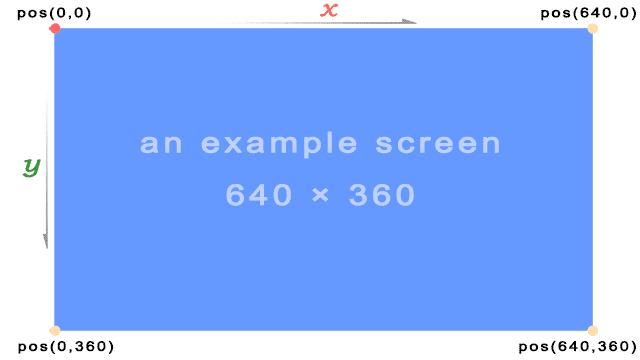
\pos(<x>,<y>)— Set absolute position (pixels from top-left)
Important notes:
- The
[Script Info]section should definePlayResXandPlayResYto match your video resolution - If
PlayResXandPlayResYare not defined, a resolution of 384×288 is assumed - Position coordinates start from top-left corner (0,0)
- The alignment tag (
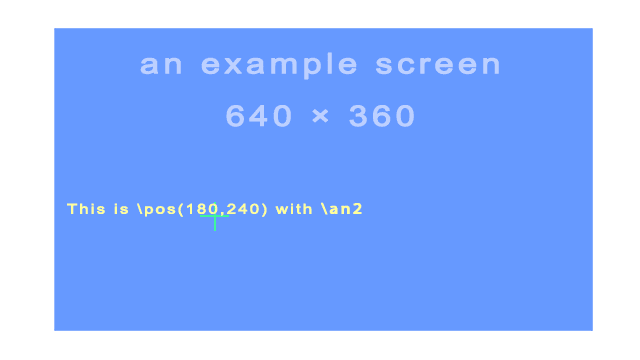
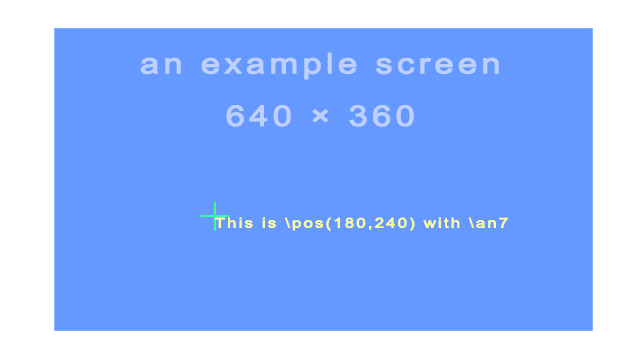
\an) determines which part of the text is anchored to the position
Example: {\an2\pos(180,240)}This is \pos(180,240) with \an2
Example: {\an7\pos(180,240)}This is \pos(180,240) with \an7
Move
\move(<x1>,<y1>,<x2>,<y2>)— Move from position 1 to position 2\move(<x1>,<y1>,<x2>,<y2>,<t1>,<t2>)— Move between times t1 and t2 (milliseconds from line start)
Example: {\move(350,350,1500,350)}Move test

Example: {\move(350,350,1500,350,500,2600)}Move test

Alignment
\an<alignment>— Set alignment (numpad style: 1=bottom-left, 2=bottom-center, 3=bottom-right, 4=middle-left, 5=center, 6=middle-right, 7=top-left, 8=top-center, 9=top-right)\a<alignment>— Legacy alignment (1=left, 2=center, 3=right, plus 5,6,7,9,10,11 for different vertical positions)
Numpad-style alignment (\an) layout:
7 (Top-left)      8 (Top-center)      9 (Top-right)
4 (Middle-left)   5 (Middle-center)   6 (Middle-right)
1 (Bottom-left)   2 (Bottom-center)   3 (Bottom-right)
Note: The modern \an tag is recommended over the legacy \a tag. Most subtitles use \an2 (bottom-center) as the default.
Margins
\marginl<pixels>— Set left margin\marginr<pixels>— Set right margin\marginv<pixels>— Set vertical margin
Note: These tags override the margins set in the style definition. Margins define the minimum distance from the edge of the video frame.
Rotation Tags
\frx<degrees>— Rotate around X-axis (degrees)\fry<degrees>— Rotate around Y-axis (degrees)\frz<degrees>or\fr<degrees>— Rotate around Z-axis (degrees, counterclockwise)
Important notes:
- Negative values are allowed
- Values above 360 and below -360 are allowed
- Z-axis rotation is the standard 2D rotation (text spinning on screen)
- X-axis rotation creates a 3D perspective effect (top/bottom tilt)
- Y-axis rotation creates a 3D perspective effect (left/right tilt)
Example: {\fr45}Test angle (45° Z-axis rotation)

Example: {\frx45}A NEW HOPE (X-axis rotation, like Star Wars opening crawl)

Example: {\fry45}Rotate Y axis

Rotation Origin
\org(<x>,<y>)— Set the origin point used for rotation
Note: When there is no \org tag, the rotation origin is implicitly the same as the position anchor point (e.g., center-bottom of text for \an2). This tag is useful for rotating text around a specific point on screen.
Text Shearing Tags
\fax<factor>— Shear text horizontally (perspective distortion)\fay<factor>— Shear text vertically (perspective distortion)
Important notes:
- A factor of
0means no distortion - Usually factor will be a small number; values outside the range -2 to 2 are unlikely to have desirable results
- Shearing is performed after rotation, on the rotated coordinates
- The coordinate system used for shearing is not affected by the rotation origin
Example: {\fax1}fax1 text

Example: {\fay1}fay1 text

Animation Tags
Fade
\fad(<in>,<out>)— Simple fade in/out (milliseconds)\fade(<a1>,<a2>,<a3>,<t1>,<t2>,<t3>,<t4>)— Complex fade with alpha values and times
Important notes for \fad:
- Adding a fade effect does not extend the duration of the line
- Uses the start and end of the line’s existing display time
- Be careful that fadein + fadeout is not greater than the line duration
- Example: If a line displays for 4 seconds, fadein + fadeout should not exceed 4000 ms
Example: {\fad(500,500)}Fade test (500ms fade-in, 500ms fade-out)
Image export: \fad and \fade survive an export to Blu-ray SUP (File → Export image-based, batch convert, and seconv), where the fade is written as palette updates. The other image formats have no way to animate a subtitle and write it fully opaque.

Complex fade (\fade) explanation:
- Five-part fade using three alpha values and four times
- Alpha values:
a1,a2,a3(decimal 0-255, where 0=visible, 255=invisible) - Times:
t1,t2,t3,t4(milliseconds after the start of the line) - Before
t1: line has alphaa1 - Between
t1andt2: fades froma1toa2 - Between
t2andt3: has alphaa2constantly - Between
t3andt4: fades froma2toa3 - After
t4: has alphaa3
Example: {\fade(0,255,0,1000,1200,1300,1500)}Fade (Advanced)

Transform
\t(<tags>)— Animate tags over the duration of the subtitle\t(<accel>,<tags>)— Animate with acceleration (1=linear, <1=start fast/end slow, >1=start slow/end fast)\t(<t1>,<t2>,<tags>)— Animate between times t1 and t2 (milliseconds from line start)\t(<t1>,<t2>,<accel>,<tags>)— Animate between times with acceleration
Supported tags for transformation:
\fs \fsp \c \1c \2c \3c \4c \alpha \1a \2a \3a \4a \fscx \fscy \frx \fry \frz \fr \fax \fay \bord \xbord \ybord \shad \xshad \yshad \clip \iclip \be \blur
Example: {\1c&HFFFFFF&\t(\1c&H0000FF&)}Color (white to red transition)

Example: {\1c&HFFFFFF&\t(\1c&H0000FF&\fs90)}Color (color and size change)

Clip
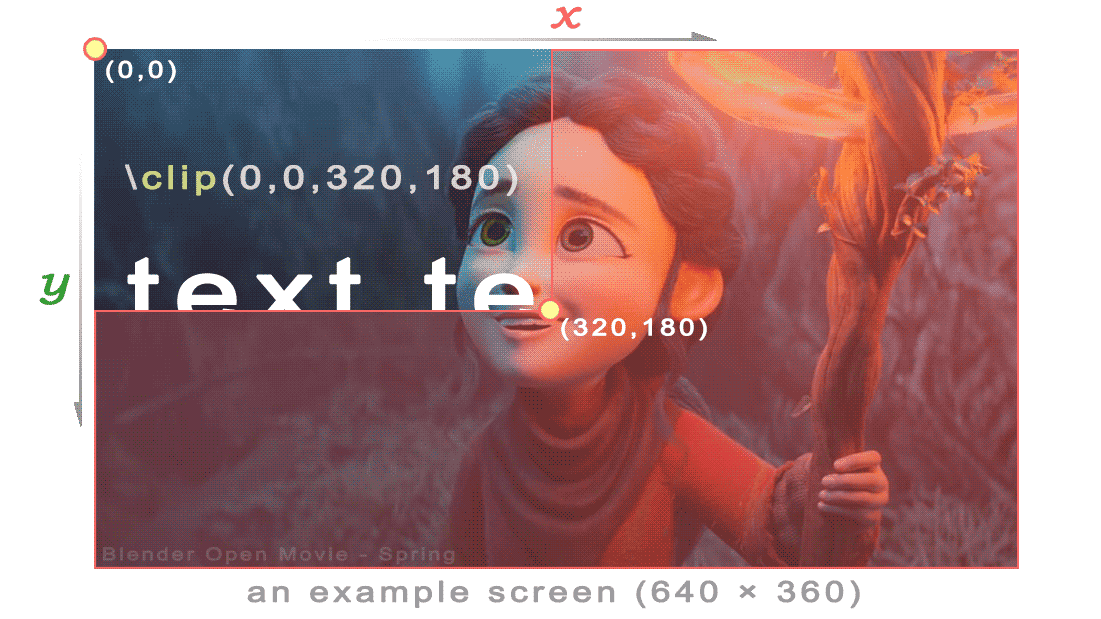
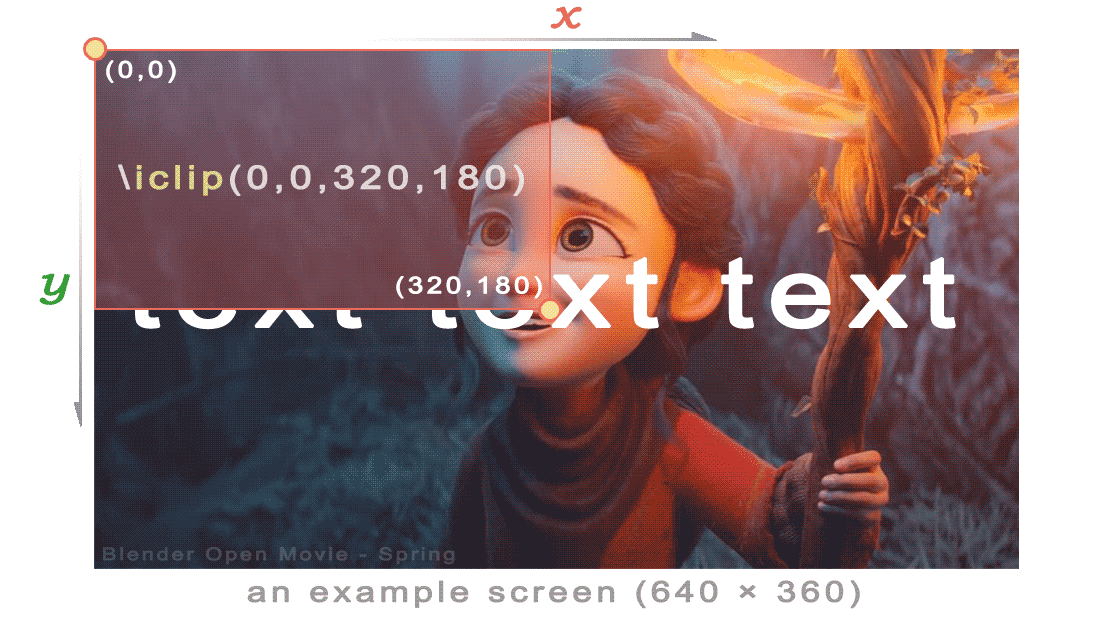
\clip(<x1>,<y1>,<x2>,<y2>)— Rectangular clip (shows only inside rectangle)\clip(<scale>,<drawing>)— Vector clip using drawing commands\iclip(<x1>,<y1>,<x2>,<y2>)— Inverse rectangular clip (hides inside rectangle)\iclip(<scale>,<drawing>)— Inverse vector clip
Note: Clipping can be used to create split-screen effects or to hide parts of text/graphics.
Example: {\clip(0,0,320,180)}text text text
Example: {\iclip(0,0,320,180)}text text text
Drawing Tags
\p<level>— Set drawing mode (0=text, 1-4=drawing with different precision levels)- Drawing commands use vector graphics:
m(move),l(line),b(cubic Bézier curve),s(cubic B-spline),c(close spline)
Drawing precision levels:
\p0— Text mode (normal)\p1— Drawing mode (1 pixel precision)\p2— Drawing mode (0.5 pixel precision)\p3— Drawing mode (0.25 pixel precision)\p4— Drawing mode (0.125 pixel precision)
Drawing command syntax:
m <x> <y>— Move to positionl <x> <y>— Draw line to positionb <x1> <y1> <x2> <y2> <x3> <y3>— Draw cubic Bézier curves <x1> <y1> <x2> <y2> <x3> <y3> [...]— Draw cubic B-splinec— Close spline (connect last point to first)
Example:
{\p1}m 0 0 l 100 0 100 100 0 100{\p0}
This draws a square.
Note: For complex drawings, consider using the ASSA Draw tool in Subtitle Edit.
Other Tags
Reset
\r— Reset to default style\r<style>— Reset to specified style
Example: {\c&H0000FF&\i1}Italic red text{\r} normal text

Line Break
\N— Hard line break (always breaks, even if line wrapping is disabled)\n— Soft line break (breaks only if needed based on wrapping style)
Note: \N (uppercase) forces a line break, while \n (lowercase) is a “smart” break that respects the wrapping style setting.
Karaoke
\k<duration>— Standard karaoke effect (duration in 1/100 second, sweeping from left to right)\K<duration>or\kf<duration>— Fill karaoke (fills from left to right)\ko<duration>— Outline karaoke (outline changes color)
Note: Duration is in centiseconds (1/100 of a second). For example, \k50 means 0.5 seconds.
Wrapping Style
\q<style>— Set wrapping style
Wrapping styles:
\q0— Smart wrapping (wrap lines evenly, try to balance line lengths)\q1— End-of-line wrapping (wrap at the end of line only, as late as possible)\q2— No word wrapping (long lines extend beyond margins)\q3— Smart wrapping with lower line wider (like\q0but prefer more text on bottom line)
Note: The wrapping style determines how long lines are broken into multiple lines.
Examples
Basic Styling
{\b1}Bold text{\b0} normal text
{\i1}Italic text{\i0} normal text
{\u1}Underlined text{\u0} normal text
Color Changes
{\c&H0000FF&}Red text{\r} normal text
{\c&HFF0000&}Blue text{\c&H00FF00&}Green text
{\1c&HFFFFFF&\3c&H0000FF&\bord2}White text with red outline
Font and Size
{\fs50}Large{\fs} normal {\fs20}small
{\fnArial}Arial font {\fnCourier New}Courier font
{\fscx200}Wide text{\fscx100} normal
Positioning
{\pos(640,360)}Centered on screen (for 1280×720 video with PlayResX=1280, PlayResY=720)
{\an7\pos(10,10)}Top-left corner
{\an3\pos(1270,710)}Bottom-right corner (for 1280×720)
Animation
{\fad(500,500)}Fade in and out
{\t(\frz360)}Rotating text (360° over subtitle duration)
{\t(0,1000,\fscx200\fscy200)}Growing text in first second
{\move(100,100,1180,620)}Diagonal movement across screen
Complex Combinations
{\b1\i1\c&HFF0000&}Bold italic blue text
{\pos(100,200)\fs40\bord3\3c&HFFFFFF&}Large text at position with thick white border
{\an5\pos(640,360)\fad(300,300)\t(\frz360)}Centered, fading, rotating text
{\clip(0,0,640,720)\move(0,360,1280,360)}Text moving behind a clip mask
Advanced Topics
Tag Priority and Order
- Tags are processed in the order they appear
- Later tags override earlier tags of the same type
- Example:
{\c&HFF0000&\c&H00FF00&}results in green text (second color wins)
Performance Considerations
- Complex animations and effects may impact playback performance
- Too many transform tags can cause stuttering on slower systems
- Vector clips are more expensive than rectangular clips
- High precision drawing modes (
\p3,\p4) use more CPU
Renderer Compatibility
- Some tags only work with certain renderers (VSFilter, libass, xy-VSFilter, etc.)
- Not all players support all tags
- Advanced features like
\blur,\xbord,\ybordmay not work in all players - Always test with your target player to ensure compatibility
Best Practices
- Use
\rto reset styles rather than manually reversing each tag - Combine multiple tags in one block for efficiency:
{\b1\i1\fs30}rather than{\b1}{\i1}{\fs30} - Set PlayResX and PlayResY to match your video resolution for accurate positioning
- Use decimal precision sparingly (e.g.,
\fs24.5) as not all renderers support it - Comment your complex override tags in separate blocks:
{Comment: This creates a spinning effect}{\t(\frz360)} - Be mindful of subtitle duration when using fade effects
- Test animations at different playback speeds
Common Pitfalls
- Forgetting BGR color order: Remember colors are Blue-Green-Red, not RGB!
- Alpha values reversed: 00 is visible, FF is invisible (opposite of some programs)
- Position without alignment:
\posbehavior depends on\analignment setting - Transform timing: Times in
\tare relative to line start, not video timeline - Fade duration:
\fadfade times count against line duration, not added to it
Notes
- Override tags are case-sensitive (
\B1will not work, must be\b1) - Unrecognized text within override blocks is silently ignored
- Mixing comments and override tags in the same block is not recommended
See Also
- ASSA Styles — Managing ASS/SSA styles
- ASSA Apply Override Tags — Applying override tags in Subtitle Edit
- ASSA Draw — Vector drawing tool
- ASSA Set Position — Positioning subtitles