Improve Time Codes (forced alignment)
Tighten the time codes of a subtitle that is already roughly in sync, by letting a forced aligner listen for every line in the audio. Nothing is transcribed and no text is changed - only the in- and out-cues move.
- Menu: Tools → Improve time codes (forced alignment)…
- Requires: a video or audio file loaded in the main window, and the Crisp ASR engine (downloaded on first use).
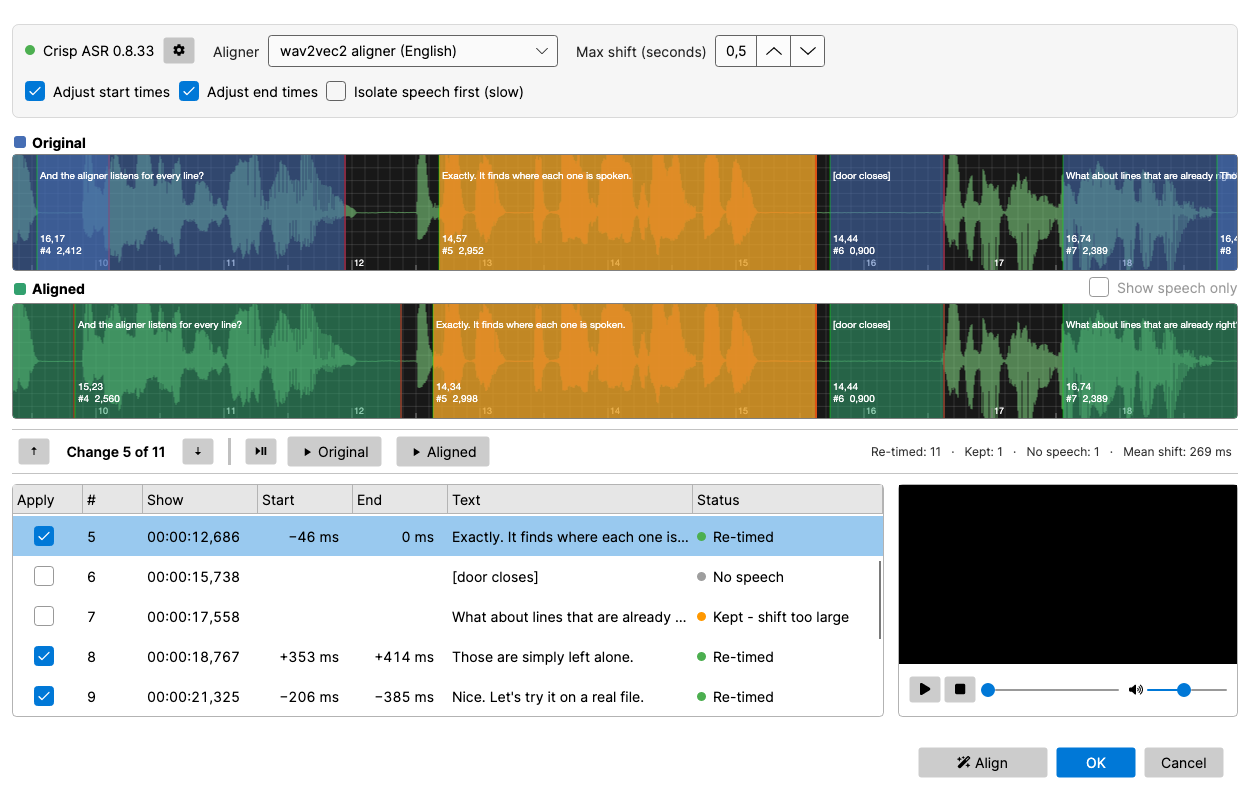
The aligner looks for each line round its current position only, so on its own it needs a subtitle that is close to begin with. With Check with speech-to-text on, a subtitle that is further out - seconds or minutes, drifting, or with jumps where scenes were cut - is synced first (see Syncing first). Without it, use Adjust all times, Point sync or Visual sync first.
Setup bar
- Engine status + gear icon — shows the installed Crisp ASR version. The gear opens the engine settings (backend, update / re-download), the same dialog as in Speech to text.
- Aligner — the model that does the listening. The list is ordered best first for the language of the subtitle:
- the wav2vec2 aligner for that language, when there is one (German, French, Spanish, Italian, Japanese, Chinese, Dutch, Portuguese, Arabic, Ukrainian, Czech) — the most precise;
- the Canary CTC aligner — one model for 25 European languages, accurate to about 80 ms. For English it comes first, ahead of the English wav2vec2 aligner: it keeps its place better when the subtitle leaves out words that are said;
- the Qwen3 forced aligner — for the languages only it covers (e.g. Korean).
A model that is not installed yet says how much will be downloaded; the download starts when you press Align.
- Max shift (seconds) — how far the subtitle may be out of sync (default 0.5). A line whose start would move further is left alone and flagged. An end that would move further is not pulled in to the speech - subtitles are often held long after the last word so they can be read - it travels with the start, so the line keeps its duration. Raise the value for a file that is off by a second or so; it is safe to do so, because single lines are checked against their neighbours (see Large moves).
- Adjust start times / Adjust end times — untick one to leave that side of every line alone.
- Isolate speech first (slow) — removes music and sound effects before aligning, so the aligner only hears the dialogue. Worth it for lines spoken over loud music or action; on clean dialogue it changes little. It takes about as long as the audio itself with a GPU, and many times longer without one. The first use downloads the Mel-Band RoFormer (vocals) model (457 MB) - the same one as Isolate speech in Speech to text. If the isolation fails, the original audio is aligned instead and the status line says so. A successful run also produces the speech-only waveform for the preview (see below).
- Check with speech-to-text — also transcribes the audio with Crisp ASR Parakeet, syncs a subtitle that is further out than Max shift by the heard words first (see Syncing first), and checks every move against where the words were actually heard (see Checking with speech-to-text). It adds a Heard column to the line list. Available for the 25 European languages Parakeet knows; the first use downloads the Parakeet v3 model (489 MB) unless one is already installed for Speech to text. A feature film takes a few minutes with a GPU. If the transcription fails, the alignment is still done, unchecked, and the status line says so.
- Align (bottom button bar, highlighted until there is a result) — extracts the audio and runs the aligner. Length is not a limit: the audio is processed in short windows of a few lines each, so long films use no more memory than short clips. Cancel stops a running alignment.
Preview
Two stacked waveforms show the same stretch of audio:
- Original (blue) — the time codes as they are now.
- Aligned (green) — the time codes after alignment.
Show speech only (on the Aligned row) redraws the Aligned waveform from the audio with music and sound effects removed - the same audio the aligner listened to when Isolate speech first was on, which makes it much easier to judge whether a cue starts and stops with the words. The Original waveform always shows the audio as it is, so the two can be compared. It becomes available as soon as the speech has been isolated once for this video, and is switched on automatically after such a run. The speech-only waveform is shared with Show speech only in the main window’s waveform: whichever of the two generates it first, the other reuses it.
The line being looked at is amber in both. Scrolling or zooming either waveform moves the other, and clicking a line in a waveform selects it in the list. A small video player sits beside the line list, so you can watch as well as listen.
Under the waveforms:
- Play / pause (or Space, wherever the focus is) plays from the playhead. Click in either waveform to move the playhead.
- ▶ Aligned (F5) plays just the selected line with its new time codes, and Shift+F5 plays it with its old ones - the quickest way to hear whether a cue now starts and stops with the speech. Double-clicking a cue in a waveform plays it with that waveform’s time codes; double-clicking a row plays the aligned version.
- ▲ / ▼ (or F7 / F8) step to the previous / next re-timed line, and Change X of Y shows where you are.
- The summary on the right counts re-timed lines, lines that were kept, lines with no speech, and the mean shift - and, after a speech-to-text check, how many moves it confirmed and disputed.
Line list
One row per subtitle line, with the shift of its start and end in milliseconds and a status:
| Status | Meaning |
|---|---|
| Re-timed | The aligner moved the line. |
| Moved with its neighbours | The lines round it all moved by about the same amount, but the aligner wanted this one somewhere else - or further than Max shift. It was given the neighbours’ offset instead. |
| Large move - listen, tick to apply | The line wants to move more than half a second while its neighbours stay put. The new time codes are the aligner’s, but the row is not ticked: play ▶ Original and ▶ Aligned and tick it if the move is right. |
| Confirmed by speech | A large move that speech-to-text heard starting where the aligner put it - ticked. Also used when the neighbours overruled the aligner but the speech sided with the aligner. |
| Heard where it was | Speech-to-text heard the line where it already was, not where the aligner moved it. The aligner’s time codes are offered unticked. |
| Moved with the sync | The subtitle was synced first, and the aligner left this line where the sync put it - a line with no speech, one already in place after the sync, or one the aligner could not place. |
| Already in place | The aligner agrees with the current time codes. |
| No speech | Nothing to listen for - blank lines, [sound descriptions], (sighs), ♪. These lines are never moved. |
| Kept - shift too large | The start would have moved more than Max shift, so the line was left alone. |
| Kept - aligner failed | The aligner could not process this group of lines. |
With Check with speech-to-text on, the Heard column shows how much of each line speech-to-text heard. A low share means the text differs from what is said - a condensed or reworded line, a name it misheard - which is exactly where the aligner is most likely to be wrong, so those are the lines worth a listen.
Untick Apply on a row to keep that line’s original time codes; the green waveform updates at once.
Press OK to write the ticked changes to the subtitle (one undo step), or Cancel to discard.
Large moves
A forced aligner places exactly the words it is given. Subtitles are often not exactly what is said: a condensed line may drop the “Okay, and, uh,” the speaker opens with, or the line before may trail off in a “you know” that was never subtitled. The aligner then puts the line confidently in the wrong place - starting late, after the dropped words, or early, on the stray ones - and does so identically every time, so it cannot be caught by running it twice.
With a small Max shift such a line is simply refused. With a larger one it would be moved wrong, so every move of more than half a second is checked against the lines round it:
- The neighbours all moved by about the same amount - the subtitle is out of sync by that much. A line that went somewhere else (or was refused for going too far) is moved with its neighbours instead.
- The neighbours stayed where they were - the line is either genuinely mistimed or has unsubtitled speech beside it, and the audio cannot say which. It is listed as Large move and left unticked for you to judge by ear. The status line says how many there are.
- The neighbours moved all over the place - there is nothing to measure against, and the aligner is believed.
Isolating the speech first does not help with this: the extra words are speech too. Speech-to-text can, though - see below.
Checking with speech-to-text
The aligner is told the text and finds it; it cannot say when the text is not what is said. Speech-to-text is not told anything: it reports the words it hears, and when. With Check with speech-to-text on, the subtitle’s words are matched to the heard words (in order, and only near where the line is), which gives every line a Heard share and - when one of its first words was heard - the time the line really starts. That settles moves the neighbourhood check could not:
- A large move is confirmed (and ticked) when the speech starts where the aligner put the line, and marked Heard where it was when the speech starts where the line was.
- A line moved with its neighbours goes back to the aligner’s own answer when that is where the speech was heard.
- Any other move of 0.4 s or more away from where the line was heard is marked Heard where it was and unticked.
Speech-to-text word times are coarser than the aligner’s, so they only ever choose between two positions - the new time codes are always the aligner’s. A steady difference between the two (Parakeet marks words about 0.2 s earlier than the aligners do) is measured on the file and allowed for, and a line with less than half its words heard is not judged at all.
Syncing first
A subtitle can be out of sync in three ways, and often in all of them at once:
- a constant offset - everything seconds (or minutes) early or late;
- a drift - the offset grows along the film, as when the subtitle was made for a different frame rate (25 vs 23.976 fps);
- jumps - the offset changes at a point where a scene, a recap or an ad break is in one version and not the other.
The aligner cannot fix these on its own, as it only looks near each line. So when Check with speech-to-text is on, the transcription is used first: distinctive words and word pairs that occur in both the subtitle and the transcription are paired up and kept only where they agree on the order. Every line with such pairs gives an offset, offsets that disagree with the lines round them are dropped as mismatches, and the rest are smoothed - following a drift, keeping a jump sharp. Lines in between get an offset from the lines round them. When that shows the subtitle is further out than Max shift somewhere, every line is moved by its offset and the aligner then fine-tunes from there; the summary starts with how far the subtitle was out at the start and at the end. A subtitle already within Max shift is not touched by this.
Because it matches words rather than speech and silence, a large offset cannot pile the lines up at the start of the film, as purely acoustic sync tools sometimes do. It needs the subtitle to be in the spoken language; if too few of its words are found, nothing is synced.
If speech-to-text hears less than 30% of the subtitle’s words, the status line asks whether the subtitle is in the spoken language: a translation cannot be aligned - neither the aligner nor speech-to-text can find its words in the audio.
How the new time codes are chosen
- The start is where the first word of the line begins.
- The end is where the last word ends - but a line is never cut shorter than the minimum display time or the optimal reading speed from Settings → General, as long as that does not show it for longer than it used to be shown or run into the next line.
- Overlaps that were in the subtitle on purpose are left alone; the tool never creates new ones.
Run Beautify time codes afterwards to snap the result to frames and shot changes.