Batch Convert
Convert multiple subtitle files between formats and apply various transformations.
- Menu: Tools → Batch convert…
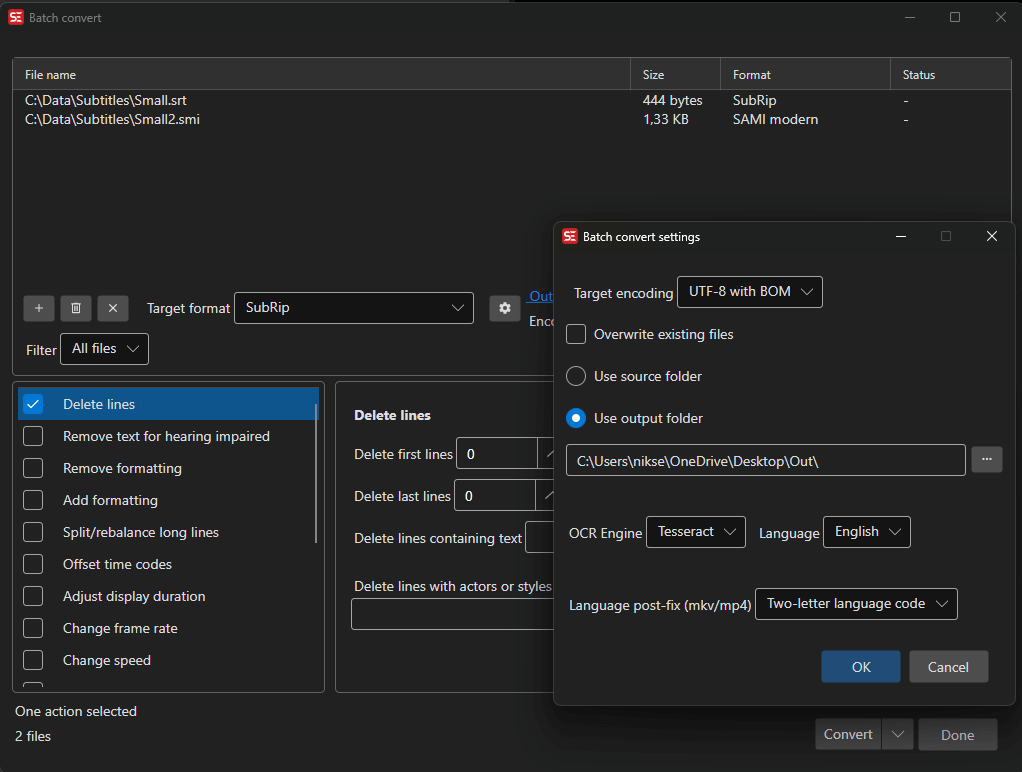
How to Use
- Open Tools → Batch convert…
- Add subtitle files (drag and drop, or use the Add button). The folder button adds every subtitle file in a folder — drag and drop works with folders too. Turn on Include subfolders when adding a folder in the settings (gear button) to scan the whole tree; a scan of a large tree or a network share can be cancelled while it runs.
- Select the output format
- Optionally add conversion functions (fixes, adjustments)
- Choose an output folder
- Click Convert
Available Functions
You can chain multiple conversion functions:
- Fix common errors
- Remove text for hearing impaired
- Multiple replace
- Change casing
- Change formatting (add/remove)
- Offset time codes
- Adjust duration
- Change speed/frame rate
- Beautify time codes — align cues to frames and apply the Beautify time codes profile rules; frame rate and shot changes are read from a video file with the same name as the subtitle file, if one is found
- Snap all times to frames — round every start and end time to the nearest frame, using the frame rate of a video file with the same name as the subtitle file or a fixed frame rate you choose
- Convert colors to dialog — turn a color change inside a cue into a dash-prefixed dialog, optionally removing the color tags, adding new lines and re-breaking the lines
- Bridge gaps
- Apply minimum gap
- Apply duration limits
- Merge lines with same text
- Merge lines with same time codes
- Merge short lines
- Split/break long lines
- Unbreak lines — join a cue’s lines into one, optionally only for short ones
- Auto-balance lines
- Fix right-to-left
- Sort by
- Change resolution — the ASSA resolution resampler applied to every file
- Change style — swap one ASSA style for another, or import styles from a file, optionally trimming unused ones
- Embed fonts — embed the fonts an ASSA file uses as attachments, optionally trimmed to the characters actually used
- Adjust image brightness/alpha/color — for image-based subtitles
- Auto translate
- Delete lines
Auto-translate in Batch Convert
Batch Convert can machine-translate files as part of the conversion. Supported engines:
- Ollama
- Ollama advanced (local LLM) — the batch/context engine described in Advanced local engines, talking to Ollama’s OpenAI-compatible endpoint
- LibreTranslate
- LM Studio
- llama.cpp — fully managed: Batch Convert reuses an already-running local
llama-server, or downloads llama.cpp plus a curated translation model (e.g. TranslateGemma) and starts the server for you. Point it at your own server via the remote-server option in Auto-translate settings. - llama.cpp advanced (local LLM) — the batch/context engine described in Advanced local engines; it gets the context size configured there
- NLLB (nllb-serve and nllb-api)
- DeepL (API key required)
- CrispASR MADLAD
The same feature is available headlessly in seconv via --translate-to — see the command line documentation.
OCR in Batch Convert
Batch Convert can OCR image-based subtitle files while converting them to text-based formats.
Supported OCR engines in Batch Convert:
- nOcr
- BinaryOcr
- Tesseract
- Ollama
- llama.cpp (curated OCR vision models, best-first — GLM-OCR, PaddleOCR-VL, HunyuanOCR 1.5, LightOnOCR; a local
llama-serveris started automatically) - CrispEmbed (local, multiple model backends — see OCR)
- PaddleOCR (Windows and Linux only)
Subtitle Edit 5 can auto-detect language and pixels-are-space settings for nOcr/BinaryOcr in many batch workflows. This reduces the amount of manual setup needed when converting many image-based subtitle files with similar fonts.
Speech to Text in Batch Mode
Speech-to-text batch mode can transcribe multiple media files and save the results next to the source files. See Speech to Text for engine setup and model details.
Settings
- Output format — Choose from 380+ subtitle formats
- Output folder — Where converted files are saved
- Overwrite existing — Whether to overwrite files
- Encoding — Text encoding for output files
For headless batch conversion, see Command Line (seconv).