Video Player
Subtitle Edit includes an integrated video player for previewing subtitles with video.
Opening Video
- Menu: Video → Open video…
- Shortcut: Configurable via Options → Shortcuts
- Drag and drop a video file onto the Subtitle Edit window
- You can also open video from a URL: Video → Open video from URL…
- Recently opened videos are listed under Video → Open recent video; the submenu’s Clear recent videos item empties the list
Playback Controls
| Shortcut | Action |
|---|---|
| Play/Pause toggle | Toggle video playback |
| Play | Start playback |
| Pause | Pause playback |
| Play next (and stop / and loop) | Play the next subtitle, then stop or loop |
| Play previous (and stop / and loop) | Play the previous subtitle, then stop or loop |
| Play selected lines | Play only the selected subtitle lines |
Note: When a “play and stop” playback stops, the video parks on the last visible frame of the line (one frame before its end time) rather than exactly on the end time. This keeps the line you just played visible on the video — stopping exactly on the end time would show a blank frame, or the next line when two lines share a boundary. The played line also stays selected in the subtitle grid.
Video Controls
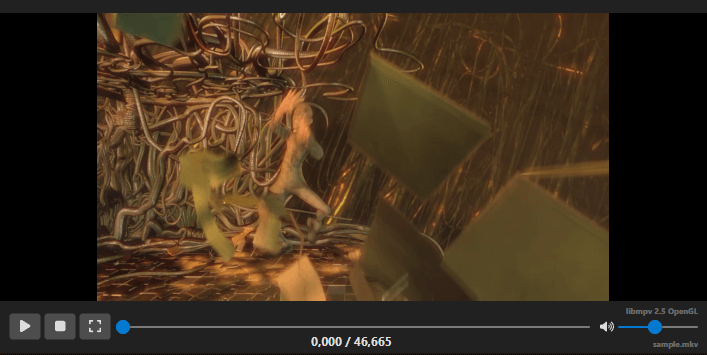
The row of controls under the video can be customized in Options → Settings → Video player → Edit video controls…. The dialog shows a live preview; check or uncheck an item to show or hide it, and use Move up / Move down to change the order. Reset restores the default layout.
- Play, Stop, Full screen, Video position (the slider) and Volume are laid out left to right in list order. The position slider takes the remaining width.
- Position / duration text and Video file name are drawn under the controls. With the position text first (default) it is centered under the slider and the file name is right-aligned; put the file name first to show it on the left and the position text on the right.
- Video player name is the small label in the top right corner.
The layout applies to every video player, including the ones in dialogs like Set sync point.
Navigation
| Shortcut | Action |
|---|---|
| One frame back | Move one frame backward |
| One frame forward | Move one frame forward |
| 100ms back | Jump 100 milliseconds backward |
| 100ms forward | Jump 100 milliseconds forward |
| 500ms back | Jump 500 milliseconds backward |
| 500ms forward | Jump 500 milliseconds forward |
| 1 second back | Jump 1 second backward |
| 1 second forward | Jump 1 second forward |
| Custom back/forward | Configurable jump amounts |
| Custom back/forward and pause | Same jump amounts, but pause playback first |
Note: Actual key bindings depend on your shortcut configuration. See Options → Shortcuts.
Go to Video Position
Jump to a specific time code position in the video.
- Shortcut: Configurable via Options → Shortcuts (search for “Go to video position”)
Playback Speed
- Toggle playback speed — Switch between normal and custom speed
- Slower — Decrease playback speed
- Faster — Increase playback speed
Full Screen
- Shortcut: Configurable
- Toggle full-screen video playback
Undock / Dock
You can undock the video player into a separate window for multi-monitor setups:
- Undock video controls
- Dock video controls
Secondary Subtitles
You can open a secondary subtitle on the video player and remove it again from the Video menu. This is useful when checking a translation against the original subtitle while previewing video playback.
Video → Open second subtitle file… sits in the same spot as in Subtitle Edit 4, right after the open/close video items (it is shown while a video is loaded). While a second subtitle is shown, Edit second subtitle settings… and Remove second subtitle file appear below it. Only one second subtitle is shown at a time: opening another file replaces the current one.
Edit second subtitle settings… re-opens the style dialog (color, font size, bold, border style, alignment) for the second subtitle that is already on the video player, with no file picker, so its look can be adjusted without removing it and opening the file again. It always shows the dialog, even when “Do not show this dialog again” has been chosen. Both commands can be given a shortcut in Options → Shortcuts (Video group).
Embedded Subtitles
Use Embedded Subtitles to add, remove, preview, and edit Matroska/WebM embedded subtitle tracks.
Supported Video Players
Configure the video player backend in Options → Settings → Video player:
- libmpv - OpenGL — default on Linux and macOS
- libmpv - Native Window ID rendering — default on Windows (not available on macOS)
- libmpv - Software rendering (slow)
- libVLC - Native Window ID rendering — alternative backend (Windows and Linux only)
- FFmpeg — plays video through FFmpeg, no libmpv/libVLC needed (all platforms)
- libmpv - Metal (experimental, needs restart) — macOS only
The same settings page also has:
- Video controls — see Video Controls
- Hide video controls in full-screen
- Auto-open video file when opening subtitle
- Subtitle preview properties — how the subtitle is drawn on the video
- Download mpv / Download VLC / Download FFmpeg libraries — fetch the player library when it is not installed
Video Info
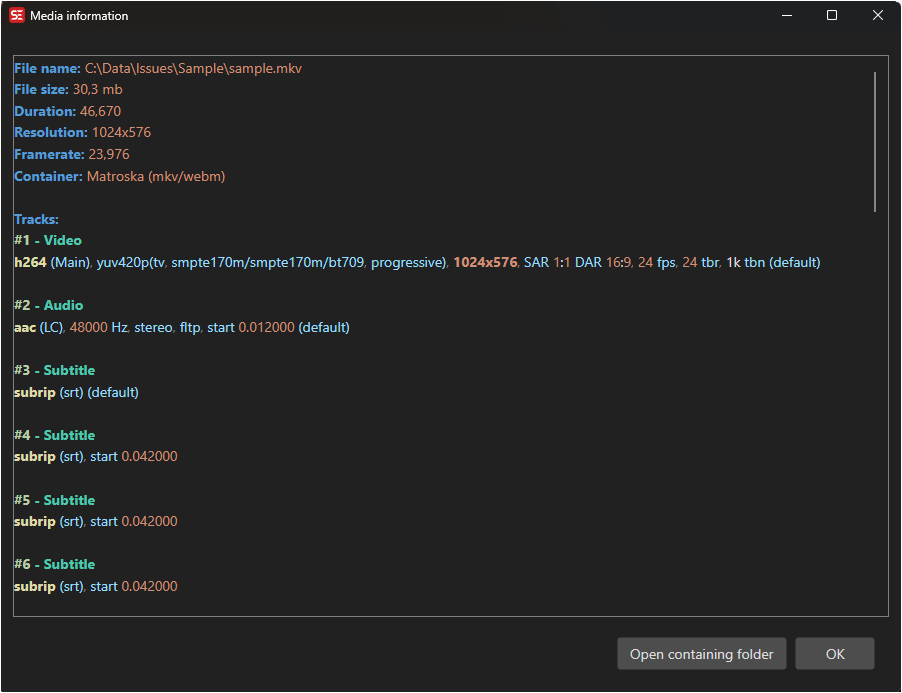
You can view detailed information about the video file via the Show media information shortcut (assign a key in Options → Shortcuts).
This displays:
- Video codec, resolution, frame rate, and bitrate
- Audio tracks with codec and channel information
- Subtitle tracks (if embedded)
- Duration and file size
Audio Tracks
If the video has multiple audio tracks, you can toggle between them via the video menu or a shortcut.
Video Menu Options
The Video menu also includes:
- Toggle select subtitle while playing - automatically select the current subtitle during playback.
Under Video → More (shown while a video is loaded):
- Chapters… - edit, import, export and write the video’s chapter marks, see Chapters.
- Cut video… - cut or merge segments of the video, see Cut Video.
- Find voices in video and clone… - find the speakers in the video, clone each voice and set up the cast for dubbing, see Text to Speech.
- Re-encode video for better subtitling… - see Re-encode Video.
- Remux video… - repackage the video with new audio tracks and soft subtitles, see Remux Video.
- Set video offset… - line the subtitle time codes up with a video whose burned-in time code does not start at zero (a broadcast master starting at 10:00:00:00, for example). The grid and every saved or exported file show the time codes with the offset added; the video, waveform and tools keep working on the video-relative times underneath. Keep existing time codes (do not add video offset) decides what the offset changes: leave it unchecked when the file is video-relative and should get the offset added to its time codes (the file is then modified), check it when the file already carries the offset and only the video needs lining up (the file is left as it is). Reset removes the offset the same way. The dialog keeps a drop-down of recently used offsets next to the time code box (the last ten you applied; 1 hour and 10 hours are offered until you have applied your own) - picking one fills the box. While an offset is active the menu item reads Update video offset from … instead, and the offset is remembered with the file in the recent files list.
- SMPTE timing (non-integer frame rate) - toggle SMPTE-style timing display when available.
- Toggle waveform toolbar - show or hide the toolbar above the waveform.