Batch Convert
Convert multiple subtitle files between formats and apply various transformations.
- Menu: Tools → Batch convert…
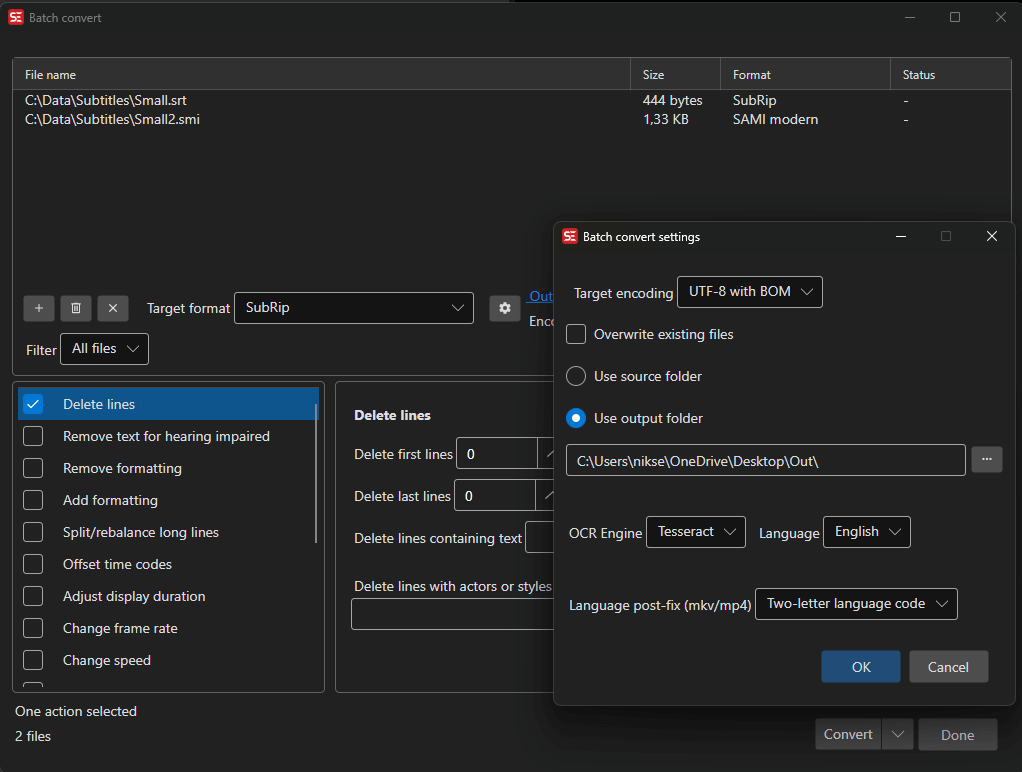
How to Use
- Open Tools → Batch convert…
- Add subtitle files (drag and drop, or use the Add button). The folder button adds every subtitle file in a folder — drag and drop works with folders too. Turn on Include subfolders when adding a folder in the settings (gear button) to scan the whole tree; a scan of a large tree or a network share can be cancelled while it runs.
- Select the output format
- Optionally add conversion functions (fixes, adjustments)
- Choose an output folder
- Click Convert
Use Filter above the file list to show only some files: File name contains…, Track language contains…, Format contains…, Extension is…, Status is error or Forced tracks only.
Presets
The function choices and their options can be saved as a named preset: pick Save preset…, enter a name, and choose it later from the Preset drop-down to restore everything. Delete preset removes the selected one.
Available Functions
You can chain multiple conversion functions:
- Fix common errors
- Remove text for hearing impaired
- Multiple replace
- Change casing
- Change formatting (add/remove)
- Offset time codes
- Adjust duration
- Change speed/frame rate
- Beautify time codes — align cues to frames and apply the Beautify time codes profile rules; frame rate and shot changes are read from a video file with the same name as the subtitle file, if one is found
- Snap all times to frames — round every start and end time to the nearest frame, using the frame rate of a video file with the same name as the subtitle file or a fixed frame rate you choose
- Convert colors to dialog — turn a color change inside a cue into a dash-prefixed dialog, optionally removing the color tags, adding new lines and re-breaking the lines
- Bridge gaps
- Apply minimum gap
- Apply duration limits
- Merge lines with same text
- Merge lines with same time codes
- Merge short lines
- Split/break long lines
- Unbreak lines — join a cue’s lines into one, optionally only for short ones
- Auto-balance lines
- Fix right-to-left
- Remove Unicode control characters — remove the invisible direction control characters (LRM, RLM, LRE, RLE, PDF, LRO and RLO) and replace no-break spaces with normal spaces
- Convert actors — convert actor/voice labels from one style to another (e.g. inline
[NAME]text to the Actor property), like Convert actors - Merge continuation lines
- Renumber
- Sort by
- Change resolution — the ASSA resolution resampler applied to every file
- Change style — swap one ASSA style for another, or import styles from a file, optionally trimming unused ones
- Change style properties — set font, size, colors, outline and other properties of the ASSA styles in every file
- Embed fonts — embed the fonts an ASSA file uses as attachments, optionally trimmed to the characters actually used
- Adjust image brightness/alpha/color — for image-based subtitles
- Auto translate
- Delete lines
Auto-translate in Batch Convert
Batch Convert can machine-translate files as part of the conversion. Supported engines:
- Ollama
- OpenAI Compatible API
- Ollama advanced (local LLM) — the batch/context engine described in Advanced local engines, talking to Ollama’s OpenAI-compatible endpoint
- LibreTranslate
- LM Studio (local LLM)
- LM Studio advanced (local LLM) — the batch/context engine described in Advanced local engines
- llama.cpp — fully managed: Batch Convert reuses an already-running local
llama-server, or downloads llama.cpp plus a curated translation model (e.g. TranslateGemma) and starts the server for you. Point it at your own server via the remote-server option in Auto-translate settings. - llama.cpp advanced (local LLM) — the batch/context engine described in Advanced local engines; it gets the context size configured there
- NLLB (nllb-serve and nllb-api)
- DeepL (API key required)
- CrispASR MADLAD
To translate into several languages in one run, click Add next to the To language and pick more target languages (Remove drops one). Every file is translated into each language and saved as its own output file, with the target language code as the language post fix (e.g. movie.de.srt, movie.fr.srt).
The same feature is available headlessly in seconv via --translate-to — see the command line documentation.
OCR in Batch Convert
Batch Convert can OCR image-based subtitle files while converting them to text-based formats.
Supported OCR engines in Batch Convert:
- nOcr
- BinaryOcr
- Tesseract
- Ollama
- llama.cpp (curated OCR vision models, best-first — GLM-OCR, LFM2.5-VL 3B, PaddleOCR-VL, HunyuanOCR 1.5, LightOnOCR; a local
llama-serveris started automatically) - CrispEmbed (local, multiple model backends — see OCR)
- PaddleOCR (Windows and Linux only)
- Apple Vision (macOS only — pick a language, nothing to download)
Subtitle Edit 5 can auto-detect language and pixels-are-space settings for nOcr/BinaryOcr in many batch workflows. This reduces the amount of manual setup needed when converting many image-based subtitle files with similar fonts.
OCR language per file
A batch often holds the tracks of one disc in several languages. For the engines that take a language (Tesseract, PaddleOCR, Apple Vision, Ollama and llama.cpp), the language the source declares wins over the language chosen in the batch settings:
- the track language of a Matroska/MP4/transport stream track
- the language of a VobSub
.idxfile that holds a single language - a language tag in the file name, e.g.
Movie [fra].sup,Movie [ron].supormovie.it.sup(two- or three-letter ISO 639 codes)
The language from the batch settings is used when the source declares nothing, or when the engine does not have the language - for Tesseract that means the language model is not installed.
Transport Stream Input
A transport stream (.ts, .m2ts, .mts, or .mpg/.mpeg containing one) is listed as one item, and every subtitle track in it is converted: each DVB image track, every teletext page on every PID - one PID can carry several pages, e.g. 888 and 889 for a second language, and each page becomes its own output file - and ARIB STD-B24 caption tracks. Each output is named from the source file plus the file name ending template below, e.g. movie.en.srt; a track without a language code in the stream gets its PID or teletext page number instead, so two language-less tracks never collide.
When a transport stream is in the list, a Transport Stream settings… button appears:
- Override original X position - replace the DVB subtitle’s own horizontal position with an alignment (left, center, right) and a left/right margin in percent of the screen width
- Override original Y position - replace the vertical position with a bottom margin in percent of the screen height
- Override original video size - scale the screen size, bitmaps and positions to the width and height you enter (Get size from video… reads them from a video file)
- File name ending - text added before the extension for every extracted track, with placeholders for the two- or three-letter language code in lowercase or uppercase; the default is
.{two-letter-country-code}. Leave it empty to use the regular language post fix instead - Only teletext - skip the DVB image tracks and convert only the teletext (and other text) tracks
Position and video size only affect DVB image tracks exported to an image-based format.
Speech to Text in Batch Mode
Speech-to-text batch mode can transcribe multiple media files and save the results next to the source files. See Speech to Text for engine setup and model details.
Settings
- Target format — Choose from 380+ subtitle formats
- Target format settings — shown for formats with export options: ASSA (styles, properties, attachments), EBU STL header, PAC code page, Cavena 890 titles/translator/start of programme, DVB Teletext page number/language/hearing impaired, custom text format, and the image formats (Blu-ray sup, BDN XML, VobSub, D-Cinema, DOST, FCP, images)
The Settings button opens Batch convert settings:
- Output
- Target encoding — Text encoding for output files
- Use source folder / Use output folder — Where converted files are saved
- Overwrite existing files
- Keep source file date/time on output files
- Language post-fix (mkv/mp4/auto-translate) — Append the detected language code (2- or 3-letter) to the output file name, e.g.
movie.en.srt
- Adding files
- Include subfolders when adding a folder
- Video files (mkv, mp4, ts…) when adding a folder — Ask (default; a prompt offers Add video files or Subtitle files only, with Do not ask again), Add their subtitle tracks, or Skip
- Image-based subtitles (OCR) — OCR engine and its language/database/model, and VobSub color isolation
- Other
- Prevent computer from sleeping while converting
Text formats are saved with CR+LF line breaks when Force CR+LF on save (text subtitle files) is on in Settings.
For headless batch conversion, see Command Line (seconv).